Groovy
Groovy is adopted in Remote Manager as a scripting language for runtime programming and appointing management tasks over the system.
Groovy is a multi-faceted language for the Java platform.
Groovy scripts may access dedicated APIs that are part of the RM functionality, therefore organizing arbitrary management scenarios. Scripting can be used to appoint various management actions upon devices managed by RM (install software, configure devices), as well as to operate the backend RM system itself (operate system configuration, generate alert notifications and reports).
Groovy scripts may be:
launched as a single execution – Task (For detailed description check Task Execution);
used for defining management automation – Rule (For detailed description check Rule-Based Automation).
Script Services
Dedicated APIs available via the Groovy scripting are provided by the so called Script Services.
A Script Service is simply an interface providing methods (APIs) that could be accessed within the scripts.
Here is an example where the Script Service provides the following interface:
//////// Script Service ////////public interface MyScriptService { public Object[] sayHello(); }In Groovy, this service may be bound as ‘myService’, so it could be used in RM Scripts in the following way:
//////// Groovy Script //////// for (int i =0 ; i < 10; i++) { myService.sayHello() }In this Groovy example, the script execution will call 10 times the "sayHello" method of the "MyScriptService" Script Service.
The Script Service Alias
The "myService" variable used within the script is called a Script Service alias. That means the service object is bound in groovy under this specific alias/binding name.
All Script Services have respective binding names (aliases) they can be accessed with.
Available Script Services
The full set of Script Services available for scripting is a subject of plugging and extension within RM. Scripting functionality is dynamic and customizable regarding arbitrary project needs and customizations.
By default, the RM System comes with a certain set of dedicated Script Services available to RM users. Here is the current list of all system-provided script services:
Script Service | Aliases | Details |
|---|---|---|
GDM Script Service |
| |
Alert Script Service |
| |
Log Script Service |
| |
SR Script Service |
| |
M2M Device Groups |
|
Rule Engine
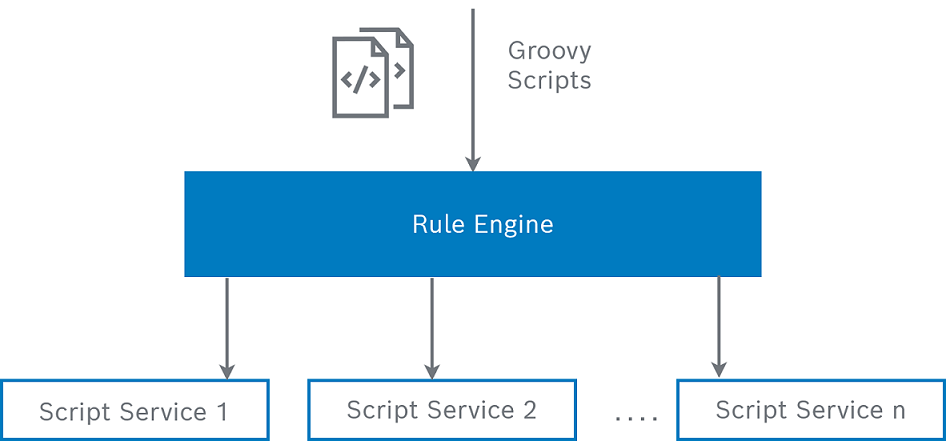
The system that organizes scripting in RM, launching of Tasks and Rules out of groovy scripts, provides execution statistics and detailed execution monitoring is called RM Rule Engine:
Writing Groovy Scripts
Script Service Documentation
Each of the system-provided script services (see the table in "Available Script Services" sub-section above) has a dedicated Script API Documentation that can be found in the respective RM functional module documentation, for instance Script Doc, and is referred within the Script Service documentation page.
The Script API Documentation is divided in two sections:
Script API – describing API methods defined by the Script Service'
Rule Trigger Events – describing events provided by the Script Service that can be engaged in Rule Automations.
Groovy Bindings
Depending on the context of the groovy execution:
Task Scopes,
Automation events,
access rights of operator users,
the System binds the following objects within the groovy script executions:
All Script Services are bound into the Groovy runtime with their respective Script Service aliases. See "Available Script Services" section above for available aliases.
Example:
log.info("Hello from Rule Engine");// this line adds a log entry into the RM log service.In addition, for Device Scope Tasks the system binds the target device for which a script is executed as target binding name (see "Task Scope" section from Task Execution). The interface of the bound target object is instance of the
DeviceRootCUclass defined by the GDM Script Service. With regard to the device type of the represented target device, this object might be of type OSGiDevice, TR069Device, OMADevice, etc.Note that all these object types extend the
DeviceRootCUinterface adding methods specific to their device type.Example:
target.consoleCommand(‘config.ls’);// this line executed over devicesof type OSGi Device will execute the console command"config.ls"on allinvolved devices.When a Groovy execution is triggered by a functional event in an automation scenario, then the event object itself is bound in the Groovy execution with "event" binding alias name. I.e., you can access the data of the triggering event.
Example::
if(event.type =="lightOn") {// do something}else{/*do something else*/}Especially for system-users the system binds a BundleContext object as 'bc', allowing the whole RM OSGi registry to be accessed via scripting. In this way scripts launched by the system-user can utilize arbitrary Java API Interface of the RM system. See "Accessing Arbitrary Service from the RM OSGi Service Registry" section below.
Auto Importing of Packages
For all Script Services providing dedicating APIs for Scripting in RM, the Rule Engine automatically performs the package-import in the user Scripts. That means users can directly write:
OSGiBundle b = target.getOSGiBundle(‘../../../bundles/javax.servlet.jar’)instead of:
import com.prosyst.mprm.script.devices.OSGiBundleOSGiBundle b = target.getOSGiBundle(‘../../../bundles/javax.servlet.jar’)This feature is not present for the usual java APIs accessible via the Bundle Context 'bc' binding for system users.
Synchronous and Asynchronous Methods
It is of vital importance for RM Scripting to support asynchronous methods because of the devices' nature of sending and completing requests. Normally, management actions upon devices are done by sending remote commands/messages to the physical targets, therefore being long-time consuming tasks. Added to this the huge number of managed devices RM aims to operate, we need a non-blocking way to execute such huge number of long-time-consuming actions in parallel.
Asynchronous methods allow actions to be completed after the Groovy method body returns, which potentially may happen long after the script (Groovy text) execution is finished..
Normally, an asynchronous method may:
just send the needed commands to the underlying physical device and exit without blocking/waiting for a reply to come from it;
fork the execution of some potentially complex (calculation or i/o intensive) job in separate thread in background.
Example of synchronous method – getting the ID from a device object:
OSGiDevice myDevice = target //...get osgi deviceString deviceId = myDevice.getId(); The method OSGiDevice.getId() is synchronous and returns the id of the OSGiDevice object immediately without need to process anything in background.
Example of asynchronous method – installing a bundle:
OSGiDevice myDevice = target //...get osgi device myDevice.installBundle('http://...');The OSGiDevice.installBundle() method just sends a command with the install location to the device and exits, not waiting for it to download the bundle content and perform the real installation. The bundle installation is being completed on the background (asynchronously).
This allows mass simultaneous execution handling of huge number of commands to the managed targets.
Handling Asynchronous Results via Groovy Closures
As you might have already noticed, the results from synchronous methods are applied immediately as method return values and could be used in Groovy scripts as such. In the provided examples, we can get the result (deviceId) as a method return value.
String deviceId = myDevice.getId();In contrast to this, the results of asynchronous executions are potentially applied at a later moment and cannot be got in this way. To be able to get an asynchronous result and use it further in a script execution, the user has to receive it in a specially provided Callback.
The Rule Engine defines that such Callbacks could be provided by the script writer as Groovy Closures. A closure is an open, anonymous, block of code that can take arguments, return a value and be assigned to a variable.
Closure c = {arg1, arg2 -> println("Hello from closure, args are: " + arg1 + ‘, ’+ arg2)}This block of code could be invoked dynamically at an arbitrary later moment. For our purpose – it can be invoked when an asynchronous action is finished and the result of the finished action could be provided as closure argument.
Therefore the Rule Engine defines the following concept:
When calling a method the script writer can:
normally provide the arguments specified in the Script Documentation, or
optionally provide additional last argument - "Closure".
Example:
OSGiDevice d = target //...get the osgi device Closure c = {"println \'Echo from closure\'"} d.installBundle('http://...', false, true, null, c);Closure purpose
Adding a code that can be called after an asynchronous execution of the method is complete.
In the example above the code in the Closure will be executed when the execution of the console command http.ls is complete and the confirmation for the completion is delivered to the RM backend. This is quite handy when a new action has to explicitly be appointed after the previous action is completed.
Example: If a bundle that provides control unit implementation needs to be installed and right after that an action has to be executed for the newly installed control unit, the following approach has to be used:
OSGiDevice d = target//...get the osgi deviceClosure c = {d.createControlUnit('myControlUnitType','$create.my.cu', constructorArgs)}d.installBundle('mprm://mycontrolunits.jar', c);In this way calling
d.createControlUnit(...)will wait for the installation of the mycontrolunits.jar bundle to be over. Below is the example how the code will look like if there is no waiting.OSGiDevice d = target//...get the osgi deviced.installBundle('mprm://mycontrolunits.jar', c);d.createControlUnit('myControlUnitType','$create.my.cu', constructorArgs)If the script is executed like that,
createControlUnit(...)method will likely complete with error because the new constructor (part of the functionality which is dynamically installed by the bundle mycontrolunits.jar) won't be available.Users to be able to obtain the result (Result Value // Error Message) from the execution of the action (Synchronous /Asynchronous). Especially when the result is not available as a method return value (for asynchronous methods).
For receiving results from asynchronous methods the Closure is called with 2 arguments: - result and - error.
Example:
OSGiDevice d = target//...get the osgi deviceClosure c = {result, error ->if(error ==null) {println('failed to install bundle mycontrolunits.jar')}else{newBundleId = resultprintln('Installed bundle -> '+ newBundleId)d.createControlUnit('myControlUnitType','$create.my.cu', constructorArgs)}}// end of closured.installBundle('mprm://mycontrolunits.jar',false,true,null, c);
Summary how a method could be called (see the Script Doc):
public void installBundle(String location)This method may be called using any of the following:
Call | Method |
|---|---|
Calling without closure |
|
Calling with closure having no arguments |
|
Calling with closure having 1 argument – the result value |
|
Calling with closure having 2 arguments – the result value and the method error |
|
Accessing Arbitrary Service from the RM OSGi Service Registry
The RM system allows accessing random RM Java services that are available in the RM OSGi register through the script.
For this purpose the system adds additional binding to the Groovy scripts:
– 'bc' which represents 'BundleContext' object. Through this binding a random OSGi service from the Service Registry might be obtained.
Example of System-Scope Task:
com.prosyst.mprm.backend.system.SystemConfigInfo sysInfo = bc.getService(bc.getServiceReference('com.prosyst.mprm.backend.system.SystemConfigInfo'))myHostAddress = sysInfo.getMyHostAddress()println('My Host Address is: ' + myHostAddress)return myHostAddress;This example uses the Java APIs of the System Package, more specially the SystemConfigInfo interface for retrieving the backend host address and gets the system service from the OSGi Service Registry of the RM backend OSGi framework via the Bundle Context bound in the groovy runtime as "bc".
This feature allows more dynamics in using the RM functionality via scripting by accessing not only the script-dedicated functionality exported by Script Services, but also by accessing all Java APIs available on the backend OSGi framework.
Launching Scripts: Tasks and Rules
The execution of a groovy script is called Task. The Rule Engine maintains monitoring of the status progress and detailed statistics related to each Task execution – number of involved devices, execution status of each device, detailed reports for asynchronous methods, etc.
A Task could be launched manually – that means a given groovy script can simply be launched by the user and the execution can be monitored as a Task.
Tasks could also be implicitly triggered by an automation Rule. That means when Rule condition is satisfied, a Task could be triggered automatically out of the Rule. Many Tasks might be triggered out of the same Rule as one and same Rule might be triggered multiple times. All Tasks – launched manually by users or automatically by Rules – bring the same type of information for monitoring the status progress of the respective execution.
See next chapters – Task Execution and Rule-Based Automation.
Class loading using reflection in the scripts is not allowed as well as reading or changing the system properties in the scripts.
Rule Engine Architecture
The System is composed of the following components:
Script/Rule Engine Modules – implementations of the System Logic;
3rd party Groovy library – a ready to use implementation of Groovy language for OSGi;
Database – maintenance of persistent data related to Scripting / Rules support: records for Rules and Tasks, persistent call waiting.
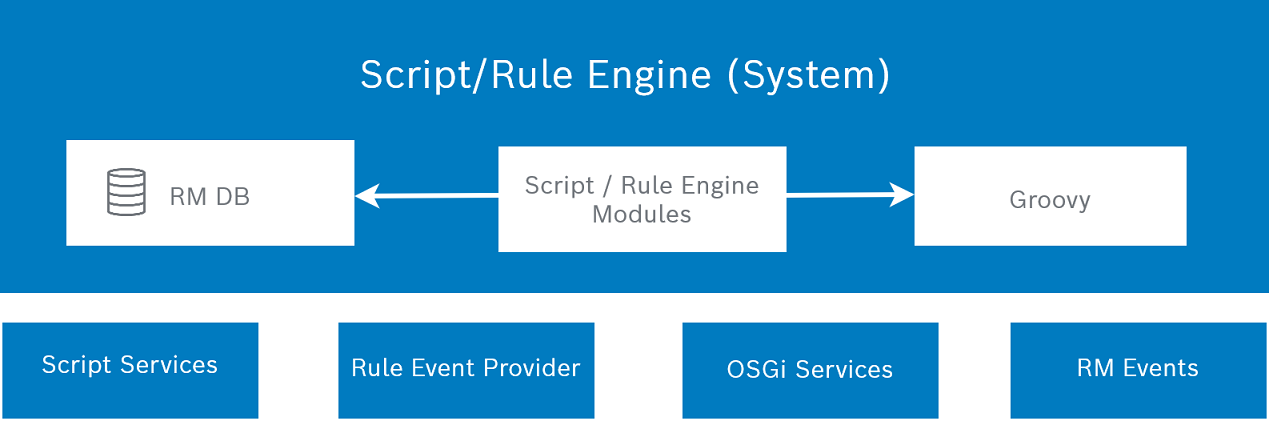
The Script/Rule Engine System:
Maintains Rules: storing and managing of Rules; supporting the Condition parts by registering Event Listeners for functional events, scheduling timers; determining the triggers (evaluation of triggering-condition criteria), launching automatically the Action parts of the Rules.
Maintains Tasks: persistence of asynchronous call-waitings; delegates service functionality requests (via script bindings) to the Script Service Providers and OSGi Services.
Provides callbacks and utilities to the Script Services to implement their functionality.
Script Services and OSGi Services could be accessed within the Groovy scripts, i.e., their methods could be invoked to fulfill any management job. OSGi Services though are available only to system-users. Rule Event Providers and RM Events are used to fire automation events for triggering Rules that in turn start Groovy scripts.