Generic Device Management Script Service tutorial.
Overview
The GDM Script Service gives the opportunity to manage devices via scripts in the RM framework. It follows the idea that devices and their components (software components, configurations, user settings, etc.) are presented with control units (CU), where the control unit has state variables (properties) and actions (methods), that can be executed.
The conception of the GDM script service is to ease the use of control units so that mass tasks on devices can be performed. This is achieved by dynamically generated classes that represent the objects of a concrete control unit type. There is also dynamic support for control unit properties and methods.
For example, for all devices of type 'mprm.osgi.device' a class with name OSGiDevice is created, that has the properties and methods corresponding to the control unit state variables and actions, given in the control unit type description. The OSGiDevice object uses the consoleCommand(String command) method that corresponds to the 'console.command' action.
Aliases Generation
Aliases we will call the names of the dynamically generated classes, properties and methods. For the generation of the class name the control unit type name is used, for the generation of the class property name the control unit action name is used and for generation of class method name the control unit action name is used. The reason why the name is used instead of the id is that too many considerations has to be made to form a readable alias from the id, while to use the name only a few steps has to be performed.
The control unit alias along with the state variables and actions aliases are generated when the control unit type is added to the RM.
In the table below the system provided control unit types are listed with links to the corresponding CU documentation. That information can be used as a starting point for the aliases generation. For example, if you are interested in a certain control unit alias, note the control unit type name.
GDM Module | Control Unit Doc URL |
|---|---|
OSGi Device Management | |
Java ME |
Control Unit Aliases
The control unit alias:
is used as name of the dynamically generated class for the control unit.
participates in some dynamic methods names generation.
participates in the control unit events names generation.
The steps to generate the control unit alias from the name are:
Upper case the start letter.
Remove the spaces.
Upper-case the letter after the removed space..
In the table below control unit alias examples are provided, showing how the control unit alias is created from the control unit type name:
CU Type | CU Type Name | CU Alias |
|---|---|---|
| OSGi Device |
|
| TR069 Device |
|
| OSGi Bundle |
|
| System Properties |
|
Aliases Collision
If there are more than one control unit type with same alias in the scope of a certain device type, the script service will not be able to find the control unit type that the alias points to and an exception will be thrown. That's why the control unit types in the scope of same device type must have different aliases. If control unit types names are equal, a control unit type alias can be predefined through the GDM Script Service configuration, that will be described later.
Action Aliases
The action alias is used as method name of the dynamic class of the corresponding control unit.
The action alias is generated by using the action name. The steps are:
Lower-case the start letter.
Remove all spaces.
Upper-case the letter after the removed space.
Control unit action alias examples are provided in the table below:
CU Action | CU Action Name | CU Action Alias |
|---|---|---|
| Register OSGi Device |
|
| Change Configuration |
|
An action alias can be checked through the RM console. Go to the control unit type node in the device management tree. There is a tool-tip over the action display name (see the Action Alias Tool-tip figure below).
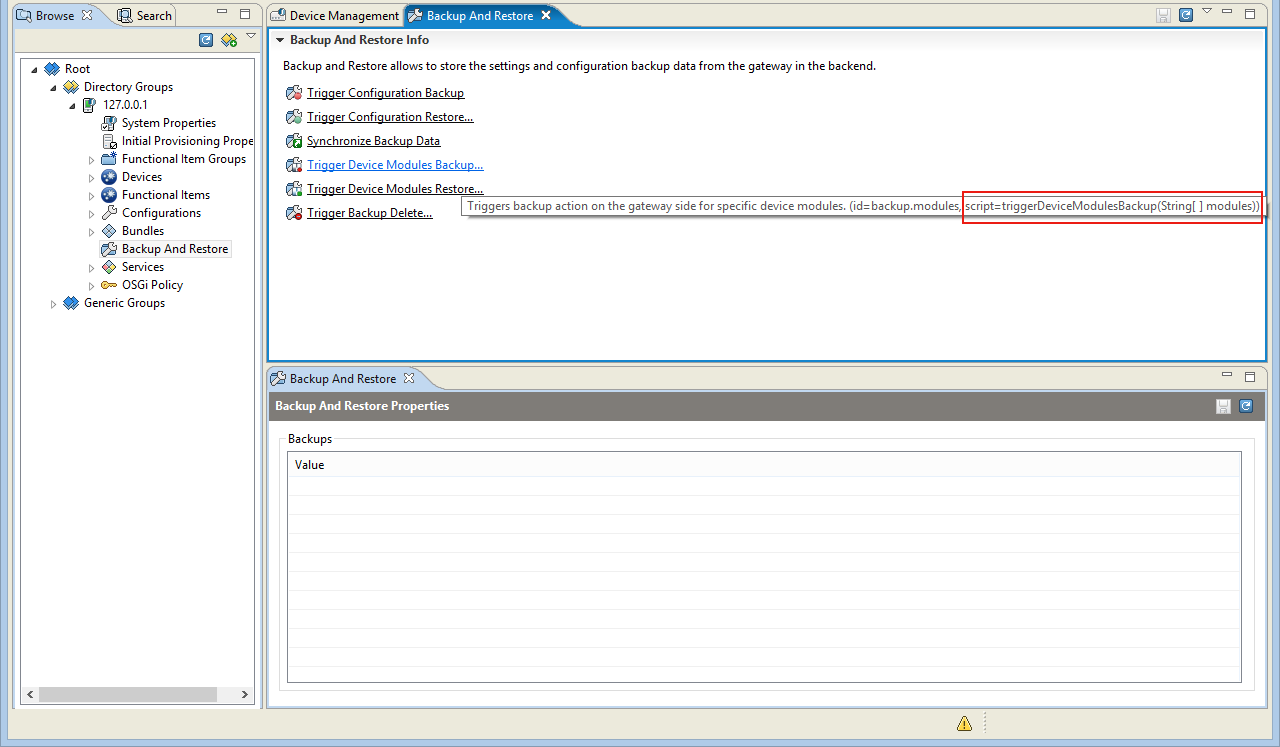
State Variable Aliases
The state variable aliases act as control unit properties.
The steps for the alias generation from the state variable name are the same as these pointed above:
Lower-case the start letter.
Remove all spaces.
Upper-case the letter after the removed space.
Control unit state variable alias examples:
CU State Variable | CU State Variable Name | CU State Variable Alias |
|---|---|---|
| Configuration Properties |
|
| Start Level |
|
GDM Script Service Interfaces
The GDM Script Service covers the management of the system provided control unit types as well as the custom provided ones. The script doc for the system provided control units can be found in the table below:
GDM Module | Script Doc URL |
|---|---|
OSGi Device Management | |
Java ME |
There is no Script Doc for the custom provided control unit types but the concept of the Script Doc generation is the same as the one used for the system provided control unit types.
DeviceManager
The main (start-point) interface is DeviceManager which is found in the scripts under the aliases 'deviceManager' or 'dm' (short).
It has the following non-aliased methods:
Method | Description | Synchronous |
|---|---|---|
| Lists all device control units with the given control unit type, under the node specified by the given path, and satisfying the given filter. | Yes |
| Returns the control unit corresponding to the given ControlUnitID object. | Yes |
| Explicitly creates a device control unit instance of the given type using the given constructor. | Yes |
| Unregisters a device control unit instance. | Yes |
| Lists all aliases of control unit types (device and component types). | Yes |
| Lists all control unit types (device and component types). | Yes |
| Returns a Node object identified by the given path. If there is no device or group with the given path then null is returned. | Yes |
| Executes the given action over the given control unit. | No |
| Synchronizes the control unit state with the target underlying resource. | No |
Similarly, the DeviceManager interface has dynamic methods, which names are aliased. Their name consists of CU types aliases, CU state variable aliases and CU actions aliases:
Method | Example | Description | Synchronous |
|---|---|---|---|
|
| Lists all device control units with the given control unit type, under the node specified by the given path, and satisfying the given filter. | Yes |
|
| Returns the device control unit with the given id. | Yes |
|
| Registers a device control unit. | Yes |
|
| Unregisters the device control unit with the given id. | Yes |
The purpose of the dynamic names is to provide with more readable and writable methods. The definition of a dynamic method looks like this:
$DeviceTypeInstanceget$DeviceTypeInstance(String deviceId)There is a system provided device type 'mprm.osgi.device' with alias OSGiDevice. So we can call the method:
OSGiDevice getOSGiDevice(String deviceId)with action script:
OSGiDevice device = dm.getOSGiDevice('my_device');ControlUnit
Another common interface is ControlUnit, that represents the control unit instance. It has the following non-aliased methods:
Method | Description | Synchronous |
|---|---|---|
| Returns the id of the control unit which uniquely identifies it in the scope of its parent. | Yes |
| Returns the control unit identification. | Yes |
| Returns the value of the specified state variable. The state variables supported by a control unit and their types are defined by the metadata of the control unit. | Yes |
| Generic method for listing all action aliases of the control unit type. | Yes |
| Lists all control unit actions (ids). | Yes |
| Generic method for listing all state variable aliases of the control unit type. | Yes |
| Lists all control state variables (ids). | Yes |
| Returns a persistent control unit that corresponds to the control unit. All action invocations via this instance will be persistent. | Yes |
| Destroys this control unit. | No |
| Executes the specified action over this control unit. The actions supported by a control unit and the number and types of the input and output arguments of each action are defined by the metadata of the control unit. | No |
For all control units types dynamic classes are created that implement it. For example, for the component control unit type 'mprm.osgi.bundle' dynamic class is created OSGiBundle. Except these methods, the dynamic classes also have some dynamic methods:
Method | Examples | Description | Synchronous |
|---|---|---|---|
|
| Executes the specified action over this control unit. The actions supported by a control unit and the number and types of the input and output arguments of each action are defined by the metadata of the control unit. The | No |
The control units dynamic classes have also a dynamic property:
Property | Examples | Description | Synchronous |
|---|---|---|---|
|
| Returns the value of the specified state variable. The state variables supported by a control unit and their types are defined by the metadata of the control unit. | Yes |
ControlUnitID
Another common class is ControlUnitID. It has only synchronous and non-aliased methods:
Method | Description | Synchronous |
|---|---|---|
| Constructs a device control unit id. | Yes |
| Constructs a control unit id. | Yes |
| Returns the device type. | Yes |
| Returns the device id. | Yes |
| Returns the control unit type. | Yes |
| Returns the control unit id. | Yes |
Node
The Node interface represents a node of the devices tree hierarchy. It has only synchronous and non-aliased methods as well:
Method | Description | Synchronous |
|---|---|---|
| Returns the full path of this node. The path is unique within the tree composed of groups and devices and also represents the node location in the tree. The path of the root node of the tree is 'ROOT'. | Yes |
| Returns the user-friendly name of the node. It may or may not be the same as the relative name of the node. This depends on the node type (root, group or device). | Yes |
| Changes the user-friendly name of this node. It may be set as a relative name of the node. This depends on the node type (root, group or device). | Yes |
| Returns the value of the property with the given property name associated with this tree node. The method doesn'tsearch in parent nodes. If the property does not present in the node the method returns null. | Yes |
| Assigns a generic property with the given property name and value of this node. Passing null as a property value removes the property from the set of generic node properties. | Yes |
DeviceRootCU
All devices control units implement the interface DeviceRootCU, that extends the methods from the interface ControlUnit and Node. It has the following non-aliased methods added:
Method | Description | Synchronous |
|---|---|---|
| Returns the component control unit with the given id. | Yes |
| Lists all component control units with the given control unit type satisfying the given filter. | Yes |
| Explicitly creates a component control unit instance of the given type using the given constructor and returns the id of the newly created control unit. | No |
| Executes the RM management script command. | No |
For all device control units dynamic classes are created that implements the DeviceRootCU interface. For example, for the device control unit type 'mprm.osgi.device' dynamic class OSGiDevice is created . Listed in the table below are the dynamic class names of all system provided device control units:
Device CU Type | Dynamic Class Name (Alias) |
|---|---|
| |
| |
|
For example, we can extend the script that gets the OSGi device 'my_device':
OSGiDevice device = dm.getOSGiDevice('my_device');device.installBundle('mprm://contentId=mprm.osgidm.osop', false, true, null);device.unregister();The installBundle(String location, boolean smartInstall, boolean start) method is the dynamic constructor of the component control unit type 'mprm.osgi.bundle'. This method exists because the OSGiDevice implements DeviceRootCU. The OSGiDevice method unregister() comes from ControlUnit interface, that is also implemented by the device class.
The dynamic 'get' method name can be checked through the RM console.
GDM Script Events
There are also generic and dynamic script classes for the GDM events. They are used when constructing a management rule as event-based triggers. The events metadata participates in the trigger condition definition.
Generic Events
The following generic control unit events are supported:
Event Type | Event Data | Description |
|---|---|---|
|
| The control unit base event, that is extended by the other control unit events. |
|
| Represents a control unit added event. |
|
| Represents a control unit removed event. |
|
| Represents a control unit changed event. |
|
| Represents a control unit type appeared event. |
|
| Represents a control unit type disappeared event. |
|
| Represents a hierarchy attached event. |
|
| Represents a hierarchy detached event. |
Dynamic Events
Like the dynamic control unit classes there are also dynamic events generated by the control unit type. Their name includes the control unit type alias:
Event Type Syntax | Example | Extends | Description | Additional Event Data |
|---|---|---|---|---|
|
|
| Type-specific CU added event. |
Example:
Example:
|
|
|
| Type-specific CU removed event. |
|
|
|
| Type-specific CU changed event. |
|
|
|
| Type-specific CU changed event, corresponding to the changed state variable. |
|
|
|
| Global type-specific CU event including all CU changes: added, removed and changed. |
|
Below is an example of OSGiDevice events listing in RM console:
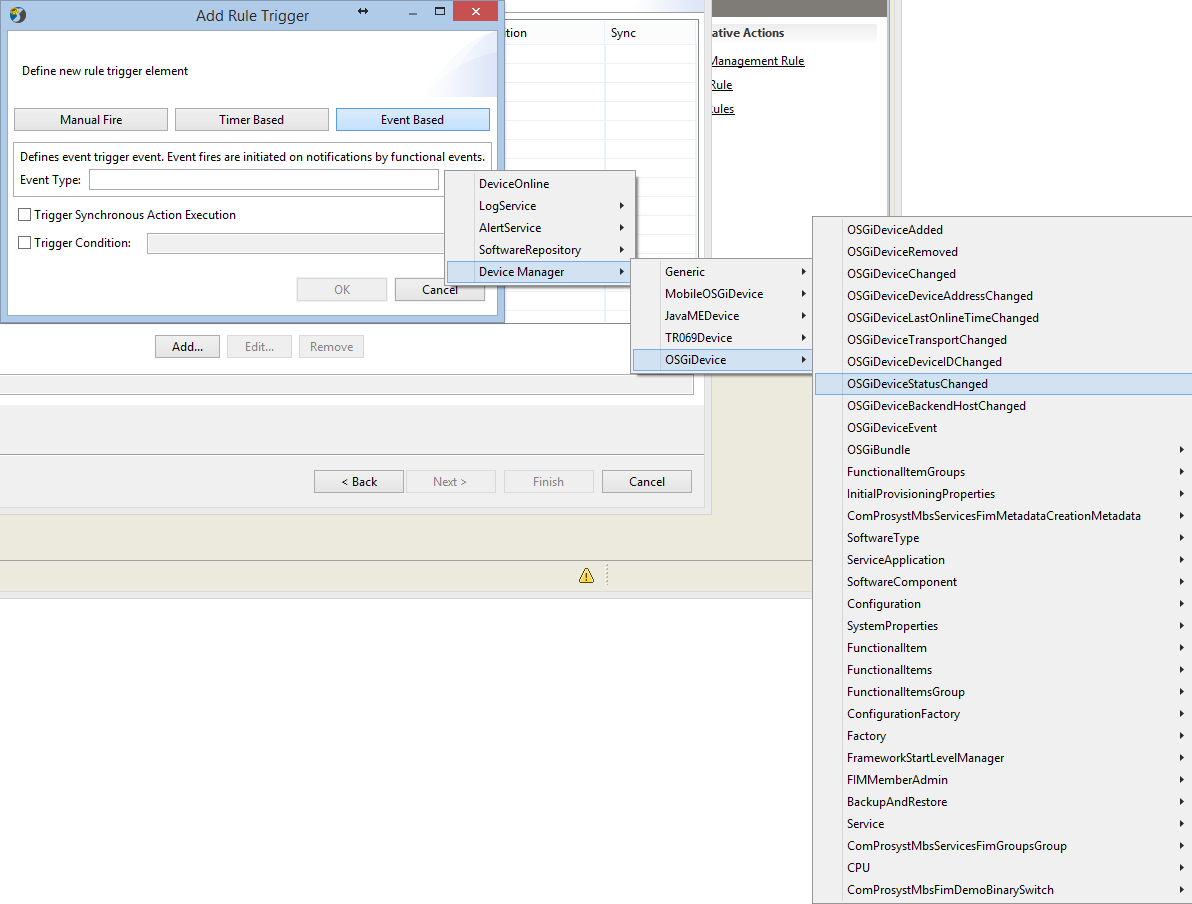
If the OSGiDeviceStatusChanged event is chosen, a trigger condition can be added:
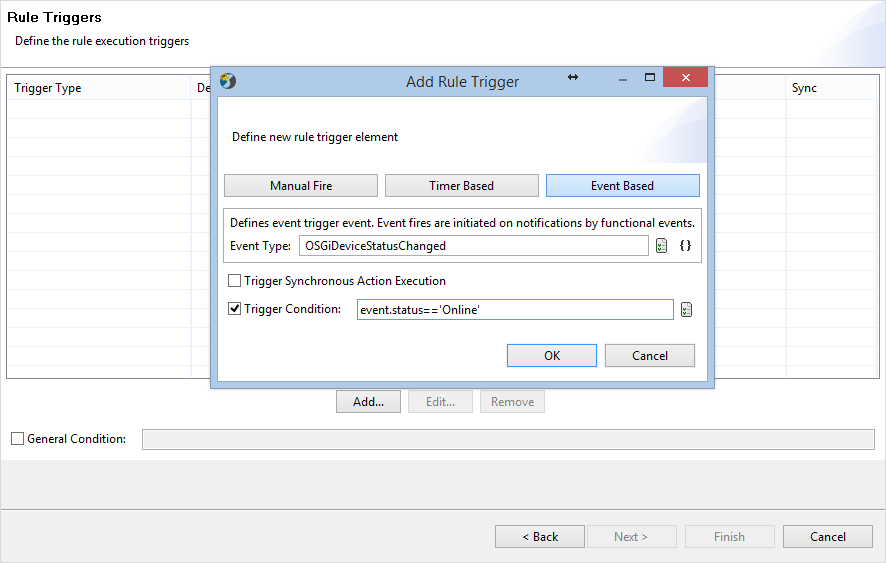
Configuration
The aliases generation can be managed through the 'gdm.rules.cu.iniconfig-resource' bundle. The configuration file is 'cu_service.properties'. In the table below the control unit aliases settings are described:
Syntax | Example | Description |
|---|---|---|
|
| Skips a single control unit type alias generation. |
|
| Skips the alias generation of all control unit types that match the specified pattern. |
|
| Predefines the control unit alias name |
|
| Specifies if a control unit is singleton. Dynamic 'get' method will be added without the need to specify the control unit id. Instead of 'get' method with a control unit id as an argument, 'get' method without arguments will be provided. Example: No 'list' method will be provided for this control unit! |
|
| Specifies the plural form of the control unit alias. |