Overview
The Log Script Service is related to the RM Log Service functionality.
It provides:
service methods for adding log entries into the RM Log Service via scripting;
dedicated log events to be used for triggering of automation Rules.
Usage
The main (entry-point) interface is ScriptLogger which is bound in scripts under the alias "logService" or the short "log" alias.
The service provides several simple methods, respectively for adding log entries with different severity level and given message.
Example:
log.debug("Hello from Rule Engine")
This groovy code, once executed in Task or Rule will add a log entry of severity level DEBUG with the "Hello from Rule Engine" message.
Log Events
The Log Service implements event notifications dedicated to be used as Rule triggering events. The event type is "mprm.log.event" and could be found under the "LogService" group in the UI Event Based trigger definition.
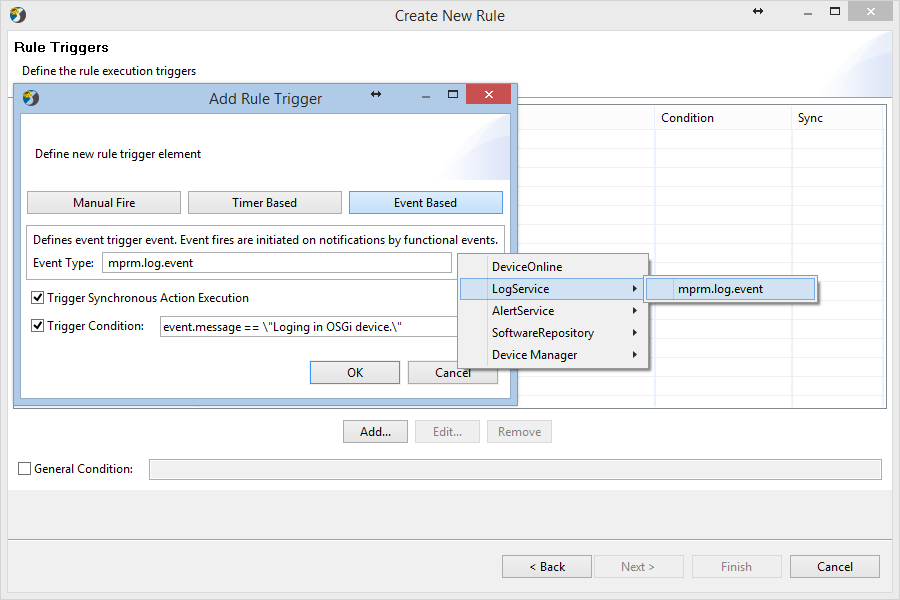
The Log Script event notifications are fired when a log entry is added into the log service. The Event Data is a structure representing the log entry fields and can be used within the Trigger Condition in the Script Action of the Rule.
Based on this functionality, users can define Rules that perform automatic actions in response of concrete logs appearing in the Log Service. For instance you can create a Rule that writes into a file all newly added logs that contain some marker: "Logging in OSGi device" (see "Example 4 – Duplicating System Log Entries Into a File" from Task and Rule Examples).
This is the standard Rule Engine defined JSON format for import/exporting of Rules.
Notice that event data can be used in both Trigger Condition and Script Action. Since such a log entry "Logging in OSGi device" appears in RM always when OSGi device is connected, having such a Rule will provide you with file containing records for devices coming online.
You can trigger the Rule simply by connecting an OSGi device to your RM and then you can check the file 'rule-filtered-logs.txt' residing in your <RM>/bin/mserver directory.
Best Practices
Using Log events in Rule triggers should be done very carefully, since many log entries are usually generated in the RM backend system. There is also a big chance for you to fall into endless cycles of Rule triggering if you define unconditioned log-event trigger and as a result the Rule Action starts an action that in turn generates log-events. Please have in mind that almost all RM functional modules use heavily the log service, therefore almost anything you appoint against the RM system will produce logs. For this reason it is good when you use the log-event in Rule Triggers to always define a strict trigger condition that will prevent the Rule from uncontrolled triggering.
API Reference
Log Script Service API documentation is available here.