Overview
The Alert Script Service is related to the RM Alert Board functionality (Alert Board Service).
It provides:
service methods for Alerts to be raised via RM scripting;
dedicated alert events to be used for triggering of automation Rules.
Usage
The main (entry-point) interface is ScriptAlert which is bound in scripts under the alias "alertService" or the short "alert" alias.
The service provides two simple methods, respectively for raising and dropping an alert to the RM Alert Board.
Example1:
Alert myAlert = new Alert(AlertLevel.LOW, 'Rule Engine Test Alert')alert.raise(myAlert)Example 2:
Alert myAlert = new Alert(AlertLevel.LOW, 'Rule Engine Test Alert')alert.drop(myAlert)Alerts Events
The Alert Service implements event notifications dedicated to be used as Rule triggering events. The event type is "mprm.alert.event" and could be found under the "AlertService" group in the UI Event Based trigger definition:
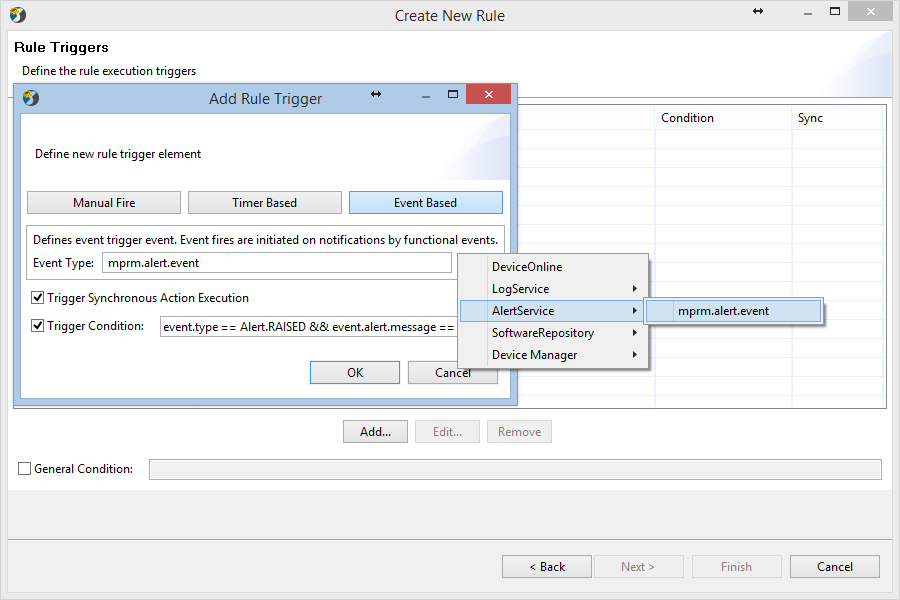
The Alert Script Service fires event notifications when an alert is raised or dropped. The event data brings information about the Alert itself and whether this Alert is being raised or dropped, see Alert Event.
The data provided by the event could be used within the Trigger Condition as well as within the Script Action. Based on this functionality, users can define Rules that perform automatic actions in response of concrete alerts appearing or disappearing from the Alert Board. For instance: a Rule that adds error-log when an Alert with message "UserAdmin is unavailable!" is raised in RM, would look like the "Example 5– Monitoring the Alert Board" from the Task and Rule Examples guide (given in JSON-format).
The trigger condition groovy script defines that Rule Trigger should happen only when the Alert is raised (not dropped) and has the concrete Alert Message. The Script Action uses another system-provided Script Service – Log Script Service for adding log entries into the RM system logs. The log entry bears the same message from the raised alert. Note: this is the standard Rule Engine defined JSON format for import/exporting of Rules. The example could be saved as file directly imported in the UI using the "Import Rule" button. After importing, you have to enable the Rule by clicking "Enable Rule". To try the Rule, you can stop manually the um.user.be.jar bundle in the RM OSGi console, command: user/um.user.be.jar. When this bundle is stopped an Alert with "UserAdmin is unavailable!" message automatically appears in RM. Now if the Rule is enabled an error-log automatically is added in the System Logs with the same message.
API Reference
Alert Script Service API documentation is available at the "Alert Script" section from the Script Doc API.