The current document describes using the Remote Access Client for accessing RM components and services.
Overview
The RM system allows external systems (such as J2EE application servers) or administration applications (such as The RM Console) to access all functionality of RM through uniform APIs. Each non-RM module that needs to access the RM system must use a programming module called Remote Access Client (RAC).
If you want to access RM functionality from a J2EE application server, it is advisable that you use the RM Resource Adapter instead of the RAC. The RM implementation of the Resource Adapter part of the JCA architecture uses the RAC for backend communication but this process is transparent to developers. See the J2EE Integration package documentation for details.
RM Remote Access Client is a set of Java class libraries that provides access to RM functionality and resources to external system and applications. Each RM distribution package provides its own RAC class library containing the classes necessary for accessing the package's services.
The access point of the Remote Access Client is the com.prosyst.mprm.rac.RemoteAccessClient class, used by the external application to establish a communication session with the RM and to obtain RM services. This class is included in the System RAC class library (lib/rac/system-rac.jar).
Every instance of the RemoteAccessClient class represents a session between the external application and the RM system on behalf of a particular RM user. This means that the application has to authenticate itself with a valid user name and its corresponding credentials in order to obtain an instance of RemoteAccessClient. The application using the RAC instance is subject to restrictions according to the access rights granted to the authenticated user. For example, applications logged in with the system account will have the exclusive rights to alter the RM system configuration and perform administrative operations, while applications using other accounts will be allowed less privileges depending on their roles. The access rights for a specific RM service are determined by the service itself, see RM RPC Service: Modeling User Access Rights. One application can maintain multiple sessions to the RM (represented by separate RemoteAccessClient instances) simultaneously. This is useful for multi-user applications (for example J2EE applications), which can create separate sessions for every concurrent application user, leaving the access rights control to the RM.
The RAC module communicates with the RM backend over the RM Connection Framework. RAC is only able to establish a connection with a backend host having role CC or RAS. A single TCP/IP connection opened by the same RAC module can be reused by multiple sessions opened to a particular host. This ensures optimal usage of the system resources in case of a large number of simultaneous sessions initiated via a single RAC module. Requests executed from a single session are sent to a particular remote access server. The exact RAS used for the session is determined by the load-balancing mechanism of the RM during session establishment. The selected RAS determines if it will keep the established session or if it will redirect it to a different, less loaded RAS host. In addition, the session can be switched to another remote access server if the original server crashes. In general, this backend host switching in case of failure is transparent to the applications, but if the application needs to be informed about such event, it can register the appropriate event listener. It can also forbid such redirecting by using a special connection property (see the "Connection Parameters" part of this document).
If the application needs to perform system configuration changes over the RM system, it must ensure it is connected to an RM backend host with control center role. This can be done by using the corresponding connection parameter of the RAC instance.
Using the RAC Libraries
Each RM distribution package provides its own RAC class library containing the classes necessary for accessing the package's services through the Remote Access Client. All these libraries are places in the lib/rac folder of RM's installation. The appropriate RACs for the RM packages providing remote services are listed below:
Package | Appropriate RAC Library |
|---|---|
System | system-rac.jar |
foundation-rac.jar | |
Generic Device Management | gdm-rac.jar |
OSGi Device Management | genericosgi-rac.jar |
osgidm-rac.jar | |
Software Repository | sr-rac.jar |
User Management | user-rac.jar |
Service and Subscription Management | service-rac.jar |
subscription-rac.jar |
The RAC library for each RM distribution package must be used in combination with the System RAC library and the RAC libraries of all packages this package depends on.
Set classpath to all necessary RAC libraries for your applications in order to compile them. For standalone applications, you also need to include the RAC libraries in the classpath of the starting scripts of applications. For The RM Console plug-ins this is unnecessary, you only need to include the necessary Java packages in the Import-Package manifest header of your bundles (plug-ins).
Using the Remote Access Client
In short, the Remote Access Client allows:
- Obtaining references to the RM front-end services
- Obtaining and using OSGi services running on backend server hosts through the RM RPC Service
- Registering event listeners to receive notifications of a specified type (see RM Event Service)
- Communicating with net services on the backend host via the RM Connection Framework
The RemoteAccessClient is an abstract class, so it cannot be instantiated directly. An instance of RemoteAccessClient can be obtained in two ways: for standalone applications, this is done through the static connect method. For the console plugins, this is done by getting reference to the RemoteAccessClient service in the console framework.
Obtaining a RAC Instance from Standalone Applications
To obtain the implementation of the RemoteAccessClient, invoke statically the RemoteAccessClient.connect method. This method exists in three variants:
connect(java.lang.String url, java.lang.String userName, java.util.Dictionary credentials, java.util.Dictionary params)- This method variant allows you to connect to the desired backend host using the supplied URI, user account and connection parameters.connect(java.lang.String\[\] urls, java.lang.String userName, java.util.Dictionary credentials, java.util.Dictionary params)- This method variant does the same as the previous variant, only it allows supplying a set of alternative connection URIs. Initially, the RAC will try to establish connection over the first supplied URI. If it does not succeed, it will try the second URI, and so forth, until a connection is established.connect(P2PConnection connection, java.lang.String userName, java.util.Dictionary credentials, java.util.Dictionary params)- This variant uses a previously established peer-to-peer connection with a backend server for a new user session with the supplied user account.
The supplied user credentials must contain either a password or a certificate. This depends on the login model you need for your user session to the RM: password-based or certificate-based. For password-based authentication, the user will be allowed to log in the RM if the supplied password matches the one stored in the account for this user in the User Admin Service. For certificate-based authentication, the user will be allowed to log in to the RM if the supplied certificate is signed by a certificate considered as trusted by the certificate verifier services running on the RM backend.
Each method returns the implementation of RemoteAccessClient, connected to a backend server (RAS or CC).
Connection Parameters
The first parameter of all three connect methods indicates the URI(s) for establishing connection to the backend host. The supplied URI must follow the syntax described in RM Connection Framework: Client Side URIs.
The userName and credentials parameters of the three methods form the user account for authentication to the backend server. If the credentials Dictionary will contain the user's password, you can use the RemoteAccessClient.USER_PASSWORD property to hold the value of the password.
The optional connection properties, specified by the last parameter, can be:
RemoteAccessClient.CONNECT_TO_CC- If this property has a value true, then the RAC will be forced to establish connection with the control center even if the URI(s) passed to theconnectmethod point to a remote access server host. This property is useful if you need to perform system configuration operations. Default value:false.RemoteAccessClient.DO_NOT_RECONNECT- If this property has a valuetrue,it instructs the Remote Access Client that it should not be redirected during the connection establishment. Reconnection could occur as a result of the load balancing and fault tolerance mechanisms. Default value:false.
Normally, you do not need to include these properties when connecting to the RM backend, so you can pass null instead of them. In such case, the default values of the connection properties will be used.
The following listing illustrates obtaining a RAC instance connected to the backend server running on the machine with IP 192.168.104.9 (this IP is arbitrarily chosen). The RAC instance authenticates itself with the system account, supplying a password as credential.
Obtaining a RAC instance from a standalone application:
import com.prosyst.mprm.rac.RemoteAccessClient;import java.util.Hashtable;import com.prosyst.mprm.common.ManagementException;public class RACTest { private static RemoteAccessClient rac; private static Hashtable credentials; private static String userName = "system"; private static String URI = "socket://192.168.104.9:11449"; public static void main(String[] args) { credentials = new Hashtable(); credentials.put(RemoteAccessClient.USER_PASSWORD, "system pass"); try { rac = RemoteAccessClient.connect(URI, userName, credentials, null); . . .//do some work with the connected RAC rac.close();//closing the session after all the work is done } catch(ManagementException me) { me.printStackTrace(); } }}Supplying Certificate Credentials for the User Account
It is possible that a remote access client is authenticated via certificate credentials (see Overview on the RM Security). In such case, the credentials Dictionary parameter is constructed using the preprocessCredentials(java.util.Dictionary credentials, java.lang.String name, java.lang.String password) method of the Credentials Manager (com.prosyst.mprm.auth.client.CredentialsManager) implementation. However, before using the Credentials Manager implementation, you must have the appropriate certificate and key settings (issuer key pairs &certificates, user keys & certificate) most conveniently generated using the user-friendly options of the Certificates console node (see the Certificate Management users' guide) or calling directly the Certificate Management API (see the Certificate Management developer's guide).
To be able to use certificate user credentials for connection through a RAC, besides the system-rac.jar file you also should have the files foundation-rac.jar and tlsclientsa.jar from the lib/rac directory in the classpath of the application.
Prerequisites for Creating the User's Credentials
To create certificate-based credentials, take the following steps:
1. Provide the certificate issuer's keys and certificate chain. Note that, to be able to receive access to the RM backend, the root of the issuer's certificate chain must be a trusted certificate for the backend, that is, it must be added to the Certificate Repository of RM (e.g. by using the Certificates node of console) and assigned domain "mPRM RAS".
2. Provide a key pair holder (implementation of com.prosyst.mbs.services.crypt.KeyPairHolder) holding the keys and certificate chain for the user account.
Such a key pair holder can be easily generated by using the options of the console's Certificates node:
- To generate a key pair holder for a certificate already added to the Certificate Repository and associated with a key pair, select it and use the Create Key Pair Holder command from the popup menu or from the Certificate menu. In the shown wizard, you may skip the registration properties of the key pair holder as they are not considered in a non-OSGi environment. You have to only specify the location of the key pair holder JAR file, which should be named as <user_name>_kph.jar.
- To generate a key pair holder for a brand new keys and certificate signed with a certificate from the Certificate Repository, select the issuer certificate and use the Issue Key Pair Holder command from the popup menu or from the Certificate menu. In the shown wizard, specify the certificate attributes such as common name, organization, expiry date, etc. If you may also specify a password for protecting the keys. Next, you do not have to specify registration properties but only specify the path to the generated key pair holder JAR file, which should be named as <user_name>_kph.jar.
To be able to use the issued key pair holder successfully, make sure that the isser certificate has an associated key pair in the Certificate Repository.
If you want to use the Certificate Management API, you have to create a secure context JAR file.
3. Create a user account in the RM user management system with name equal to the common name attribute of the user's certificate.
4. Place the generated key pair holder JAR file in the working directory of the Java application that will obtain valid certificate credentials with the Credentials Manager. This can be done either by specifying the right directory to the key pair holder wizard in the console (see step 2) when the key pair holder is created, or by copying the generated file manually.
Optionally, you can place the key pair holder elsewhere and specify the path to it to the Credentials Manager through a system property, called mprm.rpc.client.crendetials_basedir, or in a programming way when obtaining the credentials as described in the next section.
Obtaining Valid Credentials from the User's Certificate Settings
1. In your source code, create an empty credentials Dictionary (Hashtable). For example:
Hashtable credentials = new Hashtable();
2. Provide a com.prosyst.mprm.auth.secctx.SecurityCtxProvider object - use RM's default SecurityCtxProvider for use in RAC-based application - com.prosyst.mprm.auth.impl.secctx.sa.SecurityCtxProviderImpl. SecurityCtxProviderImpl retrieves key pair holders from a specific directory. By default, this is the working directory of your application.
To instantiate the SecurityCtxProviderImpl, as constructor argument pass one of the following:
- The path to the directory where the key pair holder is located.
nullin case the key pair holder is in the working directory or you are going set the directory path as value of themprm.rpc.client.crendetials_basedirsystem property.
SecurityCtxProviderImpl provider = new SecurityCtxProviderImpl(null);
3. Obtain a SHA1 DigestOutputStream - create a com.prosyst.mbs.impl.services.crypt.digest.SHA1 instance using an empty constructor and pass it to the DigestOutputStream constructor.
DigestOutputStream digest = new DigestOutputStream(new SHA1());
4. Instantiate the com.prosyst.mprm.auth.impl.cba.client.CredentialsManagerImpl class. It takes two parameters - a com.prosyst.mprm.auth.secctx.SecurityCtxProvider object and a com.prosyst.mbs.services.crypt.DigestOutputStream object. Use the objects created in the previous steps.
CredentialsManager credMngr = new CredentialsManagerImpl(provider, digest);
5. Invoke the created CredentialsManager instance's preprocessCredentials method. Pass the created in step 1 credentials Dictionary, the user name and the password protecting the owner key pair, if any, as parameters. For example:
credMngr.preprocessCredentials(credentials, "certified_user", "protection");
Now the initially empty credentials Dictionary is filled with appropriate contents.
6. Pass the obtained in this way credentials object to the RemoteAccessClient.connect method.
The source code example that follows illustrates a RAC obtaining a valid credentials Dictionary out of the generated user certificate chain & key pair.
Creating a RAC performing certificate-based user login:
import java.util.Hashtable;import com.prosyst.mbs.impl.services.crypt.digest.SHA1;import com.prosyst.mbs.services.crypt.DigestOutputStream;import com.prosyst.mprm.auth.client.CredentialsManager;import com.prosyst.mprm.auth.impl.cba.client.CredentialsManagerImpl;import com.prosyst.mprm.auth.impl.secctx.sa.SecurityCtxProviderImpl;import com.prosyst.mprm.common.ManagementException;import com.prosyst.mprm.rac.RemoteAccessClient;public class CertAuthTest { private void login() { try { // Initialize the security provider granting access to the user-specific // key pair holder SecurityCtxProviderImpl provider = new SecurityCtxProviderImpl(null); // Initialize the SHA1 output stream for // challenge-based connection verification DigestOutputStream digest = new DigestOutputStream(new SHA1()); // Create a Credentials Manager CredentialsManager credMngr = new CredentialsManagerImpl(provider, digest); // Preprocess certificate credentials Hashtable credentials = new Hashtable(); credMngr.preprocessCredentials(credentials, "certified_user", "protection"); // Connect to the RM backend Hashtable connProps = new Hashtable(1); connProps.put(RemoteAccessClient.CONNECT_TO_CC, "true"); RemoteAccessClient rac = RemoteAccessClient.connect("socket://localhost:11449", "certified_user", credentials, connProps); // ... execute the planned actions on the RM system } catch (ManagementException e) { e.printStackTrace(); } catch (Exception e) { e.printStackTrace(); } } public static void main(String[] args) { CertAuthTest start = new CertAuthTest(); start.login(); }}Obtaining a RAC Instance by Plug-ins for the console
Plug-ins for the console need not invoke the connect method to obtain a connected RAC. They all share the RAC instance used by the console to establish connection with the RM backend using the settings defined by the user in the Login Box (see RM Console). Because RM Console operates on top of an OSGi framework, the RemoteAccessClient is registered as a service in the console after logging in to the RM system. Hence, you only need to get the service from the bundle context in the standard way for getting OSGi services. The connection to the backend has already been established, so you proceed directly with the communication.
The Remote Access Client service is exported only after the console has connected to the RM system! It is exported by the RM Console Adapter bundle (packages/system/mc/prmadapt.jar).
Getting and releasing the Remote Access Client as a service in the console:
import org.osgi.framework.*;import com.prosyst.mprm.rac.RemoteAccessClient; . . . private BundleContext bc; private ServiceReference racRef; private RemoteAccessClient rac; . . . racRef = bc.getServiceReference(RemoteAccessClient.class.getName()); if(racRef!=null) { rac = (RemoteAccessClient)bc.getService(racRef); . . . //do some work with the obtained RAC bc.ungetService(racRef);//releasing the service after it is no longer needed }Getting Front-end Services
A front-end service of RM allows accessing a specific RM functionality, such as log service, alert board, etc. Front-end services are contained in the Front-end APIs (all packages starting with com.prosyst.mprm.admin.*). Remote applications can obtain front-end services through the getService method of RemoteAccessClient. Its only parameter requires the fully-qualified object class name of the service.
Getting the RM Log Service through the getService method:
LogReader logReader = (LogReader)rac.getService(LogReader.class.getName());Obtaining Remote Reference of Backend Services
You can obtain remote references of the OSGi services running on the backend using the getRemoteReference method. More details about it is available in the RM RPC Service document.
If you need to use a front-end RM service, it is advisable to use the getService method, not the getRemoteReference one. getService obtains the local reference of the front-end service, while the getRemoteReference obtains reference of the service running remotely on the backend. The getRemoteReference method is suitable for use when you need to get custom services that do not have a front-end implementation.
Registering an Event Listener
Through the methods of RemoteAccessClient you can register event listeners for specific types of events occurring in the backend system. This allows you to synchronize with the services running on the entire RM system. Registering for events is done through the addEventListener method. More information is available in RM Event Service: Registering an Event Listener through a RAC.
Communicating with Net Services
The RemoteAccessClient class allows you to establish communication with defined net services running on the RM backend. This is done using the getNetService(java.lang.String netServiceName) method of RemoteAccessClient. For more information, see the RM Connection Framework document (the example in its listing "The client part of the communication" illustrates sending a message to a net service through RAC).
Switching the Connection to the Control Center
Only the connection to the control center allows performing system configuration management. Hence, if you want to change the existing RM system configuration, you need to make sure the connected backend host has the control center role. The isConnectedToControlCenter() method indicates if the host has CC role. The switchToControlCenter() method allows redirecting the current connection from the current backend host to the control center host.
Redirecting the established connection to a RAS to the CC:
if(rac.isConnectedToControlCenter()) { System.out.println("The connected host is the CC"); } else { rac.switchToControlCenter(); System.out.println("Connection redirected from a RAS to the CC"); }If you want the redirecting to the CC host to be done automatically, set the the RemoteAccessClient.CONNECT_TO_CC parameter with value true to the connection Dictionary.
Listening for Changes in the Session State
Applications interested in knowing the changes in the current state of the established connection to the RM CC or RAS host can register for receiving session events by implementing the com.prosyst.mprm.rac.ConnectionListener interface. There are two types of session events:
ConnectionListener.EVENT_DISCONNECTED- An event of this type is fired when the session has been closedConnectionListener.EVENT_RECONNECTED- An event of this type is fired when the connection between the Remote Access Client and RM has been re-opened.
The processing of the session events must be done in the implementation of the event(int eventType) method of the connection listener. This method will be invoked by the RAC instance when a new session event appears for the current session.
Handling session events through a connection listener:
import com.prosyst.mprm.rac.ConnectionListener;public class TestConnListener implements ConnectionListener { public void event(int eventType) { if(eventType == ConnectionListener.EVENT_DISCONNECTED) { System.out.println("Warning: The connection to the RM has been lost!"); . . . //take the appropriate actions } else if(eventType == ConnectionListener.EVENT_RECONNECTED) { System.out.println("No panic: The connection is regained"); . . . //take the appropriate actions } }}After that, the connection listener implementation must be registered in the RAC instance to get notified of events. The registration of a connection listener is done by invoking the addConnectionListener(ConnectionListener listener) method of RemoteAccessClient. After the connection with the RM backend has been closed, the connection listener can be removed using the removeConnectionListener(ConnectionListener listener) method of RemoteAccessClient and destroyed.
The following listing illustrates registering the connection listener implementation created in the listing "Handling session events through a connection listener" in the current RAC instance. We shall reuse the RAC instance created in the listing "Obtaining a RAC instance from a standalone application" from the above section "Obtaining a RAC Instance from Standalone Applications".
Registering the connection listener in the current instance of Remote Access Client:
import com.prosyst.mprm.rac.RemoteAccessClient;import com.prosyst.mprm.rac.ConnectionListener;. . .public class RACTest { private static RemoteAccessClient rac; . . . //obtaining the connected RAC instance TestConnListener connListener = new TestConnListener(); rac.addConnectionListener(connListener); . . . //after all the work is done rac.removeConnectionListener(connListener); rac.close(); . . .}Creating an RAC-Enabled Service
By RAC-enabled service we imply a service obtainable remotely via the getService method of RemoteAccessClient.
An RAC-enabled service has three basic features:
- It is RPC-enabled (i.e. implements
com.prosyst.util.Remote,see RM RPC Service: "Creating an RPC-enabled Service") - It has a remote service factory implementation (will be described below)
- The remote service factory implementation is provided in the classpath of the remote application.
Actually, any RPC-enabled service, even if it is not RAC-enabled, can be obtained from a RAC via the getRemoteReference method. However, the getRemoteReference method returns a com.prosyst.mprm.backend.rpc.RemoteReference object, which is fairly clumsy to manipulate. If you want to invoke methods of the remote service, you need to use the invoke method of RemoteReference in a manner similar to the Remote Method Invocation mechanism in Java 2. The getService method, however, which can be used for RAC-enabled services, returns directly the remote service's object class. You can call its methods directly.
By creating an RAC-enabled implementation of a service, you actually wrap the RPC implementation inside the service implementation, and allow users to use it indirectly.
Components of the RAC-enabled service implementation:
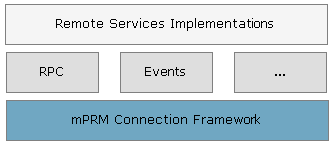
Providing the RAC implementation is done by implementing the com.prosyst.mprm.rac.spi.RemoteServiceFactory interface. Its createServiceObject(String serviceName, RemoteAccessClient rac) method must return the RAC-enabled service implementation.
Providing the RAC-enabled service implementation:
package test.io.remote;import com.prosyst.mprm.common.ManagementException;import com.prosyst.mprm.rac.RemoteAccessClient;import com.prosyst.mprm.rac.spi.RemoteServiceFactory;import test.io.TestService;public class TestServiceFactory implements RemoteServiceFactory { public Object createServiceObject(String serviceName, RemoteAccessClient rac) throws ManagementException { if((serviceName != null) && (serviceName.equals(TestService.class.getName()))) { //Returning the RAC implementation of the service return new TestServiceProxy(rac); } else { return null; } }}The RAC-enabled implementation of the remote service must wrap the remote invocation of the remote service via the RM RPC API, and the remote invocation of its methods.
The RAC-enabled service implementation:
package test.io.remote;import test.io.TestService;import com.prosyst.mprm.rac.RemoteAccessClient;import com.prosyst.mprm.backend.rpc.RemoteReference;import com.prosyst.mprm.common.ManagementException;public class TestServiceProxy implements TestService { private RemoteAccessClient rac; private RemoteReference testServ; public TestServiceProxy(RemoteAccessClient rac) throws ManagementException { this.rac = rac; //Getting remotely the Test Service testServ = rac.getRemoteReference(TestService.class.getName(), getClass()); } /*Here we invoke the remote method via the RM RPC API*/ public String testMethod (String testMessage) { try { return (String) testServ.invoke("testMethod", new Class[] {String.class}, new Object[] {testMessage}); } catch(Exception me) { me.printStackTrace(); return "Error!"; } }}After you write and compile the source code, you need to provide the RAC implementation in a JAR file, available in the application classpath. Besides the source code, the JAR file must contain in the META-INF directory a plain text file with name the fully qualified object class of the RAC-enabled service, and content the Java class of the remote service factory implementation. For example, with the Test Service the name of the file would look like this:
File name: test.io.TestService
File content: test.io.remote.TestServiceFactory
You need to add a separate file for each service with RAC implementation provided in the JAR file.
Add the JAR file containing the RAC implementation of the service(s) to the classpath of the remote application getting the service(s) through a RAC.
So, now that we provided the RAC implementation of the Test Service, it can be used in the standard way (as follows):
Using the Test Service through a RAC:
TestService testService = (TestService) rac.getService(TestService.class.getName()); String reply = testService.testMethod("Test message"); System.out.println("Test Service returned: " + reply);