Provides information about using RPC Services
The RM RPC Service provides synchronous RPC-based communication mechanism for collaboration between components deployed on different backend hosts of an RM system, and between external applications and RM. The application model of the RMr RPC Service is based on remote method invocation of services registered in the OSGi frameworks of the RM backend hosts.
Overview
The RM RPC Service is based on the API of the Gateway Software Protocol, available in Bosch IoT Gateway Software, but extends it with features especially suited for the distributed model of the RM system. The functionality of RM RPC Service is available through the interfaces defined in the com.prosyst.mprm.backend.rpc and com.prosyst.mbs.services.pmp packages.
Components deployed on the RM backend servers access the RPC functionality through the com.prosyst.mprm.backend.rpc.BackendRPCService interface, which is registered as an OSGi service. Note that the BackendRPCService is registered after the backend host is configured and completely initialized. External applications access the RPC functionality though the com.prosyst.mprm.rac.RemoteAccessClient class.
An Example Service Interface
A backend service can be obtained by remotely running applications only if it implements the com.prosyst.util.io.Remote interface. In the remoteInterfaces method implementation you must specify the classes and interfaces whose methods remote applications can invoke.
The following listing "Example patch descriptor" shows a service interface called TestService. The TestServiceImpl class in the second listing "Implementing the example service and the Remote interface" implements TestService and enables access to the service interface methods by implementing Remote as well.
Example patch descriptor:
package test.io; public interface TestService { public String testMethod(String message); }Implementing the example service and the Remote interface:
package test.io; import com.prosyst.util.io.Remote; public class TestServiceImpl implements TestService, Remote { private String result; // From the TestService interface public String testMethod(String message) { result = ("Your message is: " + message); return result; } // From the Remote interface public Class[] remoteInterfaces() { Class[] classes = {TestService.class}; return (classes); } }After defining the service interface and implementing it, we need to register it in the framework as an OSGi service. We shall register it under the test.io.TestService interface, and other bundles will be able to get this service by referencing this interface.
Although your services must implement com.prosyst.util.io.Remote, you need not register them in the framework under this interface.
Registering the example RPC-enabled service in the framework:
import test.io.TestService; import test.io.TestServiceImpl; import org.osgi.framework.*; . . . private BundleContext bc; . . . bc.registerService(TestService.class.getName(), new TestServiceImpl(), null); . . .Argument and Return Types Supported by the RPC Service
The object type passed as arguments to or returned by the RPC-enabled methods of services can be from the following list:
- Primitives
- Wrapper classes of the primitives (Boolean, Integer, etc.)
Stringjava.io.Serializable– The standard interface from the Java Platform used for object serializationcom.prosyst.util.io.Externalizable– The Externalizable interface defines a lightened structure for object serialization. A bundle developer may implement Externalizable for transferring composite objects representing method results or arguments over a stream.- Arrays of the above object types (primitives, primitive wrappers,
String, com.prosyst.util.io.Externalizableandjava.io.Serializable) java.io.InputStream- Note: If you want to useInputStreamas an argument type to methods of RPC-enabled services, you must obey the following rules: Only the last argument of multiple-argument methods can beInputStream,and you cannot have more than oneInputStreamargument in the same method! Otherwise, an RPCException will be thrown. You can also use InputSteam as a return type.com.prosyst.mprm.backend.rpc.RemoteReferencecom.prosyst.mprm.data.Enumerator(Note: This object type is accepted only as return type, not as an argument type!)com.prosyst.mprm.backend.rpc.AsyncResultCallback– TheAsyncResultCallbackinterface defines an approach for asynchronous execution of RPC-enabled service methods. Note: If you want to useAsyncResultCallbackas an argument type to a method, you must place it as last argument in the method's signature.com.prostsr.mprm.backend.rpc.AsyncEnumeratorResultCallback– As an input argument theAsyncEnumeratorResultCallbackinterface has the same usage asAsyncResultCallback,but it is suitable when the method's result is in the form of acom.prosyst.data.Enumeratorobject.
Using Enumerator as Return Type
RM provides a special interface - com.prosyst.mprm.data.Enumerator, which can be implemented and used as service method return type instead of java.util.Enumeration. The Enumerator interface wraps a series of consecutive elements, similarly to the java.util.Enumeration, but is especially convenient for return type of RPC-enabled services' methods. Its methods can throw exceptions and owns a method (close) that allows you to free the occupied resources if the Enumerator hasn't been fully read.
The RM RPC Service offers some more benefits from using Enumerator as return type of a service method when using multicast references to the service (see "Obtaining Remote References of Services through the Backend" below). It allows merging the Enumerator objects returned by the service instances on different backend hosts, and preserving the sorting of elements of the original Enumerators in the resulting Enumerator. The prerequisites for enabling this type of merging are:
- The elements of the original
Enumeratorsmust be comparable, i.e. implement java.lang.Comparable - The elements of the original
Enumeratorsmust be sorted in increasing or decreasing order.
More information about merging the returned Enumerators by multicast method invocations is available in the "Invoking Methods on Multicast References" part of this document.
Providing Asynchronous Method Execution
Executing methods of an RPC-enabled service asynchronously might reduce the thread resources consumed on the backend when such a method is invoked over the RPC Service. Asynchronous method execution implies returning the method as soon as possible providing the result later if case your service is busy and is not able to produce the result immediately.
An RPC-enabled service whose public methods will support asynchronous execution should take as last argument an AsyncResultCallback argument. Still, the method signature should contain return type corresponding to the asynchronously delivered result. For example, if the TestService from the above listing "Example patch descriptor" will support asynchronous execution, its testMethod should be declared as:
An example service interface with support for asynchronous execution:
package test.io.async; import com.prosyst.mprm.backend.rpc.AsyncResultCallback;public interface TestService { public String testMethod(String message,AsyncResultCallback callback);}When the method is invoked, it can save a reference to the AsyncResultCallback instance and return without providing result. Later, when the service is ready with processing the request, it can call the result method of the saved AsyncResultCallback reference. In case, the request could not be satisfied, the service should call the error method of AsyncResultCallback.
The following listing illustrates implementing asynchronous execution of an RPC-enabled method . The example simply starts a new thread on each method call which sleeps for 30 seconds and them returns the result by calling the result method of the AsyncResultCallback reference passed at method invocation.
Implementing the example service so as to support asynchronous method execution:
package test.io.async; import com.prosyst.mprm.backend.rpc.AsyncResultCallback;import com.prosyst.util.io.Remote;public class TestServiceImplAsync implements TestService, Remote { public String testMethod(String message, AsyncResultCallback callback) { // Launching a "fake" job which will return the result // later AsyncThread thread = new AsyncThread(callback, message); new Thread(thread, "Asyncronous Test Service").start(); return null; } public Class[] remoteInterfaces() { return new Class[] { TestService.class }; } private class AsyncThread implements Runnable { private AsyncResultCallback callback; boolean running = false; private String message; public AsyncThread(AsyncResultCallback callback, String message) { this.callback = callback; this.message = message; running = true; } public void run() { while (running) { try { // Sleeping for 30 seconds and returning the result Thread.sleep(30 * 1000L); String result = "Your message is: " + message; callback.result(result); } catch (InterruptedException e) { callback.error(new RPCException(e)); } finally { // Terminating the job running = false; } } System.out.println("[AsyncThread] Thread completed!"); } }}In case your method will asynchronously return an Enumerator, declare AsyncEnumeratorResultCallback as the last argument type of the asynchronously-executed method of your RPC-enabled service. On invoking the method, save a reference to the passed AsyncEnumeratorResultCallback argument, and when available provide the result element by element by calling the nextResultElement method of the AsyncEnumeratorResultCallback. Indicate end of the element sequence included in the Enumerator by calling the resultFinished method.
Modeling User Access to Your Services
By default, if no user access rights are defined in an RPC-enabled service, all users have the right to use this service. Often, however, backend services need to restrict the access to their functions (i.e. to their Java methods) according to the roles of the invoking user.
Basically there are two approaches for verification of user access rights:
- By using the static methods of
com.prosyst.mprm.backend.login.SessionContext - By checking the invoker thread for
com.prosyst.mprm.backend.security.AccessPermissionpermissions.
Using SessionContext
A backend service invoked through the RM RPC can determine the invoker user and its roles using the static methods of com.prosyst.mprm.backend.login.SessionContext.
The following listing illustrates rewriting the testMethod implementation from the above listing "Implementing the example service and the Remote interface" to perform simple user authentication. It checks if the current user session is with role "system". If it is, it produces the desired result String. Otherwise, it produces an error message.
Rewriting the testMethod implementation to perform simple user authentication:
public String testMethod(String message) { String result; if(SessionContext.hasRole("system")) { result = ("Your message is: " + message); } else { System.out.println("Sorry, you don't have the right to access the Test Service!"); result = "Error!"; } return result; }You are able to explicitly define restrictions over the system user, and in such case it will not be able to access functionality it is forbidden to. Have in mind, however, that the goal of the system user is to have unlimited administrator's access to RM, so it may be meaningless to impose such restrictions.
The default RM services do not have restrictions over the system user.
Using AccessPermissions
RM introduces a special permission type, com.prosyst.mprm.backend.security.AccessPermission, for verifying if a logged in user has the role to use a specific functionality of your service, that is, if the user is allowed to call a specific method of your service interface.
Each AccessPermission has a name which usually signifies the RPC-enabled service the permission is related to and an optional action which usually represents some operation that can be done on the service.
A service might choose between two approaches in defining and checking for an AccessPermission:
- Use an
AccessPermissionidentified by role name, which prompts the action related to the permission. For example, an AccessPermission name Procedure-View suggests that it is related to viewing RM management scripts. In this case, use theAccessPermission(String)constructor passing the role name as argument. For example:
new AccessPermission("Test Service Use");
To receive access to a service's methods secured by the AccessPermission above, a user should have the following role in the RM User Admin Service:
Test Service Use
For example all members of a user group called Permission - Test Service - Use will be granted an AccessPermission with name "Test Service" and actions "Use".
- Use an
AccessPermissionidentified by name and action which logically suit its functionality best and pass them as arguments to theAccessPermission(String, String)constructor. For example:
new AccessPermission("Test Service", "Use");
To receive access to a service's methods secured by the AccessPermission above, a user should have the following role in the RM User Admin Service:
Permission - <PERMISSION_NAME> - <ACTION>
For example all members of a user group called Permission - Test Service - Use will be granted an AccessPermission with name "Test Service" and actions "Use".
The permission check should be done in the body of the secured service method by using the checkPermission method of Java Access Controller (java.security.AccessController). If the user does not have the required permission, an exception will be thrown. If the check results with success, the checkPermission method will return, which will allow the execution of the rest of the service method's body.
The following listing contains a modification of the testMethod implementation from listing "Implementing the example service and the Remote interface" above, which uses an AccessPermission with the name and action previously discussed.
Implementing testMethod so as to restrict user access by means of AccessPermissions:
import java.security.AccessController;import com.prosyst.mprm.backend.security.AccessPermission; . . . AccessPermission testPermission = new AccessPermission("Test Service", "Use"); public String testMethod(String message) { String result = null; // Checking the access permission of the user AccessController.checkPermission(testPermission); result = ("Your message is: " + message); return result; }Using the Service's Request Context
The request context of an RPC-enabled service allows you to get the com.prosyst.mprm.net.Connection object representing the point-to-point connection between the remote invoker of the service and the backend service. In this way, you can manipulate the connection and the data transmitted over the connection. The specifics of the RM connection framework are described in the RM Connection Framework document.
When a service method is invoked by a remote application or another backend service, the local RPC Service creates a new job, implementing Runnable and com.prosyst.mprm.net.connection.RequestContext. The RequestContext interface represents the service's request context and allows you to get to the established connection. The created job is attached to a thread taken from the Thread Pool Manager. The Thread Pool Manager is an essential service in RM, which manages the thread instances created in the framework. All threads in the thread pool implement the com.prosyst.util.threadpool.ThreadContext interface (see the documentation of Bosch IoT Gateway Software Framework Package for more information). The thread in which the point-to-point connection is executed also implements ThreadContext.
Therefore, to get the RemoteContext instance of the current communication session:
- Get the current thread, which is a
com.prosyst.util.threadpool.ThreadContextinstance - Get the Runnable object attached to the
ThreadContextby invoking itsgetRunnablemethod, and cast the result to RequestContext (for clarification, see the above listing "Implementing testMethod so as to restrict user access by means of AccessPermissions").
Then you can get the point-to-point connection object via the getConnection method of the RequestContext.
Getting and using the request context of the service:
import com.prosyst.util.threadpool.ThreadContext; . . . public String testMethod(String message) { Thread currentTh = Thread.currentThread(); //The current thread is created by the Thread Pool Manager and implements ThreadContext if(currentTh instanceof ThreadContext) { //Getting the Runnable object associated with the thread Runnable reqCtx = ((ThreadContext) currentTh).getRunnable(); //The Runnable object is an instance of RequestContext if(requestCtx instanceof RequestContext) { //Now we can reach the point-to-point connection object P2PConnection connection = ((RequestContext) reqCtx).getP2PConnection(); System.out.println("The connection comes from URL: " + connection.getRemoteURL()); } } result = ("Your message is: " + message); return result; }Obtaining Remote References of Services on the Backend
Remote reference of backend services is obtained by calling the methods of the RM RPC Service (com.prosyst.mprm.backend.rpc.BackendRPCService). The RM RPC Service provides remote references to the target backend services, which are represented by com.prosyst.mprm.backend.rpc.RemoteReference objects.
Remote Reference Types
All obtained services are returned as com.prosyst.mprm.backend.rpc.RemoteReference objects. A RemoteReference extends the RemoteObject class from the PMP API and provides access to the methods of a particular remote object.
There are two types of RemoteReference objects:
- Unicast reference – Makes reference to a single remote object (remote service). You can get such a remote reference with the "unicast" methods of the RM RPC Service.
- Multicast reference – Makes reference to potentially many remote objects, which represent separate instances of a remote service, each running on a different backend server host. Calling a method on a "multicast" reference results in calling this method on all remote service instances referenced by the multicast reference. You can get such a reference with the multicast methods of the RM RPC Service.
Using the RM RPC Service Methods
The RM RPC Service gives you the opportunity to:
- Get a unicast reference to a service instance on a particular host specified by its host ID. This is done through the
getUniHostReferencemethod. - Get a unicast reference to a service instance running on a host specified by the role (CC, MS or RAS) in which it participates, or the ID of the MS in which it participates. If the specified role includes more than one backend hosts, the exact host will be determined internally by the system. This is done through the
getUniRoleReferencemethod. - Get a multicast reference to a set of service instances with the same name (and properties) running on all hosts with the same role or MS ID. This is done using the
getMultiHostReferencemethod. - Get a multicast reference to a set of service instances with the same name (and properties), which set contains one service instance for every specified role. This is done through the
getMultiRoleReferencemethod. - Get a multicast reference to a set of service instances running on all hosts of the clustered management server, which is responsible for a specified device context. This is done through the
getContextMultiHostReferencemethod. - Get a multicast reference to a set of service instances, which set contains one instance per each management server responsible for some part of a specified device context. If a clustered management server is related to the context, then a service instance from the most suitable MS host is taken. This is done through the
getContextMultiRoleReferencemethod.
Specifying Host Roles
The backend host(s) referred by the RM RPC Service can be defined through the host role, through the management server ID, or through the host ID. If a role or MS ID specifies more than one host (for example: RAS, the ID of a clustered MS, etc.), then:
- In case you are getting multicast reference to this role/ID, all hosts having this role will be referenced
- In case you are getting unicast reference to this role/ID, an arbitrary host among all having the same role will be selected internally by the system. For example, if you specify a RAS role, the unicast reference will return an arbitrary host having RAS role. If you specify the ID of a particular clustered MS, then an arbitrary host among all members pf the cluster will be selected. If the initially selected host crashes or becomes overloaded, the remore reference will be switched to another host with the same role. This process is transparent to applications.
The host role can be one or more of:
- Control Center (CC) – Represented by the
com.prosyst.mprm.admin.system.Roles.CCconstant. Only one host in the entire system can have this role, so referencing this role always results in reference to a single host. - Management Server (MS) – Represented by the
com.prosyst.mprm.admin.system.Roles.MSconstant. There can be numerous hosts with this role in the same RM system. - Remote Access Server (RAS) – Represented by the
com.prosyst.mprm.admin.system.Roles.RASconstant. There can be numerous hosts with this role in the same RM system.
The MS ID is the unique identifier of the MS and its member host(s). If the MS is clustered, more than one host will have this ID.
The host ID is the unique identifier of a particular host. It is assigned to it when the host is initially added to the RM system. Each separate host is given a different ID, so specifying a host ID always references one host instance.
You can access the host and MS ID and role information as well as other system configuration specific information through the com.prosyst.mprm.admin.system API. See the Backend Server Host Configuration document from Programmer's Guide for more information about system configuration issues.
Obtaining Remote References of Services through a Remote Access Client
Remote reference of a backend service can be obtained through a Remote Access Client (RAC) by invoking the getRemoteReference(java.lang.String serviceClassName, java.lang.Class clientClass) or getRemoteReference(java.lang.String serviceClassName, java.lang.String filter, java.lang.Class clientClass) method of com.prosyst.mprm.rac.RemoteAccessClient. In such a case, RM uses unicast remote references to contact remote services and only remote services running on the currently connected Remote Access Server (RAS) can be invoked. When the RAC is switched to another RAS (if the first RAS crashes), the existing remote references automatically refer to the remote services on the new RAS.
The following listing illustrates remotely invoking the Test Service, created in the three listings above in section "An example service interface" and its testMethod.
Obtaining remote reference of the Test Service through the Remote Access Client:
import test.io.TestService; . . . private RemoteAccessClient rac; . . .//obtaining the RAC instance in the appropriate way try { RemoteReference testService = rac.getRemoteReference(TestService.class.getName(),null); String testMessage = (String) testService.invoke("testMethod",/*method name*/ new Class[] {String.class},/*parameter type*/ new Object[] {"test message"});/*parameter value*/ System.out.println("The Test Service returned the following:\n"+ testMessage); } catch(RPCException e) { e.printStackTrace(); }If you need to obtain a service that has a front-end part (interface in some of the com.prosyst.mprm.admin.* packages), it is advisable to refrain from getting remote references through the getRemoteReference method. Use getService instead.
More information about working with the Remote Access Client is available in the Remote Access to RM document.
Invoking Methods on the Obtained Remote References
The RemoteReference adds convenient methods suitable for the invocation of methods of the services running on RM backend hosts.
Invoking Methods on Unicast References
Basically, there are two ways to invoke methods on unicast remote service reference:
Using the
getMethodmethod ofRemoteReference– This method overridesgetMethodof theRemoteObjectinterface from the PMP API. It returns the remote method in the form of acom.prosyst.mbs.services.pmp.RemoteMethodobject. The remote method can be called using theinvoke(java.lang.Object[]args, boolean serflag) orinvoke(java.lang.object[] args, boolean serflag, java.lang.clasS LOADER)method of the obtainedRemoteMethodinstance. The returned object from the method invocation is in the form of ajava.lang.Object,so you need to explicitly cast it to the desired object type. For primitive return types, you need to cast the received Object to the wrapper class of the corresponding primitive. For example: int -> Integer, long -> Long, etc.
This approach is convenient if you need to invoke the same method many times because it allows you to manipulate directly theRemoteMethodobject representing the method instead of passing the method name each time to theRemoteReference'sinvoke method.- Using the proper invoke method of
RemoteReference– In this case, you need to pass the method name, arguments and argument values to the invoke method. The returned object from the method invocation is in the form of ajava.lang.Object,so you need to explicitly cast it to the desired object type.
Using the sortedInvoke method of RemoteReference is appropriate only with multicast references as described in the "Invoking Methods on Multicast References" chapter below. When called on unicast references, sortedInvoke acts like the invoke method.
Modifications of the invoke and sortedInvoke methods of RemoteReference allows you to apply two approaches in calling remote methods - synchronous calls and asynchronous calls - see the "Invoking Methods Synchronously and Asynchronously" section below for details.
The following listing illustrates invoking the Test Service, created in the three listings above in section "An example service interface", on the control center via a unicast reference.
Getting remote reference of the Test Service on the CC host:
import org.osgi.framework.*;import com.prosyst.mprm.backend.rpc.*;import com.prosyst.mprm.admin.system.Roles;import test.io.TestService;public class GettingTestService { private ServiceReference rpcRef; private BackendRPCService rpcService; private RemoteReference testService; private String greeting; . . . rpcRef = bc.getServiceReference(BackendRPCService.class.getName()); if(rpcRef!=null) { rpcService = (BackendRPCService)bc.getService(rpcRef); try { testService = rpcService.getUniRoleReference(Roles.CC, TestService.class.getName(), null, null); greeting = (String) testService.invoke("testMethod",/*method name*/ new Class[] {String.class},/*parameter type*/ new Object[] {"hello"});/*parameter value*/ System.out.println("Test Service: "+greeting); } catch(RPCException rpce) { rpce.printStackTrace(); } } . . .}Invoking Methods on Multicast References
There are certain specifics when invoking methods on multicast remote service references.
With the invoke Method
Using the invoke method on a multicast RemoteReference has the following specifics:
- If the invoked method has a primitive return type, then the result from calling the invoke method will be an array of objects of the corresponding wrapper type. For example, if the service method returns
int, then invoke will return an array ofIntegerobjects. - If the invoked method returns an array, then the result from calling the invoke method on the multicast reference will be again an array, formed by concatenating the arrays returned by the service instances on the involved backend nodes.
- If the invoked method returns
com.prosyst.mprm.data.Enumerator,the result from calling the invoke method will be again anEnumeratorproduced by concatenating the elements of the Enumerators returned by the service instances on the corresponding backend nodes.
In addition, when using an invoke method, there are two approaches in calling remote methods - synchronous calls and asynchronous calls - see the "Invoking Methods Synchronously and Asynchronously" section for details.
When calling methods which support asynchronous execution (see "Providing Asynchronous Method Execution"), you need not include AsyncResultCallback or AsyncEnumeratorResultCallback neither as argument type nor as argument object. The RPC Service will automatically provide needed objects to the relevant backend RPC-enabled service.
With the sortedInvoke Method
The sortedInvoke method is useful if the return type of the remote method is com.prosyst.mprm.data.Enumerator, and the elements contained in the Enumerator are comparable (implement java.lang.Comparable), and are sorted in increasing or decreasing order. Basically, this method does the same as the invoke method, with the only difference that it merges the sorted content of the Enumerator objects returned by each service instance in order to preserve the original sorting of the Enumerators forming the resulting Enumerator.
If the invoke method preserves the original order of each internal Enumerator, the sortedInvoke merges the results obtained from each service instance, and produces a resulting Enumerator containing data merged in increasing or decreasing order, according to what the order in the returned Enumerators is.
When calling methods which support asynchronous execution (see same"Providing Asynchronous Method Execution"), you need not include AsyncResultCallback or AsyncEnumeratorResultCallback neither as argument type nor as argument object. The RPC Service will automatically provide needed objects to the relevant backend RPC-enabled service.
For clarification consider the following example:
The invoked method on host A returns an Enumerator with the following contents: 1,2,5.
The invocation of the same method on host B returns an Enumerator containing 2,3.
The invocation of the same method on host C returns an Enumerator containing 3,4.
If we use the invoke method of the RemoteReference, the resulting Enumerator returned will contain: 1,2,5,2,3,3,4 i.e. (Enumerator A, Enumerator B, Enumerator C).
If we use the sortedInvoke method, however, the resulting Enumerator will contain 1,2,2,3,3,4,5, i.e. the same numbers merged in increasing order (duplicate entries are duplicated in the resulting Enumerator).
This use case is illustrated in the following figure.
Merging Enumerators returned by service instances running on different hosts using the invoke and sortedInvoke methods: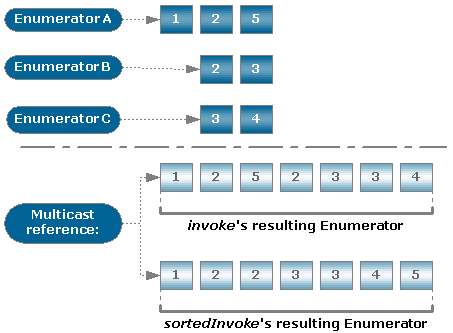
Note that sortedInvoke is useful only if the target method returns an Enumerator with sorted elements, so that when the RM RPC Service merges the Enumerators coming from each service instance the resulting Enumerator will remain sorted.
The order in which the elements in the resulting Enumerator are arranged should coincide with the sorting order in the returned Enumerators.
In addition, when using an sortedInvoke method, there are two approaches in calling remote methods - synchronous calls and asynchronous calls - see the same "Invoking Methods Synchronously and Asynchronously" section for details.
With the getMethod Method
As said above, the getMethod method returns a com.prosyst.mbs.services.pmp.RemoteMethod representation of the target method. If the RemoteMethod object is obtained from a multicast remote reference, its invoke methods act as the RemoteReference's invoke method when invoked on a multicast remote reference.
Invoking Methods Synchronously and Asynchronously
The RemoteReference interface contains modifications of the invoke method and of the sortedInvoke method for calling methods of RPC-enabled services in synchronous and in asynchronous manner.
Calling a remote method synchronously will lead to blocking the application's thread performing the call until the result becomes available, whilst calling a remote method asynchronously will cause the invoke/sortedInvoke method to return without blocking the executing application thread - the application will get the result later if not currently available.
It is not required to invoke asynchronously-executed methods of an RPC-enabled service in asynchronous way and synchronously-executed methods in synchronous way as calling remote methods is handled internally by the local RPC Service. Using asynchronous calls to methods whose execution would probably take more time will reduce the thread resources consumed for handling the call.
The RemoteReference methods for synchronous method calls are:
invoke(String methodName, Class[] argTypes, Object[] args)sortedInvoke(String methodName, Class[] argTypes, Object[] args, boolean inc)
The RemoteReference methods for asynchronous method calls are:
invoke(String methodName, Class[] argTypes, Object[] args, AsyncResultCallback callback)invoke(String methodName, Class[] argTypes, Object[] args, AsyncEnumeratorResultCallback callback)sortedInvoke(String methodName, Class[] argTypes, Object[] args, boolean inc, AsyncEnumeratorResultCallback callback)
As seen from the preceding line, to be able to call asynchronously a remote method you have to implement an AsyncResultCallback for supported return types except Enumerator and an AsyncEnumeratorResultCallback for return type Enumerator. The "callback" instance will receive the result from the method invocation when it becomes available or an RPC exception in case of a failure.
The general usage of the invoke and sortedInvoke methods above is described in the preceding sections "Invoking Methods on Unicast References" and "Invoking Methods on Multicast References".
Handling Exceptions Raised During the Service Invocation
It is possible that the execution of RPC operations results in errors due to the behavior of the remote services you are trying to invoke, or due to system level errors. On any error, even if the method invocation succeeds on some of the specified hosts, the RM RPC Service throws a com.prosyst.mprm.backend.rpc.RPCException. This exception is a wrapper of the real exception occurred somewhere in the system.
Handling Exceptions When Using Unicast References
Dealing with the RPC exception can be done with the getBasicException method of RPCException. For unicast remote service reference or method invocation it returns the real exception. If the exception has been raised by the RPC Service itself, getBasicException will return null.
Retrieving the real exception out of the initially thrown RPCException:
try { . . .//do some RPC operations} catch(RPCException rpce) { rpce.printStackTrace(); Exception realExc = rpce.getBasicException(); if (realExc != null) { System.out.println(realExc); } }Handling Exceptions When Using Multicast References
There are additional issues about processing an RPC exception related to a multicast references.
For operations with multicast remote service references there can be several RPC exceptions, each thrown by a service instance on a specific backend host. To get all RPC exceptions related to a multicast reference, loop the getNextException method until you have retrieved all host-related exceptions occurred during the RPC operation. You can check what the real exception corresponding to an RPC exception is through the getBasicException method. When there are not any more exceptions, getNextException returns null.
If you use getBasicException for a multicast reference, this method returns the first real exception generated in the system.
Even though an error has occurred somewhere and one or more RPC exceptions have been thrown, the RPC operation may have succeeded on some RM host. You can retrieve the successful results using the getPartialResults method of RPCException.
Retrieving the real exceptions out of the initially thrown RPCException:
try { . . .//do some RPC operations} catch(RPCException rpce) { rpce.printStackTrace(); //We expect the result from the RPC operation to be String String results = (String) rpce.getPartialResults(); . . .//do some processing of the partial results RPCException fake = rpce; while (fake != null) { System.out.println(fake.getBasicException()); fake = rpce.getNextException(); } }