Overview
To provide a universal access to its functionality and to avoid the requirement of using proprietary Java APIs, RM exports Web Services for its main services such as device management, user management, access to the Software Repository, etc.
Backend Web Services can be requested from every host participating in an RM system regardless of its role there (control center, management server or remote access server).
Usage over REST
An RM Web Service can be also accessed by using the REST technique, that is, by executing HTTP methods on URLs representing a service's resources.
The REST URLs of Web Services share the following pattern:
http://<rm_host>[:<http_port>]/rs/<service_alias>/<service_path>[?<param>=<value>&<param>=<value>...]
where:
- <rm_host> is the IP address or domain name of the backend host running in an RM system
- <http_port> is the port on which the backend HTTP server is running. Include it in the URL only if it is different from 80 (HTTP default), for example if the HTTP server uses its secondary port 8080.
- <service_alias> is the alias on the server for access to the service.
- <service_path> is the path to the resource inside the scope of the service.
<param>=<value> indicate that the URI can optionally have one or more parameters separated by &. <param> is the name of the parameter, <value> is its value. The [..] brackets show that this is an optional part, they are not part of the URI itself.
For example, to check if a group called "osgi" within the root of the device management tree has children, use the GET method on the /rs/devices/hasSubNodes?groupPath=ROOT/osgi resource.
Authentication
To be able to use the Web Services of RM, you have to authenticate your client application to the backend by providing a user name and a password.
The Remote Manager validates all input parameters from incoming requests.
Bosch IoT Remote Manager supports HTTP basic authentication for accessing RESTful versions of the RM Web Services.
The user account sent by the client should be available in the User Manager of RM beforehand. Moreover, to be able to access a specific Web Service and use its resources, the user account you will present must have some special service-specific roles. Details about these roles are available under the section "Access Rights" or "Access Control" of the relevant document within each package Conceptual Guide.
The system shall ensure DB connection availability by limiting the remote enumerator timeout before clean.
Pagination configuration
The REST APIs of Bosch IoT Remote Manager provide several methods for listing devices, bundles, groups, rules, user roles, logs, etc. Usually these GET requests return a huge data response organized in pages that include a certain number of entries per page. By default each page contains 20 entries and you can obtain the following entries by using the link for the next page(see below). The number of entries per page is configurable via the limit query parameter. 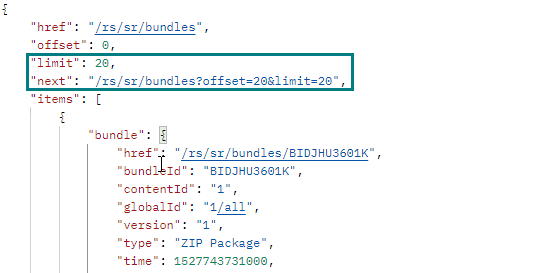
This pagination mechanism has certain limitations that aim to prevent system overloading. A typical scenario is when multiple users execute concurrent REST requests that require pagination. In such cases Bosch IoT Remote Manager cannot persist all data from all requests and cannot keep all those DB connections open. When the maximum number of open sessions is reached or the time limit between two page requests is exceeded you will receive an HTTP error code 400 with the following message:
Data is not available. Offset must be 0.However, Bosch IoT Remote Manager provides the possibility to adjust these limitations according to your use case via the REST Enumerator Service Configuration Properties configuration. To find the configuration:
- Enter the System Configuration perspective.
- Select the Configurations tab on the left side.
- Search for REST Enumerator Service Configuration Properties and select it from below.
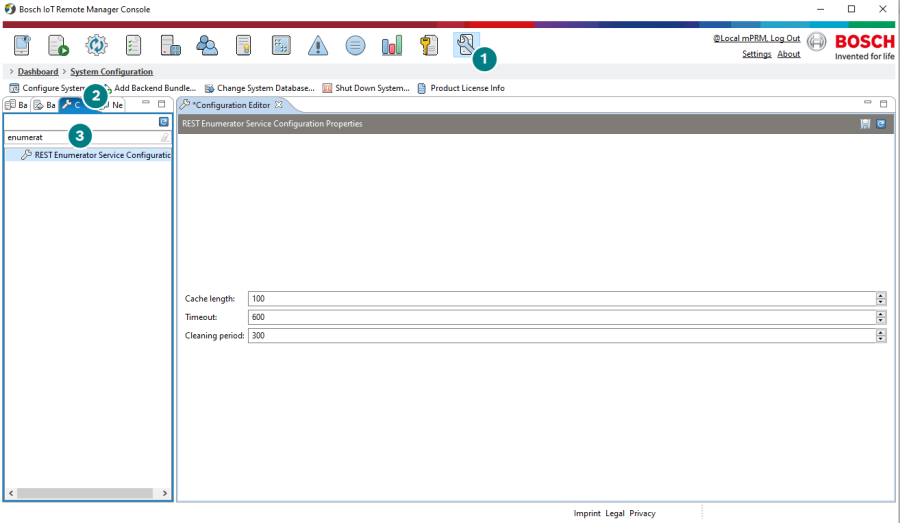
This configuration provides three properties with their default values shown in the respective input field:
- Cache length - the number of concurrent requests that the system supports. By default 100 requests are permitted. For example if 105 users are trying to list all their devices, the oldest 5 will have their connections closed at the moment when the limit is reached. This prevents overloading of the system and improves performance.
- Timeout - the allowed interval of time between the current and the previous pagination request. By default it is 600 seconds. If you do not open the next page within this timeout period, your DB connection will be closed and you will have to start over at the first page. This is due to the fact that enumerators are always iterated from the beginning upon a new connection.
- Cleaning period - the interval in time in which Bosch IoT Remote Manager checks if the timeout above has been reached for a user session. By default it is 300 seconds. On each 300 seconds, the system checks for any enumerators that are not used and closes their connections if there are any.
All configuration properties have a minimum value of 1 and no restrictions for maximum value. However, we would advise to keep the maximum value reasonable.
This configuration is applicable for all REST services and all user REST requests that require pagination.
List of Web Services
RM provides access to the following functionality via Web Services:
Functionality | Package | Description |
|---|---|---|
Device management | Generic Device Management | Offers general operations for examining and controlling devices of all types that are registered in the backend. |
Management operations | Offers access to the operations launched from the backend on certain devices. | |
OSGi device management | OSGi Device Management | Provides features specifically developed for handling devices running an OSGi platform. |
User management | User Management | Supplies resources for accessing and adding user accounts and groups on the backend. |
Preferences management | Provides operations for handling from the backend user-specific preferences on OSGi-enabled devices. | |
Software Repository | Software Repository | Enables storing and managing applications in the central store of the backend. |
Service management | Service and Subscription Management | Allows introducing services uniting several applications so as to deliver a ready solution for a specific device platform. |
Subscription management | Allows subscribing device users for services. |
An overview of each service is available in the Programmer's Guide of the relevant package.