Describes the principles of the RM Connection Framework and the ways for using it.
The RM Connection Framework provides low level network services for information exchange between the backend hosts of the distributed RM system, and between external applications and RM through the Remote Access Client (RAC) module. The higher level communication services, such as RM RPC and RM Event services, are built over the RM Connection Framework. You can also develop custom applications that communicate over this mechanism. Most custom applications, however, do not need to use the RM Connection Framework directly, but can use the more convenient higher level RM RPC and Event services. Nevertheless, some more sophisticated applications can benefit by using directly the features of the RM Connection Framework.
Overview
All connections between a backend host and a RAC are managed by the Connection Manager (com.prosyst.mprm.net.connection.ConnectionManager) service running locally on each backend host. The connections between the host and other backend frameworks are managed by the Backend Connection Manager (com.prosyst.mprm.net.connection.backend.BackendConnectionManager) service, which extends the capabilities of the basic Connection Manager. Both services are exported by the Connection Manager bundle (connmgr.jar).
A connection manager maintains one TCP connection (point-to-point connnection) between each two hosts participating in the RM system configuration. Once a connection is established, it is shared by multiple applications simultaneously. When a new application needs to communicate information, the connection managers do not create a new connection but "split" the existing physical connection into logical connections (also referred to as multiplexed connections) corresponding to the necessary information flows. Multiplexed connections are lightweight full-duplex stream-oriented connections. They support the simultaneous sending and receiving of data streams from both sides. The backend component that represents the server part of a logical connection is called net service. A backend module can be accessed over the connection framework only if it has been registered under a particular net service name.
The RM Connection Framework is built over the OSGi IO Connector model (described in the OSGi Service Platform Specification release 3.0). It specifies a communication mechanism based on the javax.microedition.io API. It requires that applications communicate over a specified scheme (the protocol or pattern of communication) which needs a specific URI format. The default scheme used by the RM connection framework is socket. It provides reliable TCP/IP communication. By default, backend server hosts can communicate with one another on TCP/IP port 11449.
The overall mechanism of the RM Connection Framework: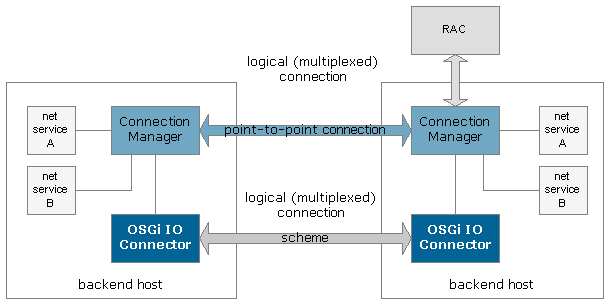
The System API provides two Java packages that enable connection management:
com.prosyst.mprm.net.connection- This is the essential connection API that can be used both by external applications to communicate with RM through RAC and by components deployed on different backend host of the RM.com.prosyst.mprm.net.connection.backend- This package provides features specific for the communication between two backend hosts.
RM Connection API
The basic RM Connection API is contained in the com.prosyst.mprm.net.connection package. It is commonly used for both RAC and backend-specific connections.
The physical connections established between two hosts are point-to-point connections, represented by the com.prosyst.mprm.net.connection.P2PConnection interface. A P2PConnection extends javax.microedition.io.Connection.
A logical (multiplexed) connection is represented by a com.prosyst.mprm.net.connection.MultiplexedConnection object. The MultiplexedConnection interface extends javax.microedition.io.StreamConnection and javax.microedition.io.ConnectionNotifier.
A net service is represented by a com.prosyst.mprm.net.connection.NetService object. One net service can use one or multiple multiplexed connections. A net service is uniquely identified in the scope of RM by its name, assigned by the ConnectionManager.setNetService(java.lang.String netServiceName,ServiceConnectionAcceptor acceptor) method or P2PConnection.setConnectionAcceptor(java.lang.String netServiceName, ServiceConnectionAcceptor acceptor) method. Many different net services can be assigned to a single P2PConnection. For example, the implementations of System RPC, RM RPC and Event Service share the same point-to-point connections using different net services.
There are two possibilities for establishing a new logical connection: the connection may be initiated by our side, or it may be accepted upon request from the other side. The accepting/rejecting of incoming connection requests is handled by the com.prosyst.mprm.net.connection.ServiceConnectionAcceptor assigned to the Connection Manager or to separate peer-to-peer connections.
You can listen for new data arrived over the connection by implementing the DataReceiveListener interface.
Backend Connection API
The Backend Connection API is represented by the com.prosyst.mprm.net.connection.backend package. It contains only the BackendConnectionManager interface, which stands for the Backend Connection Manager service.
The BackendConnectionManager interface extends the basic ConnectionManager interface. It contains methods for handling backend-specific communication, such as: establishing connection to a specified host or role, listening for incoming connections on a specified port, etc.
Creating a New Point-to-point Connection
To establish a new point-to-point (physical) connection to a specified host, refer to the Connection Manager service and invoke its openConnection(String uri) method. The String parameter passed to this method indicates the client-side URI for the connection. Normally, you don't need to handle the opening of a point-to-point connection to exchange information because the RM system automatically establishes physical connections to each backend server host added to the system, and to each external application using RAC. Usually, you only need to deal with multiplexed connections instead of point-to-point ones.
If a physical connection to the host you are trying to contact already exists, the openConnection method will return the previously opened connection and will not create a new one.
Connection Uniform Resource Identifiers (URIs)
The URIs supplied when creating a new physical connection to a host are created over the socket scheme. The URIs are formed according to the syntax specified in cRFC 2396 (Uniform Resource Identifiers (URI): Generic Syntax).
To create a new client socket to contact a remote backend host, you need to pass a client-side connection URI to the Connection Manager. By default, RM backend server hosts can communicate with each other on port 11449, opened internally by the system.
Client-Side Connection URIs
A client-side URI is to be passed as a parameter to the Connection Manager's openConnection method. It requires the following syntax:
socket://<host>:<port>[;timeout=<millis>]
Where <host> stands for the IP address or DNS name of the RAC or backend server you need to contact. <port> stands for the server port on which the remote host is listening for connections. By default, the port for inter-host communication within RM is 11449. The timeout=<millis> part is optional. If it is included, it will indicate a timeout in milliseconds for the connections. For example, a valid socket URI may look like this:
socket://test:11449
Or, if we want to specify the connection timeout:
socket://test:11449;timeout=50000
Multiplexing a Connection
To create a new logical sub-connection from a physical point-to-point connection, you need to set a new net service to the Connection Manager or directly to the P2PConnection.
Sending/Receiving Data over the Connection
The connection framework supports two methods of data exchange: synchronous and asynchronous.
Synchronous Method
To exchange data with the remote host synchronously, you can use some of the methods of MultiplexedConnection inherited from the StreamConnection and ConnectionNotifier interfaces. Namely, you can call the openInputStream or openDataInputStream methods for receiving data, or openOutputStream / openDataOutputStream methods for sending data respectively.
Asynchronous Method
The asynchronous method for receiving new data whenever such are passed over the connection, involves registering a com.prosyst.mprm.net.connection.DataReceiveListener to the multiplexed connection.
Accepting New Connections from the Opposite Side
The ServiceConnectionAcceptor added to the net service is responsible for accepting/rejecting incoming connection requests from the remote host. Note that we mean new logical connections, not physical ones.
Example
Most of the above-described operations are illustrated by the simple net service example that follows. It is separated into two parts: server and client.
Server Part
The server part of the example resided on the RM backend. It creates a new net service named "test" by invoking the setNetService method of the Connection Manager service. The accepting of connection requests for the test net services is handled by the ServiceConnAcceptorTest class, presented in the following listing. It simply prints the contents of messages sent by client applications.
The server part of the test net service:
import com.prosyst.mprm.net.connection.*;import org.osgi.framework.*;import java.io.*;public class ConnTest implements BundleActivator { private ServiceReference connmgrRef; private ConnectionManager connMgr; private ServiceConnAcceptorTest connAcceptor; private P2PConnection myConnection; private MultiplexedConnection multiplexedConn; public void start(BundleContext bc) throws BundleException { connmgrRef = bc.getServiceReference(ConnectionManager.class.getName()); if(connmgrRef != null) { connMgr = (ConnectionManager) bc.getService(connmgrRef); connAcceptor = new ServiceConnAcceptorTest(); connMgr.setNetService("test", connAcceptor); } } public void stop(BundleContext bc) throws BundleException { }}The implementation of the simple ServiceConnectionAcceptor:
import com.prosyst.mprm.net.connection.MultiplexedConnection;import com.prosyst.mprm.net.connection.ServiceConnectionAcceptor;import java.io.DataInputStream;public class ServiceConnAcceptorTest implements ServiceConnectionAcceptor { public void acceptConnection(MultiplexedConnection mc) { try { DataInputStream input = mc.openDataInputStream(); System.out.println("New connection with message: " + input.readUTF()); } catch (java.io.IOException ioe) { ioe.printStackTrace(); } }}Client Part
The client part resides on an external application and communicates with the RM backend through a Remote Access Client. It gets the test net service and sends a simple String greeting to it.
The client part of the communication:
import org.osgi.framework.BundleActivator;import org.osgi.framework.*;import com.prosyst.mprm.rac.RemoteAccessClient;import java.util.Hashtable;import com.prosyst.mprm.common.ManagementException;import com.prosyst.mprm.net.connection.*;import java.io.DataOutputStream;import java.io.IOException;public class RACTest { private static RemoteAccessClient rac; private static Hashtable credentials; private static String userName = "system"; private static String URI = "socket://192.168.104.9:11449"; public static void main(String[] args) { credentials = new Hashtable(); credentials.put(RemoteAccessClient.USER_PASSWORD,"system"); try { rac = RemoteAccessClient.connect(URI,userName,credentials,null); NetService test = rac.getNetService("test"); MultiplexedConnection myConn = test.openConnection(); DataOutputStream output = myConn.openDataOutputStream(); output.writeUTF("hello"); output.close(); } catch(ManagementException me) { me.printStackTrace(); } catch(IOException ioe) { } }}Backend-Specific Communication
By using the Backend Connection Manager, you can establish connections with remote backend server hosts by their IDs or roles, or open a server-side socket waiting for connections on a specified port.
If you use some of the methods for getting the existing connection to a backend host: getConnectionToHost, getConnectionToHostRole and getConnectionToMS, the system will try to establish connection to the default RM communication port 11449.
The example that follows illustrates calling the Backend Connection Manager. It gets the existing physical connection to the control center's host.
Using the Backend Connection Manager:
import org.osgi.framework.BundleActivator;import org.osgi.framework.BundleContext;import org.osgi.framework.ServiceReference;import com.prosyst.mprm.net.connection.backend.BackendConnectionManager;import com.prosyst.mprm.admin.system.Roles;import com.prosyst.mprm.net.connection.P2PConnection;import java.io.IOException;. . . refBEConnMgr = bc.getServiceReference(BackendConnectionManager.class.getName()); if (refBEConnMgr != null) { backendConnMgr = (BackendConnectionManager) bc.getService(refBEConnMgr); . . . try { //getting the existing connection to the control center host backendConn = backendConnMgr.getConnectionToHostRole(Roles.CC); . . . //manipulate the connection in the described ways } catch (IOException e) { e.printStackTrace(); } } . . .