The current document describes the overall mechanism of OSGi device management, and the components enabling it.
Managing OSGi devices through RM means performing the administration of devices' OSGi framework and platform through the RM backend. As already explained in other documents, this enables the RM administrator to perform remote administration and monitoring of an enormous amount of devices running in different physical locations without any need for the end device user to handle the administration herself.
Components Enabling OSGi Device Management
The management of remotely managed devices is possible through a set of components, called RM agents, activated as bundles on the target devices. These components are delivered and installed on the device during the Initial Provisioning of OSGi Devices phase. Some of these components are required. Such are the RM Core Management Agent and communication provider bundles. Others are optional, such as the optional RM agents. In addition, the RM management model requires an OSGi-specified component to be available on the device: the OSGi Initial Provisioning Service.
The following figure shows the components involved in OSGi device management: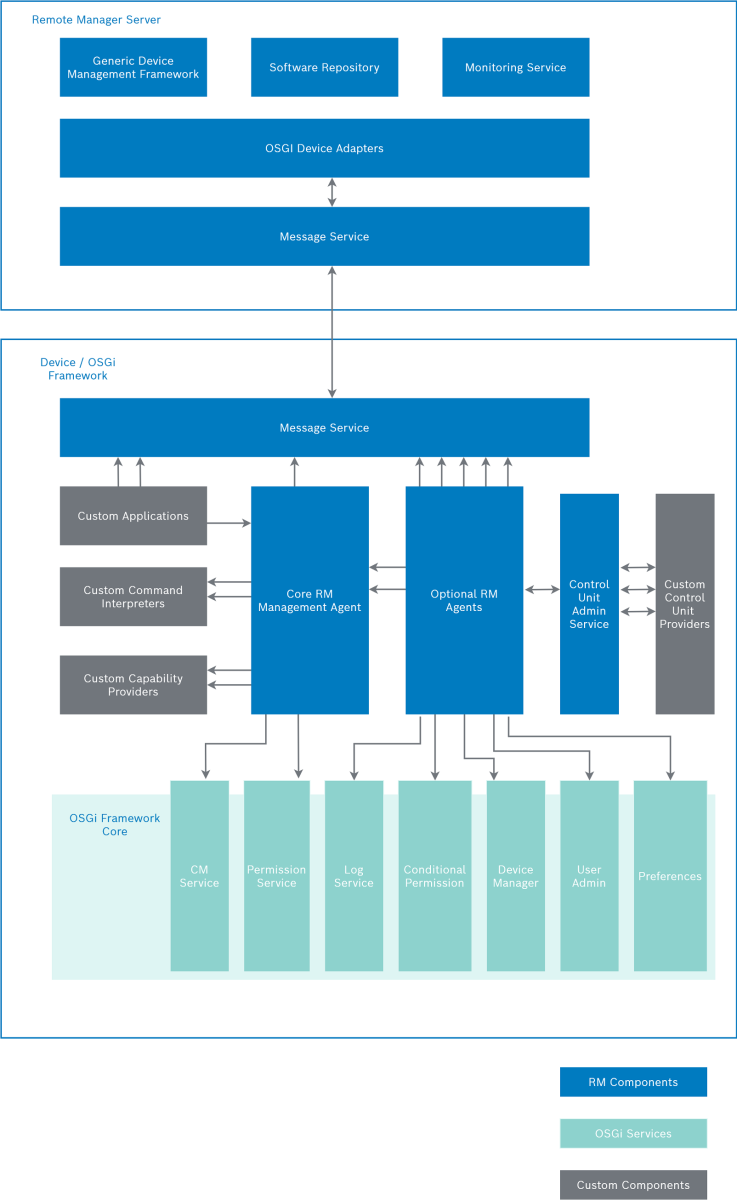
OSGi Device Components
OSGi Initial Provisioning Service
The OSGi Initial Provisioning Service is the OSGi-specified component enabling backend systems to perform remote management over OSGi devices. Although this is not an RM agent, the availability of an OSGi Provisioning Service is required.
The OSGi Provisioning Service enables the OSGi device and the management system (the RM backend in this case) to establish contact with each other. It contains important properties defining the communication between the two parties and the management features for the device. They are used initially during the provisioning, and later for establishment of each management session between the backend and the OSGi device. More information about the OSGi Provisioning Service is available in Initial Provisioning of OSGi Devices document and the OSGi Service Platform Specification release 4.
Basic Agent Components
Core RM Management Agent(s)
The Core RM Management Agent bundle, as its name suggests, enables the RM backend to perform management operations over the devices, and to monitor constantly its state. RM provides a set of core management agents, each suitable for a different version of the OSGi Service Platform Specification. The very best management agent suitable for the specifics of the OSGi device is selected internally by the backend on the basis of the information reported by the Provisioning Service.
In summary, the Core RM Management Agent has the following functions:
- Receives and executes commands from the RM backend
- Sends back execution result replies
- Monitors constantly the configuration state of the devices (including the state of bundles, services, permissions, configurations, etc.) and sends constantly notifications to the backend when there are changes in it
- Notifies the backend each time it goes online after it has been offline.
The Core RM Management Agent reads configuration properties stored in the OSGi Provisioning Service to find the URL of its management server, the network transport to be used, and other information that defines communication settings.
RM Message Service Related Components
The RM Message Service and additional transport-providing services enable the communication between the managed device and the RM backend. The Message Service is used by the core management agents and all optional agent components to exchange information with the backend. The management agents receive commands over the established connection, the Alert Agent sends alerts raised by device bundles, the Log Agent sends log messages generated on the target device, and so on. Custom management agents can also use the Message Service for interaction with the backend. The transport services provide the lower-level protocol for communication. There can also be an optional security layer involved in the communication between the two parties.
Detailed information about the network communication between devices and the RM backend is available in the OSGi Network Connectivity document.
Optional RM Agents
The Optional RM Agents extend the functionality provided by the core agents with additional RM administration features, which may be optionally enabled on each of the OSGi devices.
You can choose to enable all of them, a set of them, or none of them. Without an optional RM agent the device will still be able to execute basic commands from the RM backend but will not be able to benefit from the specific management capabilities provided by each optional agent. For example, to enable the device bundles to send alerts, you need to have the Alert Agent on that device. Each optional agent on the device communicates with a corresponding component on the RM backend. Note, however, that additional agents consume additional resources on the device, so the need for a certain set of optional agents is to be judged individually.
Developing an optional agent is a convenient way to deliver provider-specific management components to the managed devices. Adding the name of an optional agent to the initial provisioning properties of a device enables the automatic downloading and installing of the appropriate agent on the device. In addition, the console GUI provide automatic detection and visualization of optional features if they are available in the OSGi Bundles in the Software Repository. The developer of optional RM agents must also take care of providing a backend component handling the optional agent's functions. More information about developing optional RM agents is available in Initial Provisioning of OSGi Devices.
Custom Management Agents and Plugins
Custom Management Agents and plugins extend the RM-built in management capabilities. Custom management agents and plugins present software units, that must be deployed on the managed device.
- Device-side Control Unit Providers – provide management interface to arbitrary custom resources available on the OSGi Device or accessible by it (for instance the network devices located in the local OSGi Device network). For more information about custom CU Provider refer to Managing Device-Side Control Units.
- Application components – device-side application components communicating over the RM message service with corresponding custom server-side components deployed on the RM backend.
- Custom Command Interpreters – extend the set of built-in commands, which can be executed by the RM Core Management Agent with additional custom defined commands.
- Custom Device Capability Providers – plugins which can automatically discover additional capabilities of the OSGi device platform.
RM Backend Components
The RM OSGi Device Management package contains a set of backend-side components, that maintain the communication with the managed OSGi devices and their integration in the Generic RM Device Management, Software Delivery and Device Monitoring subsystems of the RM.
Registration and Initial Provisioning of OSGi Devices
Initially, the OSGi device and the RM backend are unaware of each other, and the backend cannot perform any management operations over the device. The management through the backend is possible only after the device is registered in the RM and provisioned with the RM agents. In addition, the device must be aware of the RM backend host address and of additional connection related parameters, if necessary.
Registering an OSGi Device
Registering the device includes creating a record about the device in the RM database. This record includes information about the device's host address, platform capabilities, system and framework properties, available bundles, services, configurations, permissions, etc. Basically, there are two methods of device registration in the RM system:
- Manual (explicit) registration – the device is registered on the backend, either manually by the operator (through the console) or programmatically by some custom device enrollment application or system (through the RM APIs).
- Automatic (implicit) registration – the device is automatically registered by the RM, when it establish management session to the RM for the first time. In case device-initiated registration is not recommend in the business model of the specified system deployment, you may forbid the automatic registration using the system property gm.allow.gw.register. Turn it to false (as it is true by default), to forbid device autoregistration.
Also by changing the Allow Device Autoregistration property from RM OSGI Device Manager Configuration to "No".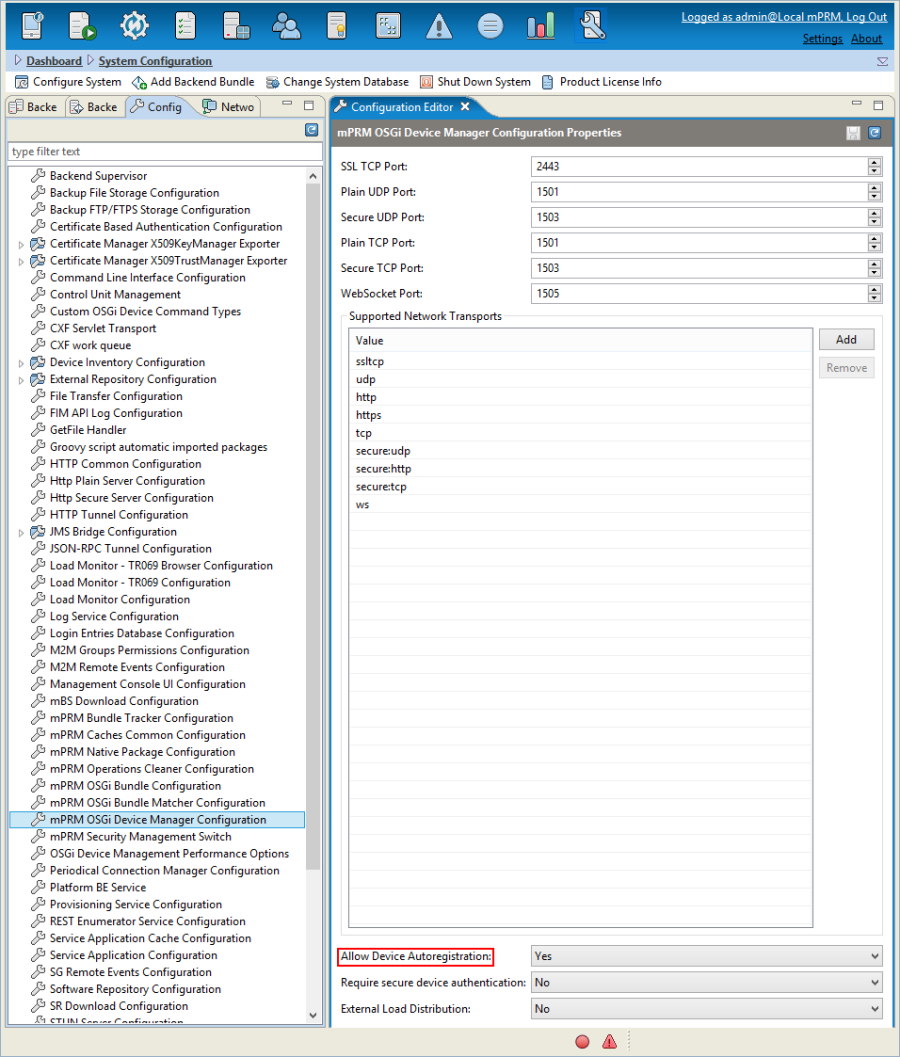
At the time of registration, the device is placed in a particular location of the Managing OSGi Device Tree, and assigned to the particular management server responsible for that location.
OSGi Device Registration Properties
Bosch Digital defines a set of registration properties, which are available as constants in the com.prosyst.mprm.admin.gateways.RegistrationProperties interface:
Registration Property | Constant of RegistrationProperties | Description |
|---|---|---|
gateway.host | GATEWAY_HOST | OSGi device host. |
gateway.boot.port | GATEWAY_PORT | OSGi device port. |
user | GATEWAY_USER | User name of the device admin account. |
pass | GATEWAY_PASSWORD | Password for the device admin account. |
prm.secure.bootstrap | SECURE_BOOTSTRAP | Specifies whether the remote initial provisioning is to be provided over secure network. |
prm.push.scheme | PUSH_SCHEME | Scheme for pushing initial provisioning data. This scheme must be "HTTP" or "HTTPS". |
prm.prv.scheme | PROVISIONING_SCHEME | Scheme for initial provisioning data assignments. This scheme must be "RSH", "HTTP" or "HTTPS". |
connect.period | CONNECT_PERIOD | Connect period for devices configured to use periodical connection scheme. |
Initial Provisioning of an OSGi Device
The specifics of the process of initial provisioning of OSGi devices is fully described in the Initial Provisioning of OSGi Devices document of the current documentation. Briefly the initial provisioning aims:
- to install the RM Agent bundles on the managed device framework
- to provide all the necessary device settings in order to made them manageable by the RM.
There are two scenarios of initial provisioning of OSGi devices:
- backend-initiated initial provisioning – the RM triggers a device to start the initial provisioning procedure, by connecting it over the network and pushing the Initial Provisioning URL of the RM to the device-side OSGi Initial Provisioning Service.
- device-initiated initial provisioning – The Initial Provisioning URL is locally provided to the device, for example it may be hard-coded at factory time.
In general, both methods involve the same activities. The most important difference between them is that, with the backend-initiated method, the registering of the device in the RM database is done before the device is provisioned, whereas, with the other method, it is vice-versa.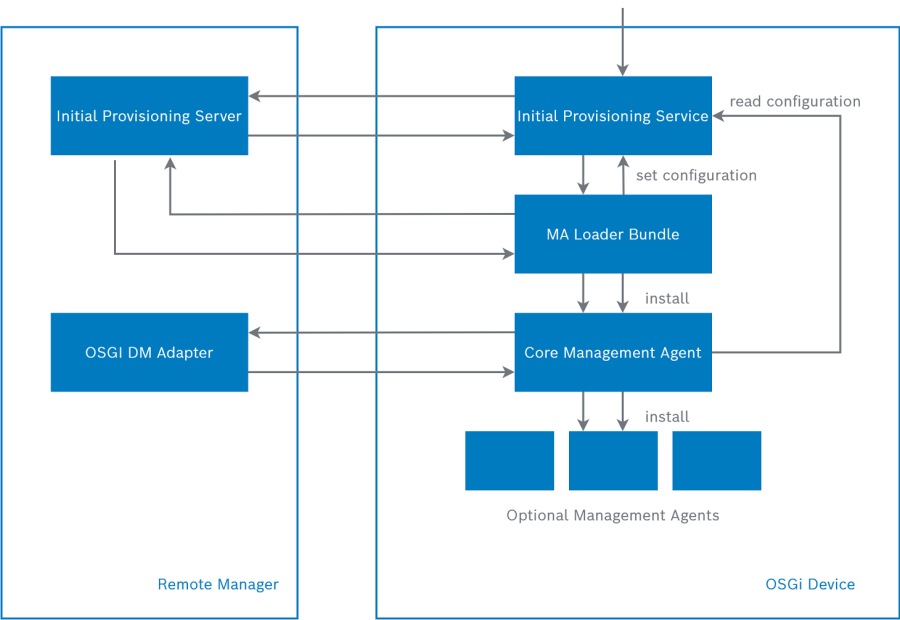
The above figure illustrates the activities of the initial provisioning process:
In order to be managed by the RM, an OSGi device can be equipped with all the necessary RM Management Agent bundles and the appropriate device settings can be adjust. This tuning process can be performed manually, at the factory time or during the installation of the device. So, the initial provisioning process is optional, as it has alternative.
Consider that the initial provisioning of a device is not always performed at the time of its registration. For example:
- having explicit (manual) registration, the information about the device may be recorded in the RM system database, but the device itself may initiate the initial provisioning after a given time period.
- when a device is provisioned with the basic RM agents, at a factory time, the RM just have to register it without performing initial provisioning as it is not necessary.
Unregistering an OSGi Device
A device can be unregistered from the RM if the RM administrator decides to stop managing the device through the system. In such case, the device's record is entirely deleted from the system database. In some cases the device may not be contacted and the provisioning URL and manager URL properties will not be deleted from the provisioning agent's configuration and it will try to reconnect again.In production systems, it is assumed that only pre-registered devices should be able to connect to the system. This means that once a device is unregistered, the device will no longer be able to connect to Remote Manager.
Device Management Sessions
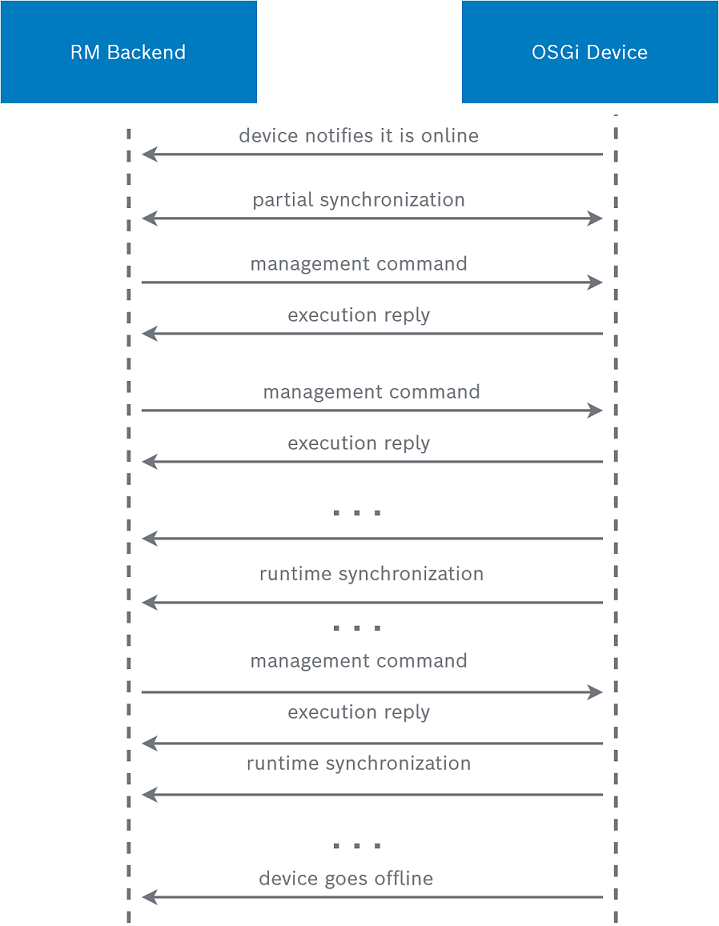
The device tries to establish a new management session each time it goes online. It tries to connect the RM management server, whose URL is defined in the properties of the OSGi Provisioning Service. If the connection is successfully established, it tries to keep it persistently open. Otherwise, the device retries opening the connection at a certain time period. The management session ends when the device goes offline again (i.e. shuts down or becomes unreachable to the management server). During an established management session the RM can perform management operations that change the configuration state of the device. There can also be operations defined over the device while it was offline. They will be executed over the device immediately when it goes online. All these RM-originating configuration changes are recorded in the RM database so that the backend will show only up-to-date information about the state of the device.
However, there could also be other, non-RM factors, that change the configuration state of a device. Users accessing the device can install new bundles, change system properties, provide new hardware, and so on, locally on the device or through other administration tools than RM's. This can happen while the device is currently in a management session with the RM backend, or while it is inaccessible to RM. In either case, the information about the occurring changes is sent to RM as soon as possible so as to actualize its database.
The following figure illustrates a typical management session between the RM backend and the managed OSGi device.
Device Synchronization
The RM backend receives constantly up-to-date information about the configuration state of devices through the process of synchronization.
There are three types of synchronization:
- Full (initial) synchronization – This type of synchronization is done the first time when the device connects the RM system. It includes extracting the information about the elements of the current state of the device, and recording it in the system database. By default, all possible information included in the device's configuration state is synchronized during this process. However, you can shorten the contents of the synchronized information by using the synchronization properties of device and device groups (see "Synchronization Settings" below).
- Partial synchronization – This type of synchronization is done each time a new management session with the device is established, and each time the Synchronize command is fired through the GUI, through a script command or programmatically. Partial synchronization includes requesting information about all aspects of the device's configuration state, and checking if the current state of the device matches the state recorded in the RM database. If there are any differences, the new state overwrites the previous record in the database. This process of updating the information is highly optimized in terms of network traffic between the backend and the device. Data is transferred only if there are changed components, and only about the changed components.
- Runtime synchronization – This type of synchronization is done constantly during the device management session. It is done each time the RM Management Agent sends notification of a change in the device's configuration state. In such case, only the information about the changed element is updated. This synchronization is based on events reported to the Management Agent. As there is no way to register listeners about changes in the device's system properties, the runtime synchronization does not reflect system properties' changes. The latter are updated only when partial synchronization of the device is performed.
Synchronization Settings
In the most common case, the process of synchronization includes the information about the whole configuration state of the device. However, you can restrict the scope of the synchronized information by using the synchronization setting properties of devices and device groups. If you are not interested in certain information about the device, you can set the corresponding synchronization property to false, and you will no longer receive information about it. This could be done initially when registering the device in the RM, or later at runtime. You can define synchronization settings for devices or for entire device groups.
The available synchronization properties are:
Property ID | User-Friendly Name | Type | Default Value | Description |
|---|---|---|---|---|
gm.sync.capabilties | Synchronize Device Platform Capabilities | boolean | true | Specifies whether the RM will automatically determine and synchronize capabilities of the OSGi device platform. |
gm.sync.sys.props | Synchronize OSGi System Properties | boolean | true | Specifies whether the RM will store and synchronize OSGi framework system properties in the backend database. |
gm.sync.bundle.configurations | Synchronize Bundle Configuration | boolean | true | Specifies whether the RM will store and synchronize configuration of the bundles deployed in the OSGi framework in the backend database. |
gm.sync.bundle.services | Synchronize Bundle Services | boolean | true | Specifies whether the RM will store and synchronize registered services by the bundles deployed in the OSGi framework in the backend database. |
gm.sync.bundle.permissions | Synchronize Bundle Permissions | boolean | true | Specifies whether the RM will store and synchronize permissions of the bundles deployed in the OSGi framework in the backend database. |
gm.rsh.shared.secret | RSH Shared Secret | String | - | Specifies which secret should be used for RSH protocol. The key is kept Base64 encoded. |
These settings can be defined using the GUI or programmatically, using the corresponding constants from com.prosyst.mprm.admin.gateways.GatewayAttributes.