The Device Communication service is responsible for the network communication between the OSGi devices and the management server.
This communication takes place after the device registration phase ends. The Device Communication service is used for all management and software delivery operations performed by RM towards OSGi devices.
Custom applications, which need to exchange information between devices and the RM backend, can also benefit from the user-friendly RM Message Service sub-component.
Device Communication Protocol Stack
The Device Communication protocol stack is divided into several layers, shown in the diagram below: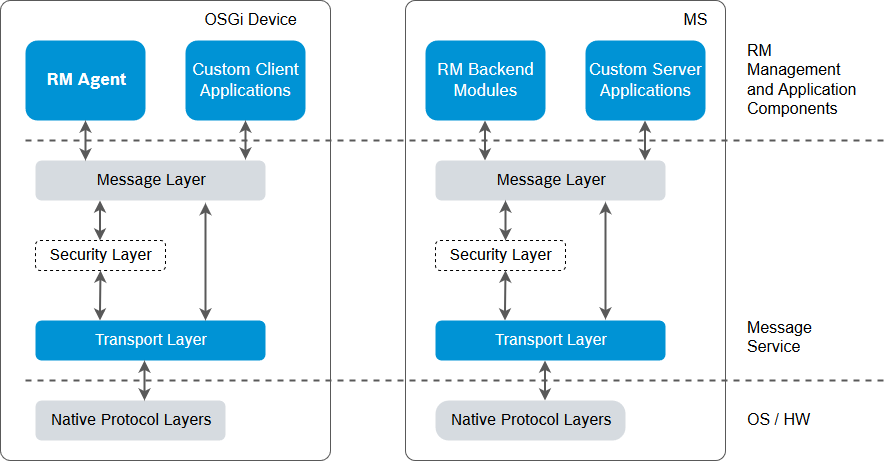
Message Layer
The Message Layer is the highest layer of the Device Communication protocol stack. It is used by the RM agents and other custom applications running on the device to communicate with the RM backend, and vice versa. The Message Layer is network transport independent, i.e. it can operate over a variety of different network protocols (TCP, UDP, HTTP), physical bearers (cable, modem, wireless) and network topologies (local network, Internet, VPN), suitable for different classes of device application fields.
The Message Layer provides the following basic services:
- Maintenance of network communication sessions between managed devices and RM management servers.
- Sending, receiving and dispatching of asynchronous and synchronous bi-directional messages.
- Stream-oriented bulk data transfer between applications on remote hosts.
Transport Layer
The Transport Layer stands between the Message Layer and the actual network protocol used for data transmission. The Transport Layer provides a common interface to the upper layers so they are able to function independently of the underlying network type.
The basic purpose of the Transport Layer is to offer asynchronous reliable sending and receiving of data packets (datagrams). Different network types offer different mechanisms for data exchange and different quality of service (QoS) levels with respect to bandwidth, reliability of data transmission, and delays. The Transport Layer is defined to compensate or tolerate these varying levels of quality, therefore providing a unified and consistent service to the upper layers.
Intermediate Layers
The Device Communication Service is designed to support an arbitrary number of optional intermediate layers between the Message and Transport Layers, which could perform various transformations of transmitted data.
An important representative of intermediate layers is the Security Layer. The Security Layer provides network level authentication of the communicating parties and secure encryption of transmitted data over the network.
Device Communication Service Components
The Device Communication Service architecture is designed to allow flexible configuration and customization by system integrators and administrators. The diagram below shows a typical configuration of the Device Communication Service Components components.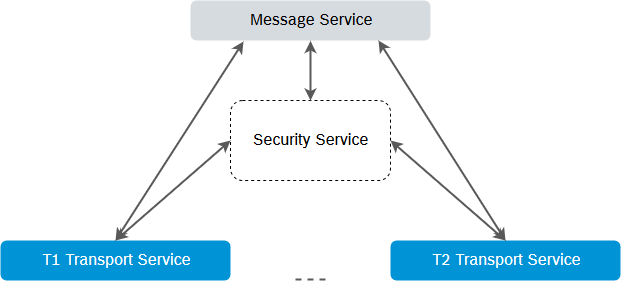
The required components of the Device Communication Service are one Message Service and one or more Transport Services. The Security Service is optional.
Message Service
The Message Service implements the functionality of the Message Layer of the Device Communication protocol stack. It is packaged as a single component, able to run on every management server and device. The Message Service is implemented by the backend-side RM Message Bundle (packages/foundation/osgidm.message.be.jar) and the device-side RM Message Bundle (packages/foundation/osgidm.message.client.jar).
The Message Service contacts the appropriate Transport Service for the actual data transmission. A single Message Service can be configured to use more than one Transport Service simultaneously. This is especially suitable for the backend-side Message Service – therefore RM can simultaneously communicate with devices, owning different network capabilities.
Transport Services
Transport Services implement the Transport Layer of the of the Device Communication protocol stack. Device Communication Service configuration can include more than one Transport Service, each responsible for communication over a different network protocol or network type.
Basically, each Transport Service consists of two parts – backend-side and device-side, residing in the MS and in the device, respectively. Additionally, depending on the protocol specifics each of the sides can choose to implement a server or a client or both.
The current RM distribution includes several ready-to-use Transport Services, but additional ones can be developed and registered for use with the Device Communication service. RM provides ready Transport Services for the TCP, UDP, HTTP , WS and SSL/TCP protocols.
TCP Transport Service
This Transport Service is built on top of the TCP/IP protocol. It maintains a single TCP connection between every connected device and the management server for sending bi-directionally data packets.
Since the TCP-based transport provides best ratio between performance and scalability, it is the RM default transport and it is recommended to be used.
Compared with the UDP Transport Service, the TCP transport provides faster transfer of large amounts of data, such as at bundle downloading, but it does not handle so well with a large number of simultaneous devices connections.
The backend-side TCP Transport Service is packed in the TCP Transport Server bundle (packages/foundation/osgidm.message.transport.tcp.be.jar). The devices-side TCP Transport Service is in the TCP Transport bundle (packages/foundation/osgidm.message.transport.tcp.client.jar).
UDP Transport Service
This Transport Service provides efficient and scalable data exchange mechanism, built over the UDP/IP protocol. The UDP Transport Service is especially designed for simultaneous communication between a very large number of OSGi devices and a single management server.
Compared with the TCP Transport Service, the UDP transport is more suitable for frequent exchange of small packets, but is less useful for transfer of larger files. Because of the large number of the simultaneous connections, the UDP-based transport is much scalable, and it can be used in cases when the TCP-based transport is not effective or not preferred for a given network configuration.
The backend-side UDP Transport Service is packed in the UDP Transport Server bundle (packages/foundation/osgidm.message.transport.udp.be.jar). The device-side UDP Transport Service is in the UDP Transport bundle (packages/foundation/osgidm.message.transport.udp.client.jar).
HTTP Transport Service
This Transport Service is built on top of the HTTP protocol. The main goal of the HTTP Transport Service is to enable communication with OSGi devices, placed behind firewalls or proxies allowing only HTTP communication with the management server.
System integrators must consider the following limitations of the HTTP transport:
- All HTTP requests are initiated by the OSGi devices. This restriction is due to the assumption that the device is behind a firewall or a proxy and cannot be reached directly from the backend. That's why, the HTTP client on the devices "pulls" the HTTP server on the backend by sending HTTP requests periodically to get messages, allocated for it. This leads to a significantly larger latency when the requests are sent from the management server in comparison with the other Transport Services.
- Every packet transmission is done in a separate HTTP transaction (request/response), which leads to establishing a TCP connection. This increases latency and overheads on the server side and decreases the data transfer rate.
The backend-side HTTP Transport Service is in the RM HTTP Transport Bundle (packages/foundation/osgidm.message.transport.http.be.jar). The device-side HTTP Transport Service is packed in the HTTP Transport Bundle (packages/foundation/osgidm.message.transport.http.client.jar).
Websocket Transport Service
Webscoket Transport Service presents full-duplex communication channels over a single TCP connection. Websocket protocol extends an easy "browser-to-RM" communication, providing a standardized way for the RM to send content to the browser without being solicited by the client, and allowing for messages to be passed back and forth while keeping the connection open.
The Websocket Transport Service is in Websocket Transport Bundle, found in packages/foundation/osgidm.message.transport.wsocket.be.jar. The Device Bundle is packed in packages/foundation/osgidm.message.transport.wsocket.client.jar.
SSL/TCP Transport Service
The SSL/TCP Transport Service provides secure SSL and TLS communication on top of TCP between the backend and the OSGi device. In particular, the Transport Service uses the JSSE SSL implementation of the underlying JVM.
The backend-side implements both the server and client sides of SSL. More specifically, the backend uses the SSL server. The own certificate that the server on the backend presents for authentication to the client running on the OSGi device is taken from the RM Certificate Manager storage – such a certificate should be added to the mPRM TLS Server domain. Unless configured otherwise, Remote Manager does not require certificate authentication from the device. If device authentication is switched on, then the SSL server will check the trust of device's certificate or of its issuer's one against the certificates available in the "Remote Manager TLS Server" domain of the Certificate Manager.
Similarly to the backend-side, the portion of the SSL/TCP transport on the OSGi device implements again both server and client. Here, the management functionality for connection with the backend uses mostly the SSL client. The SSL client checks the trust of a certificate sent by the server from the backend by consulting certain X.509 Trust Manager services (javax.net.ssl.X509TrustManager) in the OSGi framework. The trust manager services have service property foundation.certmanexp.domain=mPRM TLS Client or mPRM TLS Client=CV . If the backend requires authentication from the device, the SSL client will sent the certificate exported by a X.509 Key Manager service (javax.net.ssl.X509KeyManager) with service property foundation.certmanexp.domain=mPRM TLS Client or mPRM TLS Client=KPH. Both types of services exporting the relevant certificates can be automatically provided by generating a Security Context bundle from the console's Certificates dashboard view.
For details about the setup of server's own certificate and client's trusted certificates, refer to the Setup of the SSL/TCP Transport Service section at Setup and Configuration.
The backend-side of the SSL/TCP Transport Service is in the SSLTCP Transport Server bundle (packages/foundation/osgidm.message.transport.ssl.be.jar), and the device-side is in the SSLTCP Transport R4 bundle (packages/foundation/osgidm.message.transport.ssl.client.jar).
Security Service
The Security Service implements the Security Layer of the Device Communication protocol stack.
In particular, the Security Service exports the same interface as Transport Services, so the Message Service uses it as an ordinary Transport Service. Unlike the available Transport Services described above, the Security Service does not transmit data over the network itself, but utilizes other Transport Services.
The RM distribution provides a default implementation of the Security Service – the Secure Transport Service.
Secure Transport
The Secure Transport Service provides strong cryptographic methods for PKI authentication and data encryption. This combination of methods makes the Secure Transport Service more reliable, but it is more CPU-intensive.
The backend-side Secure Transport Service is packed in the Secure Message Transport Server (packages/foundation/osgidm.message.transport.secure.be.jar). The device-side Secure Transport Service is packed in the Secure Message Transport Client (packages/foundation/osgidm.message.transport.secure.client.jar).
Transport Stack
Transport Services can delegate the actual communication to other Transport Services. An example of such Transport Service is the Security Transport Service, described above. Such Transport Services act as an intermediate layer of the Device Communication protocol stack and can offer features like compression of data, logging, collecting statistical information, etc. Because of the common transport interfaces, this kind of services can form a chain, called a transport stack, which delivers the information using the most suitable combination of transport features.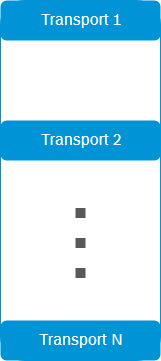
Transport Service Identifiers
Each Transport Service is identified by a unique Transport Type string.
Identifiers of Built-In Transports
The Transport Types of RM built-in transports are as follows:
Transport | Transport Type |
|---|---|
UDP Transport Service | udp |
TCP Transport Service | tcp |
HTTP Transport Service | http |
SSL/TCP Transport Service | ssltcp |
Secure Transport Service | secure |
WebSocket Transport Service | ws |
Identifiers of Composite Transport Stacks
The transport identifiers of composite transport stacks are formed by the concatenation of the Transport Types of all Transport Services in the stack, separated with '.' (dots). The order is from the top to the bottom of the transport stack. For example the type of the transport stack composed of the Secure Transport Service over the UDP Transport Service can be referred as "secure.udp".
Device Communication Service URL
The Device Communication Service have to be supplied with the URL in order to establish a network session with a remote host. The general syntax of the URL is:
><transport_type>[:<transport_type>]:<remote_address>:<remote_port>?<params
where:
- <transport_type> – Specifies the Transport Type of the Transport Service, which will be used by the Message Service for sending and receiving data over this network session or transport stack. In the case of a transport stack, the URL will contain a colon-separated sequence of the Transport Types of involved Transport Services.
- <remote_address> – Specifies the network address (IP address or DNS name) of the remote Device Communication Service. It is passed to the appropriate Transport Service. Its syntax is transport-specific. As the built-in RM Transport Services are based on the IP protocol, the syntax is: <host_address>:<port_number> but non-IP-based transports can use a different format.
- <remote_port> – Specifies the port of the remote Device Communication Service host.
- <params> – Wraps parameters of the Transport Service(s). They should be encoded in the URL in the form <param_1>=<value_1>&…&<param_n>=<value_n>.
Example: The URL for connecting with a management server, running on a host with address rm.acme.com over the secured UDP transport is:
secure:udp:rm.acme.com:1501
where 1501 is the default port number used by the UDP Transport Service.
Network Session Lifecycle
Network sessions are always initiated by OSGi devices to management servers. Therefore, the network address of the device does not have to be known to the RM before establishing the network connection. This model is particularly suitable for dial-up devices, which are dynamically provided with network addresses.
The session is initiated by the RM Management Agent, running on the OSGi device. The RM Management Agent operates in two modes:
- always-online – This is the default working mode and its description is provided in the paragraphs below.
- manual connection – Using the APIs of the ManagementAgentAdmin service, a custom module, located on the managed OSGi device can control the RM Management Agent when a connection to be closed or opened.
Besides the above mentioned network session modes, periodical session mode can be set whose functionality is delivered by the RM Connection Scheduler. The Connection Scheduler represents an optional management agent and should be explicitly enabled on the device at registration. To learn how to enable an optional feature refer to the Providing Optional RM Features section of the Registering New OSGi Devices document, part of the User's Guide.
Always-Online Mode
A new session is initiated immediately after starting the agent if it has been already configured, or after it is supplied with the necessary configuration by the Initial Provisioning Service.
The RM Management Agent keeps the connection with the management server continuously alive. If a connection can not be established, or for any other reason an already established connection drops down, the Management Agent periodically (at intervals with configurable length) tries to initiate it.
If the MS is clustered, after the connection is established the device receives a list with the addresses of all backend hosts participating in the cluster. The connection of the device can be redirected from one to another MS host according to the RM load-balancing algorithm. If the backend host, to which the device is connected, crashes, then the device using the addresses from the list will try to establish a connection to some of them consequently until an attempt succeeds.
You can configure some network session parameters on devices, as described in the Network Sessions Configuration section.
Periodical Mode
To enable the periodical connection mode on the OSGi device, consider the following prerequisites:
- Set the connect.period device registration property – This property defines the time period (in minutes) for connecting a device with the backend.
- Set the prm.env.provider.push.starting.with property with "connect" value (see "Provisioning Info Providers" chapter of the Initial Provisioning of OSGi Devices document).
OSGi devices configured to use periodical connections may benefit from the Connection Scheduler. The Connection Scheduler offers a mechanism for closing the inactive connections between the RM backend and the managed device. After the time period defined by the connect.period property expires, the Connection Scheduler re-establishes the connection. Closing the inactive connections decreases the consumption of system resources on both sides, the managed device and the backend.
Device Communication APIs
The Device Communication Service is associated with two APIs – the Message Service API, which can be used to exchange data over the Message Layer, and the Transport Service API, which can be used to develop custom Transport Services. More information on these APIs usage is available in Developer Guide.
Device IP Address