OSGi Devices in the Context of Control Unit Paradigm
The Control Unit Abstraction is the heart of the RM device management mechanism. The RM Generic Device Management Package provides utilities for representing each manageable unit (device or any other resources) as a set of control units, therefore enabling application to access them through the generic APIs of the RM.
To extend the scope of managed components with a custom type, you have to provide a custom CU Provider implementation and to install it on the backend. The Custom CU Provider delivers the control unit representation or so called custom control units, of the managed component. (Detailed description of CU Providers can be found in the Conceptual Guide/Device Management Overview chapter of the Generic Device Management Package documentation.)
Considering the possibility of providing resources of custom type, the control units can be classified in two groups:
- RM Built-in Control Units – these are control units, which models basic resources and configuration of the RM backend. Such resources are modeled as control units by the OSGi Device Manager module. For an OSGi device type for example, such a RM built-in control units are OSGi bundle, bundle configuration, permissions and so on.
- Custom Control Units – these are control units, provided by the custom CU Providers, and are not previously known to the RM backend.
Besides the functionality delivered by the Generic Device Management Package, the OSGi Device Management package supplements the opportunity to install the CU provider directly on the managed device framework. Therefore the device-side control units, the RM built-in CUs and other backend custom CUs, will be accessed in the same way. Using the GDM Package APIs or the console user interface, the end-user or external applications can process with all available control units in a unified manner, regardless of their type.
In brief, in purpose to manage an OSGi device-side resource you have to
- develop a custom CU Provider (see "How to Provide Control Units" section of the Gateway Software Runtime documentation)
- deploy the CU Provider on the OSGi device framework.
Components Enabling Custom Control Unit Management
The following picture shows the components enabling custom control unit management: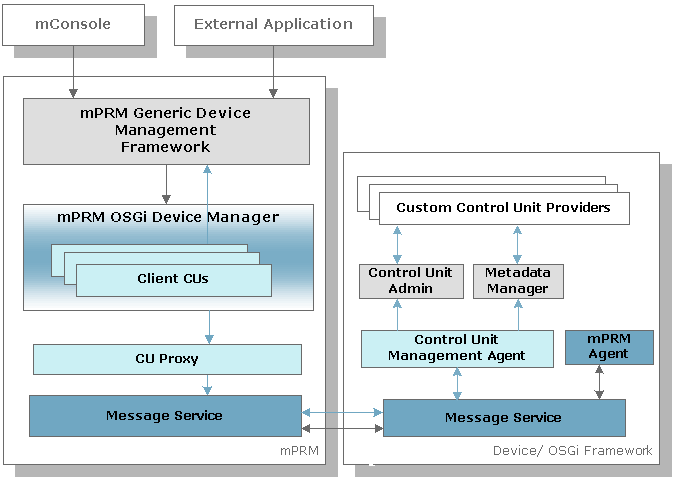
Control Unit Management Agent – The Control Unit Management Agent, residing on OSGi device framework, communicates with the Control Unit Admin for the execution of its management functions. It sends control unit information to the RM and on request from the backend invokes control unit actions and gets state variable values.
Control Unit Proxy – Residing on the RM backend, the Control Unit Proxy provides means for representing custom control units as RM built-in control units. By unifying both type of control units, the RM APIs, the console user interface or external applications can access them in the same way. More explanations about the Control Unit Proxy module can be found in the Using Control Unit Proxy section of the Component Management in the Scope of a Single Device document (part of the Programmer's Guide of the Generic Device Management package documentation).
Control Unit Admin and Metadata Manager – The Control unit Admin provides a general interface for accessing control unit state variables and actions, creating control unit instances from control unit factories and searching for specific control unit instances within the factories. The Metadata Manager is responsible for processing and storing metadata of control units on OSGi devices. Both of the modules are part of the Bosch IoT Remote Manager, but for a convenience they are included in the RM distribution, so that they can be used on frameworks from other vendors different from Bosch Digital. For further details about these modules refer to the descriptions of the Control Unit Admin bundle and the Bosch Digital Metatype Bundle from the Bosch IoT Gateway Software Framework documentation.
Installation and Setup
On the OSGi Device Framework
To enable management of device-side provided Control Units, you must provide some of the optional RM Agents on the OSGi device framework. You can do this as described below:
- When registering a new OSGi device, in the Optional Administration Features dialog, enable the Control Unit Management Agent optional feature.
- On an already registered OSGi device, deploy the Control Unit Management Agent Bundle (mprm.osgidm.control_unit_agent).
- By reprovisioning the device and enabling the Control Unit Management Agent feature.
- By installing explicitly the Control Unit Management Agent Bundle from the RM Software Repository with the "smart deploy" option turned on.
- Manually by copying the bundle to the device – located in the packages directory, and installing it on the OSGi framework.