Describes the features of the console related to watching the status of an OSGi device via a collection of custom status variables exported through the OSGi Monitor Admin service part of the OSGi specifications release 4 version 4.2.
Activating Remote Monitoring
To be able to monitor from RM status variables you need the Monitoring Agent installed on the OSGi framework of the device.
- During device registration – in the Optional Administration Features dialog of the Register OSGi Device wizard select Monitoring Agent option.
- On a registered device:
- By reprovisioning the device and enabling the Monitoring Agent feature.
- By installing explicitly the Monitoring Agent bundle from the RM Software Repository with the "Smart Install" option turned on.
In case of manual installation of the Monitoring Agent bundle, you need to install Control Unit Management Agent (mprm.osgidm.control_unit_agent) to the OSGi framework (if it is not already installed).
General Description of the Monitoring Tree
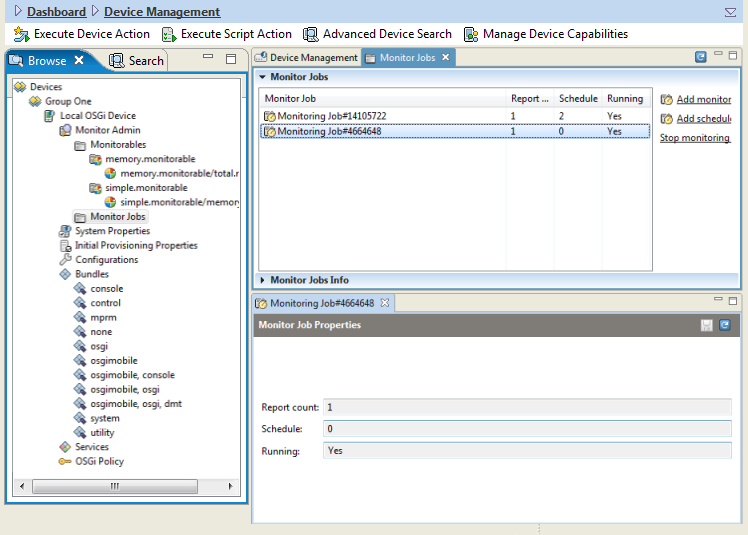
The console shows the status variables subject of remote monitoring and the currently running monitoring jobs in the Monitor Admin node of the OSGi device sub-tree.
The Monitor Admin node contains two sub-nodes:
- Monitorables – displays status variables currently registered in the OSGi Monitor Admin.
- Monitor Jobs – lists the existing jobs for monitoring status variables. Provides commands for defining new monitoring jobs.
Add Monitoring Jobs
There are two types of monitoring jobs – time-based (scheduled) and event-based.
A time-based job implies a periodic measurement taken on a given set of status variables.
An event-based job will trigger measurement when an event for changes in a status variable occurs in the Monitor Admin.
To add a job:
- Right-click the Monitor Jobs node and select Add monitoring job or Add scheduled monitoring job from the popup menu.
- In the "Add monitoring job" dialog, specify the following information:
- Status variables – set of status variables of interest
- Count – for event-based jobs – the number of changes that has to occur before getting a notification on the backend. For the time-based jobs – the number of measurements that will be taken for notification.
- Schedule – time period in seconds over which notification will be generated