This document describes the basic concepts behind management of various software components installed in on OSGi device.
Overview
The management of software units on an OSGi device is based on the Software Admin residing in the Gateway Software OSGi platform.
In general, the Software Admin is a system capable of managing arbitrary types of resources. It is the central point for installing/uninstalling and starting/stopping of components. The Software Admin is responsible for download and lifecycle management of components. It executes basic administration operations passing the actual management to Software Processors and Software Providers in charge of the relevant component type. Initially, Gateway Software supports OSGi bundles as software type manageable over the Software Admin. Other managed types might be OSGi deployment packages, Opera and W3C widgets, Debian packages, ZIP packages and iPKG packages.
Remote management of software components is based on a management agent, the Software Admin Agent, which cooperates with the Software Admin to provide detailed information and management capabilities to the RM system and its users.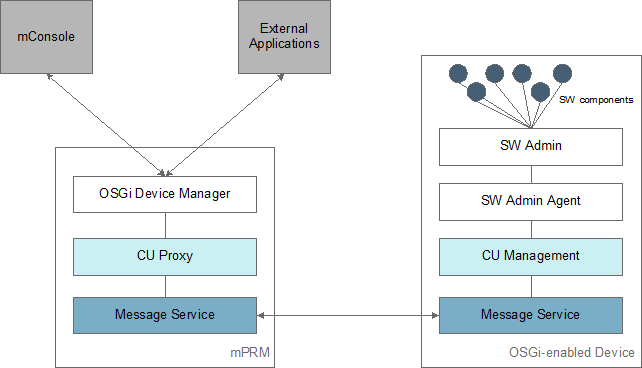
In general, the Software Admin Agent calls the Software Admin to get supported components and to perform download and installation of software pieces ordered from the RM backend. The agent adapts the Software Admin model to the RM device management system by "translating" component information and operations into the Control Unit model of RM. Next, the management of software components becomes automatically adopted on the backend and the device operator will be able to control them in a transparent manner.
Installation and Setup
On the OSGi Device Framework
Activate the Software Admin
By default, Software Admin is not active on the Gateway Software OSGi Framework. You have to explicitly install it along with the default Software Processors and Software Providers. Use the following command in runtime text console of Gateway Software:
kitman.install "Software Admin Bundles"
Install the Agent
To enable management of software components running on an OSGi-enabled device, you must provide the Software Admin Agent on the OSGi device framework. You can do this as described below:
- When registering a new OSGi device, in the Optional Administration Features dialog, enable the Software Admin Management Agent optional feature.
- On an already registered OSGi device, deploy the Software Admin Management Agent bundle (osgidm.swadmin.cu.agent) by:
- reprovisioning the device and enabling the Software Admin Management Agent feature.
- installing explicitly the Software Admin Management Agent bundle from the RM Software Repository with the "Smart Install" option turned on.
- installing the bundle and the bundles it depends on the OSGi framework. Software Admin Management Agent bundle (osgidm.swadmin.cu.agent) and Control Unit Management Agent (osgidm.clientcu.agent) are located in the packages/osgidm directory.