Overview
RM offers a set of features for management of certain aspects of the Linux OS for OSGi-enabled devices. RM allows:
- Management of processes
- Monitoring of mounted file systems
- Monitoring of system's performance by tracking specific properties such as: memory usage, network traffic, etc.
In general, the Linux OS management is achieved with the help of an agent running in the OSGi platform of the device – the OS Agent. This agent executes commands on Linux from the OSGi environment by using a special module, the Linux Native Process Service, available on Gateway Software OSGi platform.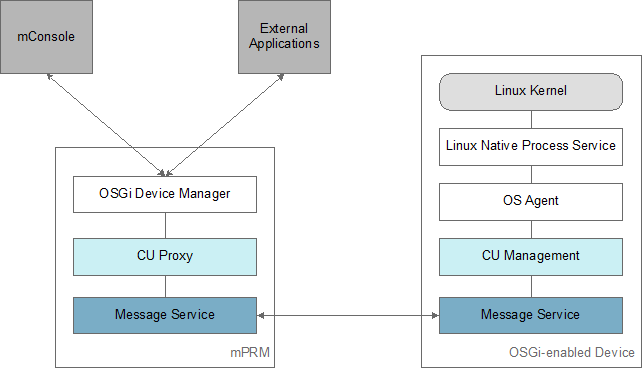
The OS Agent provides commands and monitoring information by using the Control Unit model.
Management of certain OS functionality becomes automatically available on the backend and the device operator will be able to control it in a transparent manner.
Watching network traffic is done by monitoring the eth0 interface. You can change the network interface by setting the mbs.interface.monitor system property on the device (in the default.prs file from the <mbs_runtime_home>/osgi/bin/vms/<vm> folder).
Installation and Setup
Activate the Linux Native Process Service
By default, the Linux Native Process Service is not active on the Gateway Software OSGi framework. You have to explicitly install its JAR file nruntime.jar available in <mbs_runtime_home>/osgi/bundles folder.
- You can add the bundle to the Software Repository and then install it on the device from RM.
- You can also install the bundle directly on the device from the runtime console of the OSGi runtime by using the command:
fw.install -s nruntime.jar
Install the Agent
To enable Linux OS management on an OSGi-enabled device, you must provide the OS Agent on the OSGi device framework.
- When registering a new OSGi device – in the Optional Administration Features dialog, enable the Linux System Agent optional feature.
- On an already registered OSGi device:
- By re-provisioning the device and enabling the Linux System Agent feature.
- By installing explicitly the Linux System Agent bundle from the RM Software Repository with the "Smart Install" option turned on.
- By installing the bundle and the bundles it depends on to the OSGi framework – the Linux System Agent bundle (osgidm.os.system.linux.agent.jar) and Control Unit Management Agent (mprm.osgidm.control_unit_agent) are located in the packages/osgidm directory.