Overview
The Remote Functional Items Management feature provides means for managing functional items (FIs) and devices (presented as FIs) which are installed on OSGi gateways connected to RM.
The Remote Functional Items Management feature of the console is provided over the control unit abstraction, i.e. Functional Items and Functional Item Groups on OSGi gateways are represented as client control units (see OSGi Client CU) by the Functional Item Management Agent.
Therefore the FIs are available on RM for management but are part of the Gateway Software logic.
This is how the FIs are presented on the console: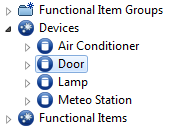
For more information about the Control Unit Abstraction see Managing Device-Side Control Units.
The Device Inventory API (on the back-end) lays on top of this representation and provides Java API for managing Functional Items (similar to the one found on the Gateway Software).
Devices (represented on the Gateway Software as Functional Items) can also be managed through the remote FIM feature.
For detailed installation instructions see the Remote Functional Items Management Installation Guide.
Gateway Software FIM and Device Access modules
The Functional Items Management (FIM) provides a common interface to manage different types of controllable modules (e.g. devices, user groups, automation, cloud services, UI widgets).
Additional information on the FIM module is available in the FIM section of the Bosch IoT Edge Services documentation.
The Device Access is a unified representation of home devices for the purposes of device automation and management.
Additional information on the Device Access module is available in the Device Access section of the Bosch IoT Edge Services documentation.
Functional Items - Related Access Roles
- FI-View(<GatewayID-FIUID>) - This access role grants view rights for Functional Items. It is disabled by default.
- FI-Manager(<GatewayID-FIUID>) - This access role grants Functional Items management rights. It is disabled by default.
The Generic Device Management Access Control is also applied here and verifies the Device-View and Device-Manager roles respectively. For more information please refer to Access Control under Device Management System Architecture Control.