Building Components
This document describes the building components of the device management system of RM:
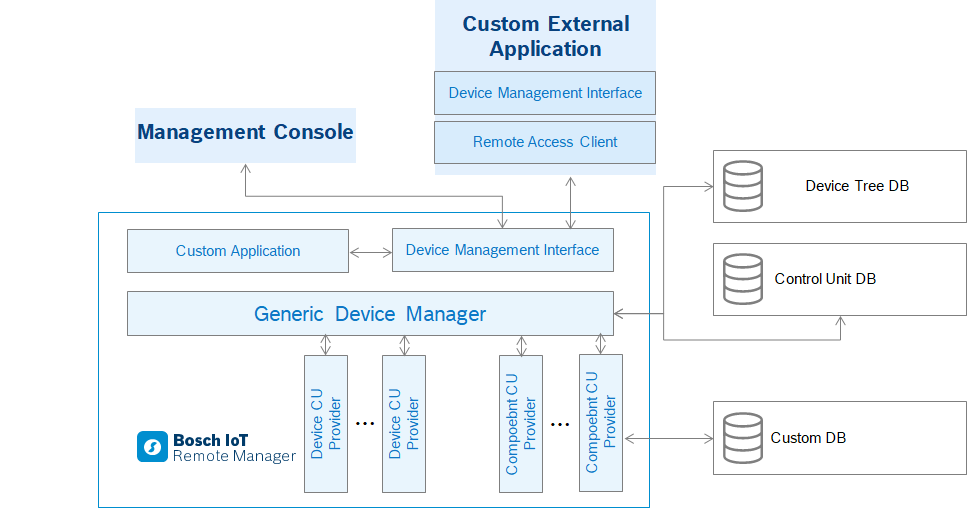
Control Unit Providers
Control Unit Providers are pluggable units which represent specific devices and their elements as control units. Every device type is associated with exactly one device root control unit, provided by a Device Control Unit Provider, and zero or more component control units, provided by Component Control Unit Providers. In other words, a Device Adapter in RM can be composed of only one Device Control Unit Providers and of many Component Control Unit Providers.
Control Unit Providers are responsible for:
Communicating with the device
Providing metadata of subordinate control units
Providing correct values of control unit state variables
Interpreting action invocations
Creating and destroying control units
Notification of changes in a device's (control unit's) state
Maintenance of persistent information about its devices
Generic Device Manager
The Generic Device Manager is the central unit in the RM device management model. It is responsible for:
Tracking Control Unit Providers
Maintaining the structure of the device management tree
Providing execution of mass management tasks
Distributing devices among management servers and among the separate hosts of a single management server in the case of a management server cluster.
Device Management Interface
The Device Management Interface provides a unified API for management of available devices and their resources. It provides access to the following functionality:
Management of the device tree structure
Ability to search for specific devices
Ability to retrieve a device's state
Execution of actions on a specific device or device resource
Execution and progress tracking of mass management tasks
The Device Management Interface is available to modules deployed on an RM backend server and to remote RAC-based applications. For detailed information about the communication within and to the RM system, refer to the documentation of the System Package.
Device Management DB Services
Device Tree Database – Keeps the structure of the Device Management Tree (described in Control Units and Device Representation). It is a database common to the whole RM system.
Control Unit Database – Keeps the states of control units as well as the relations in the component control unit hierarchy. It is a database common to the whole RM system.
Custom Database – Control unit providers may use their own databases in addition to the Control Unit Database.
Management Tasks
The RM provides a powerful mechanism for refined execution of control scripts on one or more devices by means of management tasks. The parameters of each created task can be monitored at any moment. In addition, you can schedule a task or make it periodic.
Tasks can be defined for a group of devices by executing scripts over a device group (mass tasks), or specifically for a single device.
For more information about the concept behind tasks, refer to the Task Execution guide.
Component Tracker
The Component Tracker keeps track of all component control units known to the RM system. The system or device operator has the opportunity of performing many tasks on those components.
Basic Principles and Definitions
A common situation is when there are few different instances of a component unit type in the whole RM although there are thousands of devices registered. For example, instances of the same software component deployed on all devices could be considered as one unique software component in the whole RM. Such components could be passed for tracking to the Component Tracker, which will keep a list of all different component control units known to the system. Even if a component is no longer available in the device tree, it will still be kept in the Component Tracker, and can be possibly used.
Component Template
Component units define for tracking those state variables, whose values are common for specific control units deployed on any device. The common part of component control units could be considered as their template. This component sub-state usually contains characteristics not related to the deployment target, but still uniquely identifying the component unit among the other units in the scope of the system – for example: vendor, software-version, binary content (of bundle or software component), etc. Therefore, a particular template is unique among the other templates and is common for many deployed component instances.
Track Interface
Track interface is this part of the component unit interface that defines the template for a control unit type. There can be up to one track interface per control unit type at a moment.
Track Records
Assuming that for a given type the track interface is the list of state variables {sv1, sv2, ..., svn}, a track record for the type will be the following:
cuType = <control_unit_type>trackId = <system_assigned_id>sv1 = <value of sv1>sv2 = <value of sv2>. . .svn = <value of svn>
Foreign State Variables
There are state variables in a component state that are not part of the absolute template, i.e. they do not determine uniqueness of the component, but they still accept only a few possible values which are identical on many deployed units. For example, an OSGi-compliant bundle is unique by name, vendor, version, but its location usually accepts few possible values as there are few locations of the bundle known in the system. Such state variables are called foreign state variables.
Inheritance Handling in Component Tracker
Inheritance among control unit types (in terms of super types and extension types) reflects on the tracker in the following two aspects:
Track interface – The track interface of every tracked component control unit type includes all state variables from the track interfaces of all super types being tracked. For example, let's have type C extends type B, which on its behalf extends type A. Type A and C are tracked, while type B is not. The declared track interface of type A is {sva1, sva2} and that of type C is {svc1,svc2}. As a result, the track records for type C will contain {sva1, sva2, svc1,svc2}.
Track records – Every track record in the component tracker has one super record for every super type being tracked. Super track records are created automatically when the extension record enters the tracker. For example, if type B extends type A, on producing a record for type B the tracker will create a record for type A as well.
Benefits
The tracker has the following benefits:
Tracker content can be listed so that the system or device administrator is able to see the available set of components (for examples all software components in the system) .
By browsing the Component Tracker, it is easy to specify the control unit targets of management tasks. In the common case for control unit filtering in mass tasks, it is appropriate to use the template content rather than deployment-specific data.
Regarding the technical realization, the persistent storing of control unit states is optimized through the tracker usage. All common parts of deployed control units that are kept in the tracker shall be referred by deployment records, and therefore – not duplicated multiple times.
Device Management Models
The following section outlines different situations and scenarios that may come out when integrating new device types in RM.
According to Maintenance of the Device State
Instant retrieval of the device state – The Device Adapter does not keep the state of the device on the backend and in its persistent storage, but instantly retrieves it from the device when needed. This model is applicable mainly to "always available" devices, which have fast network connection with the backend.
Maintenance of the device state on the backend – The Device Adapter stores the state of the device in the backend database and provides it from there when needed. In this model, the Device Adapter must provide a mechanism for updating its database with the changes that have occurred on the device:
By re-obtaining the actual device state (periodically, on explicit request, on connection establishment, after action execution, etc.) and updating the backend database.
By relying on event-driven mechanism for changes in the device state in case the corresponding device type supports such a mechanism.
According to the Network Communication
Backend-initiated management sessions – The management server, in particular the Device Adapter there, opens the network connection to the device when needed. This model requires devices to have permanent address and to be able to accept network connections. Here, the Device Adapter is able to instantly send management actions to the devices and to retrieve changes in their state.
Device-initiated management sessions – The Device Adapter waits for devices to establish connection in order to manage them. According to the duration of the management session, this model can be further divided in two submodels:
Short-living sessions (transactional sessions) – The device connects to the adapter, asks for management tasks, sends the results from these tasks execution (if any) and the session is terminated.
Long-living bi-directional session – Once the session is established by the device, it may stay open for a (relatively) long period of time (even in stale state), therefore allowing the adapter to send instantly additional management commands. This model provides some of the benefits of the backend-initiated management session model.
Backend-triggered device-initiated management session – The Device Adapter asks the target device to open a new session.
According to the Device Management Interface
The control unit support is implemented by:
Device – The device itself provides access to its resources modeled as control units and the interface to RM is based on the Bosch Digital control unit management protocol. For example, this model is implemented by the System Agent as well as by RM Server running the Control Unit Admin and control unit protocol bundles.
In this case, control unit data can be handled by:
Built-in device interface
RM-specific management agent
Backend adapter – The actual protocol and data model of the target device is not control unit-based, therefore the device state and commands are modeled as a set of control units by a device-specific Control Unit Provider(s) installed on the backend. This model is applied in the management of OMA DM devices and DSL/TR-069 devices.
Device and Component Registration Model
There are two possible scenarios for registering control units in the RM system:
User-initiated registration – The user requests the registration of a control unit by submitting information sufficient for contacting and registering it. In such case, the frontend application used by the user passes the registration information to the Generic Device Manager, which invokes the corresponding methods of the Control Unit Provider. This method is useful if the Control Unit Provider is not capable of detecting the available devices or resources automatically, or if the user is not interested in all available devices but only in particular ones.
Automatic registration – In this scenario, the Control Unit Provider is capable of detecting the available devices or resources (for example, via device discovery or listeners), and registers each device automatically when it appears. In this case, the Control Unit Provider notifies the Device Manager that a new device has been registered.
The situation is analogous with unregistering control units. The unregistration can either be initiated when a user explicitly requests it, or automatic when the device is no longer available.
Access Control
RM restricts access to the management actions on devices in the following way:
View devices
The right to view (and monitor) nodes in the device management tree (i.e. group nodes and device nodes), is provided to users who are members of the Device-View(<node_path>) user group. Members of the general parametric role Device-View(<node_path>) have view rights on the whole device management tree. In addition, users may not have general view rights, but to have view rights limited on specific nodes or branches of the management tree by becoming members of respective user groups.
For example, for a given node with path:
ROOT/node1/node2/../myNode
The system administrator might provide view rights to users only on this node by making them members of the user group
Device-View(ROOT/node1/node2/../myNode/)
The system administrator might provide view rights on the whole sub-tree starting from this node by making the respective users members of the user group
Device-View( ROOT/node1/node2/../myNode/*)
By default, users having the "management" permission on tree nodes have the right to view them as well.
Manage devices
The right to perform management actions on group nodes and devices is provided to users who are members of the Device-Manager(<node_path>) group. Members of the general parametric role Device-Manager(<node_path>) have "management" rights on the whole device management tree. In addition, a user might not have global management rights, but to have management rights limited on specific nodes or branches of the device management tree.
For example, for a given node with path:
ROOT/node1/node2/../myNode
The system administrator might provide to users management rights only on this node, by making them members of the user group
Device-Manager( ROOT/node1/node2/../myNode/ )
The system administrator might provide management rights on the whole sub-tree starting from this node by making the respective users members of the user group
Device-Manager( ROOT/node1/node2/../myNode/* )
By default, members of the administration group have the "management" right on the whole Device Tree.
If a user is given "view" or "management" rights to a given sub-tree, i.e. the user participates in a group
Device-View( ROOT/node1/node2/../myNode/*)
or
Device-Manager( ROOT/node1/node2/../myNode/* )
the user needs view rights on all parent nodes in order to be able to reach his sub-tree, for instance in the console device tree browser.
By default, all users have view rights on the ROOT node.
The most common case is when the administrator distributes separate user-specific nodes directly under the root. Therefore, the administrator should just create separate nodes ROOT/user-1, ROOT/user-2, etc. and make the users members of the respective groups
User-1 member-of Device-Manager(ROOT/user-1/*)
User-2 member-of Device-Manager(ROOT/user-2/*)
etc.