Initial Provisioning
The term initial provisioning is specified by OSGi. It describes the procedure for supplying a device with all necessary components for its management through a backend system, such as Bosch IoT Remote Manager. More specifically, these components are management agent bundles and configuration properties. Without such components, there cannot be a unified communication between a backend system and a device. Hence, if an OSGi device will be managed through RM or any other system, it must be provisioned with the necessary components first. OSGi defines a special service that has the goal to enable the initial provisioning of a device: the Provisioning Service (org.osgi.service.provisioning.ProvisioningService). This service must be available on the OSGi device in advance. This service is given a set of provisioning data (also referred to as provisioning properties or provisioning Dictionary) describing the URL of its backend, communication scheme, and any other information. When it receives the URL of its backend, which is the least information necessary, it starts the provisioning.
Automatic Connection Without Initial Provisioning
Transport Types
Remote Manager provides various transport services, by which a Bosch IoT Gateway Software may be connected. The following table contains their corresponding, which have to be installed on the Gateway Software, the port used for the specific type of transport and a short description.
Transport | Alias | Agent bundle | Port | Description |
|---|---|---|---|---|
WebSocket | ws |
| 80 | Presents full-duplex communication channels over a single TCP connection. Combines the features of the other transport types as it is similar in performance to TCP but works on the HTTP layer. |
TCP | tcp |
| 1501 | Maintains a single TCP connection between the device and the management server for sending bi-directionally data packets. When compared, TCP surpasses the other mentioned types of transport in terms of performance. |
HTTP | http |
| 80/8080 | Enables communication with OSGi devices, placed behind firewalls or proxies allowing only HTTP communication with the management server. |
Secure Transport Types
Remote Manager also provides the following secure means of transport:
Transport | Alias | Agent bundle | Port |
|---|---|---|---|
Secure WebSocket |
|
| 80 |
SSL/TCP |
|
| 2443 |
HTTPS |
|
| 443 |
Remote Manager does not provide SSL offloading with Secure WebSocket transport and requires a Load Balancer layer to decrypt the transported data.
For more information about our Transport Services visit OSGi Network Connectivity.
Connecting to Gateway Software
The boot.ini inside your Bosch IoT Gateway Software station should be used to install and start the bundles necessary for automatic provisioning. These bundles come from RM (except for the Provisioning Agent that is part of Bosch IoT Gateway Software) and depend on the intended transport between Bosch IoT Gateway Software and Remote Manager. In the following example, we will use WebSocket transport and the following RM bundles should be installed on your Bosch IoT Gateway Software:
osgidm.core.agent.jar
osgidm.message.client.jar
osgidm.message.transport.wsocket.client.jar
com.prosyst.mbs.osgi.prvagent.jar (part of the standard setup)
In case other transport is chosen, osgidm.message.transport.wsocket.client.jar should be replaced with the corresponding bundle that represents the selected transport (see table above). Therefore, to establish an automatic Bosch IoT Gateway Software - Remote Manager connection without initial provisioning, you have to:
Edit the Bosch IoT Gateway Software boot.ini file to add the following section (in case of WebSocket transport):
<section><level>4</level><strategy><action>i -s -f</action></strategy><bundle><name>osgidm.core.agent.jar</name></bundle><bundle><name>osgidm.message.client.jar</name></bundle><bundle><name>osgidm.message.transport.wsocket.client.jar</name></bundle><bundle><name>com.prosyst.mbs.osgi.prvagent.jar</name></bundle></section>- Paste the bundles inside the <bosch-iot-gateway-sdk_home>/runtime/osgi/bundles folder. This is the location used by the boot.ini file to parse bundles.
You can either find and copy the bundles from your Remote Manager installation directory or search for them through the Software Repository, Once you find them you just have to click Download Component located on the right side. - Add the following property in the default.prs file, located in <bosch-iot-gateway-sdk_home>/runtime/osgi/bin/vms/jdk:
prm.manager.url=<comm_scheme>:<rm_host>:<rm_port>In our example, when WebSocket transport is used, define it as follows (where <rm_host> is the IP address of your RM server):
prm.manager.url=ws://<rm_host>:80if you've chosen HTTP transport use:
prm.manager.url=http://<rm_host>:8080/httptrprtin the case of tcp transport use:
prm.manager.url=tcp://<rm_host>:1501An optional parameter that could be put in default.prs is the
"provisioning.spid"parameter. When it is used, it defines the ID of the provisioned Bosch IoT Gateway Software (e.g.provisioning.spid=testdevice). In case it is not manually set, RM is responsible for allocating the ID.
After you start the Gateway Software and the Remote Manager, their connection in the RM Console will be displayed as a new device node under the Directory Groups, as shown below:
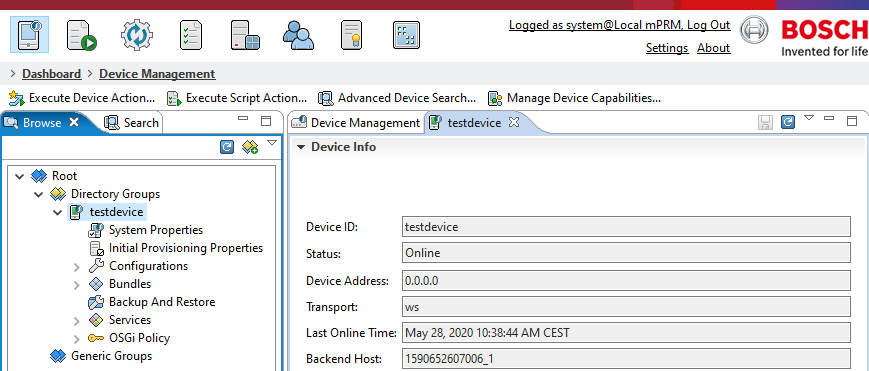
Due to GDPR requirements, the Device Address feature is turned off by default and shows 0.0.0.0 for all connected devices. It can be turned on by setting the following property: remote.manager.sync.address=true.