Provides information about the Backend server host configuration.
Configuring the backend server hosts of an RM system includes specifying the number and location (in the terms of network addressing name space) of hosts participating in the RM backend, as well as providing identification information and role(s) for every backend node.
Basic Principles
The term backend server host stands for each network node participating in the RM backend.
As changes in the host configuration of an RM system are of major significance, this operation is allowed only in system configuration mode.
Host Roles
Each backend host is associated with one or more specific roles in the context of an RM system. The role of a backend host indicates the host's purpose and supported functionality. Defined roles are control center - CC, remote access server - RAS, and management server - MS. For more information about backend server host roles and functionality, refer to the Backend Infrastructure document.
Each host is an OSGi framework, which runs a particular set of bundles. These bundles deliver the specific functionality related to the host role as well as provide the support for interaction with the other hosts of the system. For more information about configuration of bundles on RM backend server hosts, refer to the Backend Bundles Configuration chapter.
Configuration Mechanism
The following diagram shows the action sequence and participants in the host configuration process:
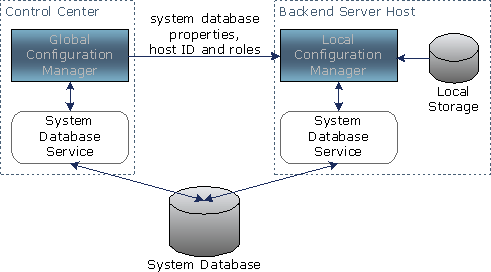
RM-Global Components
Two RM-global components take crucial part in the configuration of a backend server host:
- Global configuration manager - Manages the overall process of system configuration.
- System database - Holds the configuration of the entire system, including the basic configuration data for each host.
Host-Local Components
When a backend server host is started, it loads a locally stored set of initial bundles, including the following modules:
- Local configuration manager, responsible for:
- Communicating with the global configuration manager during initial configuration and configuration change.
- Preparing a configured host to function in the system by loading configuration data from local storage and from the system database.
- Local System Database Service, which retrieves and updates the host configuration data from the system database.
- RM Connection Framework supports bundles responsible for low level host-to-host communication.
Configuration Sequence
The configuration sequence is organized as follows: when the system administrator applies the configuration changes made in system configuration mode, or issues a configuration change command in runtime mode, the global configuration manager first persists the changes in the system database. Then, it propagates a notification to all backend server hosts affected by the change. Each host, notified in that way, connects to the system database, retrieves the data allocated there for it, and applies the pending changes in its local configuration.
In system configuration mode, changes in the basic system configuration are allowed - altering host topology, the system database location, or the sets of bundles to be installed on each host. Changes of that magnitude fundamentally affect the functional characteristics of backend hosts and require that each host initiate its local configuration process from the very beginning. When applying basic configuration changes, the global configuration manager instructs all configured hosts to reset their local configuration records with the most important parameters of the new configuration (including system database connection properties), and reboot their local OSGi frameworks. After performing that clean boot, each host connects to the newly configured system database and initializes its state using the configuration data stored there.
In runtime configuration mode, allowed changes influence only separate bundles on configured backend hosts. That's why, the global configuration manager propagates them to all concerned hosts immediately after the system administrator issues a runtime command, and host-local configuration managers apply them instantly without the need to reboot the host systems.
See the System Configuration document for more information on RM configuration modes and scenarios.
Configuration Restrictions
One host cannot be a member of more than one RM system.
One host cannot participate in more than one management server, and only one host in an RM system can play the control center role.
RM does not allow registering a new backend server host without a role.
Communication Schemes
Provided with the appropriate OSGi connection factory (see the IO Connector Service Specification from OSGi Service Platform Specification Release 3 about more information on connection factories), a backend host can be contacted over a specific communication scheme (can be a protocol or communication pattern).
Currently, RM supports socket and SSL connections with the following URL format:
- Socket
socket://<host_address>:<socket_port>
where <host_address> stands for the IP address or DNS name of the corresponding backend host, and <socket_port> stands for the port allocated for socket connection to the host - by default this port is 11449.
- SSL
ssl://<host_address>:<ssl_port>
where <host_address> stands for the IP address or DNS name of the corresponding backend host, and <ssl_port> stands for the port allocated for SSL connection to the host - by default this port is 11443.
The SSL scheme uses the RM built-in TLS server and client for establishing connection.
- HTTP
stream://<host_address>:<http_port>/httptrprt?transport=http
where <host_address> stands for the IP address or DNS name of the corresponding backend host, and <http_port> stands for the port allocated for HTTP connection to the host - by default this port is 80 or 8080. Use this connection scheme when a firewall between backend server hosts will allow connections only to the HTTP server port, and security over the connection is not crucial.
- HTTPS
stream://<host>:<https_port>/httptrprt?transport=https
where <host_address> stands for the IP address or DNS name of the corresponding backend host, and <https_port> stands for the port allocated for HTTPS connection to the host - by default this port is 443 or 4433. Use this connection scheme when a firewall between backend server hosts will allow connections only to the HTTPS server port. The credentials for HTTPS connection are the same as with the SSL connection.
You can use the above schemes to communicate with backend server hosts through the Connection Framework. See the RM Connection Framework document for more details on the Connection Framework.
Network and Connection URLs
A host can be configured with one or more URLs, valid in the scope of a particular network, for connection to the host over supported communication schemes - socket and SSL by default as discussed in the previous chapter. To learn more about RM network configuration, refer to the Network Configuration Management document.
Connection URLs are host URLs defined for the default RM network, which the system uses for communication with its backend hosts. The host always has a connection URL defined for the socket scheme as RM uses socket-based communication for initial connection and configuration of its hosts.
Backend Server Host Configuration
This chapter discusses the general configuration mechanism for a backend host.
Identification Data
The attributes that uniquely identify a backend server host in an RM system are:
- RM system ID - The unique identifier of the RM system. It is shared by all hosts. It is stored locally on each host as well as in the system database. Its purpose is to prevent the host from participation in more than one RM system.
- Host ID - The unique host ID identifies the host within the scope of the concrete RM system. This information is kept locally on the host and in the system database.
Each host also keeps locally this data (RM ID and host ID) so that it can restore its ID on restart.
Host Configuration States and Stages
In regard to its configuration, a backend server host can go through the following states and state transitions: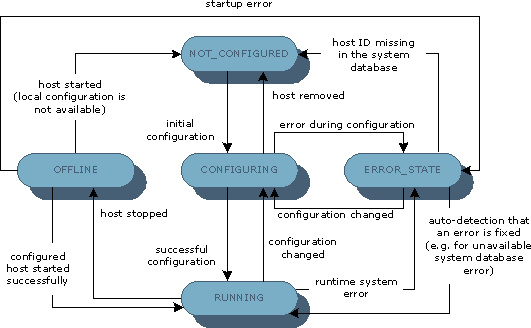
Initial configuration takes place when the host is added to an RM system, which sends to the host its configuration as assigned by the system administrator.
The main configuration activities proceed when the host is in CONFIGURING state, which includes host reboot. These activities are as follows:
- Configuration of the System Database Service - The local configuration manager saves on the local disk the system database connection properties, provided by the global configuration manager. On reboot it configures the local System Database Service with these local properties and connect to the system database. If this operation does not succeed, the host enters ERROR_STATE and the local configuration manager waits until the control center sends correct information.
- Analysis of system identification and host role information - The local configuration manager saves on the local disk the host ID, provided by the global configuration manager. On reboot, the local configuration manager reads and compares the local ID with the one stored in the system database. Several cases are possible:
- Its system ID does not match the one in the database. The host enters ERROR_STATE.
- The system database does not contain a host with the same ID as stored in the local properties. The configuration manager considers that this host was removed from the RM configuration and enters NOT_CONFIGURED state.
- Host address information under the host ID in the database does not match the real host address. The configuration manager tries to establish a connection to the address stored in the database.
If there is such a host and it has the same ID, then the configuration manager considers the local host ID as invalid and enters ERROR_STATE. This may happen if local configuration properties are copied from one machine to another.
If there is no host at the address from the database, then the configuration manager replaces the data in the database with its address. This can happen if the network address of the machine has been changed.
- Its system ID does not match the one in the database. The host enters ERROR_STATE.
- Compare the System package version - The local configuration manager reads the System package version from the system database and compares it with the locally stored one. If the version in the database is newer than the local one (provided in packages/system.xml), the configuration manager updates the local System package and reloads the initial bundles. If the version in the database is older than the local one and the host is control center, the local configuration manager uploads the System package bundles to the system database. Otherwise, the host enters ERROR_STATE.
- Activation and configuration of backend bundles - The local configuration manager gets from the system database and installs the mandatory and enabled optional package bundles, associated with the role of this host. Then the configuration manager installs and starts all standalone backend bundles. See the Backend Bundles Configuration document for more information about how bundles are configured on the RM backend.
- Database access configuration - The local configuration manager configures the local database connection managers with the connection properties of the database servers registered in the system. After database connection managers are configured, the local configuration manager configures local Database Services with configurations appropriate for this host, containing the names under which the connection properties of database server(s) to store data on are available as well as other Database Service specific properties. You can find more information about the database access features in the Database Access document.
If all of the above configuration activities succeed, the backend server hosts enters the RUNNING state.
If using the RM evaluation edition, to force a to host enter the NOT_CONFIGURED state, you can delete the bin/mserver/db.sys file. As a result the host won't know its system database location and will wait for the control center to provide it. This operation will save initialization with the data from the local H2 embedded database at host startup.
Management Server Configuration
This section describes the data used for management server identification and the general procedure for management server configuration.
Note that a management server functions only if there is at least one backend server host(s) that can be configured to participate in this management server.
Identification Data
The attributes that identify a management server within an RM system are:
- Management server ID - The unique identifier of the management server.
- Device context - The collection of devices that this management server should handle. This collection is designated by a base node in the device management tree. The device contexts of two management servers cannot intersect. See the documentation of the Generic Device Management Package for more details about how RM manages devices.
- Backend server host(s) - The backend server host(s), participating in the management server. A management server can comprise only a single host, or it can be clustered - that is, transparently formed by multiple hosts distributing among themselves the load of device management. Note that one host cannot participate in more than one management server. See Backend Infrastructure for more details on clusters in RM.
Issue on Managed Device Contexts
In a device management tree containing a parent node with at least one MS-observed child (immediate descendant or not), in system configuration mode the system determines the parent node as:
- Observed if the parent node has no data, hence, one or more devices, associated with it. In this case, the system assumes that the system administrator and device operators plan to add devices only to the node's descendants.
- Unobserved if the parent node is attached some data. In this way, the system administrator can be notified that there is important data, left out of the system's scope.
User Interface
The system administrator can fully configure the hosts of the RM backend from the console. Refer to User Guide for more details.
Backend Host Configuration API
RM provides a front-end API for using the mechanism for configuring backend server hosts. Refer to Developer Guide for more details on the API usage.