This document describes the general concepts and operations that are executed when an RM system is configured.
Principles of Work
System configuration in RM involves setting up backend hosts, deployment and customization of backend bundles, and modification of Database Service configurations.
Configuration Modes
There are two modes for system configuration according to the set of possible administration operations:
- Runtime mode - It is possible over a connection to a RAS (i.e. not mandatory to the control center), and changes take place runtime without the need to reboot the system.
This mode allows configuring standalone and optional backend bundles, and setting bundle configurations.
- System configuration mode - It is possible only when you are connected to the control center, and changes require reboot of the entire RM system (including all its hosts). They are accumulated and applied altogether when the system is restarted.
This mode allows configuring the system topology, backend bundle packages and Database Services.
Configuration States of the System
An RM system may be in the following states: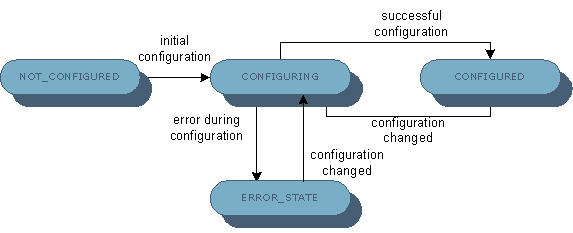
- NOT_CONFIGURED - The system is not configured. Initial configuration is required (see below).
- CONFIGURING - The system is being configured at the moment. The system is in this state while changes made in system configuration mode are being applied. The system is still not in an operational state.
- CONFIGURED - The system is successfully configured and functions without faults. Its basic functions work properly. If the system administrator initiates a configuration session in system configuration mode and applies the changes, the system returns to the CONFIGURING state.
- ERROR_STATE - The system is configured but is currently out of service due to some critical error, for example the system database server is not available. This state is associated with an error message describing what is wrong. To exit ERROR_STATE, changes in the system configuration are required.
Identification Data
Every RM system owns a unique identifier, which enables the differentiation of its system database and hosts from other RM systems. In this way, one system cannot interfere into the operation of another unless the system administrator explicitly requests so.
Modules Involved in System Configuration
System Database
The system database, kept on a JDBC-enabled RDBMS, contains all crucial RM configuration data, including the configuration of the available Database Services, backend server hosts and backend bundles. The System Database Service manages the data in and the access to the system database.
Two RM systems cannot use the same system database - to prevent that, the system currently using the database stores there its system ID.
Configuration Manager
The configuration manager has two variants - global configuration manager, which is accessible from the control center and remote access servers, and local configuration managers, which resides on each backend server host.
The function of the global configuration manager is to coordinate the system configuration process over the entire RM system. This includes:
- Storing the configuration applied by the system administrator in the system database.
- Commanding the operations of local configuration managers in the process of putting the system configuration in effect on all RM backend hosts.
Local configuration managers are responsible for configuring Database Services and bundles on their local backend host(s) according to the information read from the system database. On host startup each local configuration manager also cares to update the data about the location of its host (address and port) in the system database . The functions of a local configuration manager are further discussed in the Backend Server Host Configuration document.
Initial Configuration
Initial configuration takes place when the system administrator logs into RM, for example with the console, and configures the system components for the first time including the system database, Database Services, backend hosts, etc. The RM host, to which the administrator connects in order to perform initial configuration, becomes the control center of the newly configured system. The steps during initial configuration are as follows:
1. Determine the system database and load the initial set of data
The system administrator should input the properties needed for connecting to the database server, which hosts the system database (see Database Access for more details on database server parameters). According to the content of the system database there are three possibilities:
- The database is empty - The configuration manager uses the backend bundles locally stored on the control center as a basis for further configuration operations. This includes bundles from packages whose descriptor XMLs are located in the packages RM directory and standalone bundles from the bundles RM directory.
- The database already contains information of another RM system - An exception is thrown. The system administrator should provide another system database.
- The database contains information of the same RM system - The configuration manager compares the System package version recorded in the system database with the locally stored one.
- If the System package version in the system database is the same as or higher than the locally stored one, the configuration manager loads all configuration data from the database.
- If the locally stored System package version is higher than the one in the system database, the configuration manager proceeds in the same way as when the database is empty - the database content is presumed older than the locally stored backend bundles configuration and the latter is preferred for continuing the configuration process. If applying the configuration made on that local basis succeeds, all existing configuration data in the system database will be overwritten with the new configuration data.
- If the System package version in the system database is the same as or higher than the locally stored one, the configuration manager loads all configuration data from the database.
- The database is empty - The configuration manager uses the backend bundles locally stored on the control center as a basis for further configuration operations. This includes bundles from packages whose descriptor XMLs are located in the packages RM directory and standalone bundles from the bundles RM directory.
2. Determine the set of backend server hosts
The system administrator adds the necessary backend server hosts to the system and specifies their roles - management servers and remote access servers. See the Backend Server Host Configuration document for further information about this type of configuration.
3. Determine database servers and configure Database Services
The system administrator determines the set of database servers to keep RM-specific data on. Then, available Database Services can be configured to use specific database servers from this set. Depending on the system topology, the system administrator can also configure management server scoped Database Access Database Services. See the Database Access document for more details about the Database Service configuration mechanism.
4. Configure backend bundles and packages
The system administrator configures the deployment of backend bundle packages and standalone bundles on the backend server hosts participating in the system. In addition, the system administrator can modify bundle configuration properties and security permissions. Refer to the Backend Bundles Configuration document to get more information about managing backend bundles.
5. Apply the initial configuration
In the above steps the configuration manager does not save the transformations persistently. To impose the configuration as persistent, the system administrator must apply it. On apply the global configuration manager makes all changes persistent and puts them into operation. The administrator can cancel the configuration changes anytime during the previous steps.
The initial configuration data of RM is stored in the <mprm_root_dir>/initial_config folder. You can change this folder prior to RM startup through the mprm.initialConfig.dir system property available at the default.prs file located at <mprm_root_dir>/bin/mserver.
Configuration Change
It is possible to change the current configuration of an already configured RM system. In this case, there are two special cases:
- Use the same system database
The system administrator can perform steps 2-5 from the initial configuration procedure.
- Change the system database
This situation is treated in the same way as during initial configuration (see above).
Full List of Configuration Options
Following is the full list of system configuration options, available runtime and in system configuration mode.
The operations available in runtime mode are:
- Viewing available backend server hosts.
- Viewing available Database Services and their persistent configurations.
- Deploying, updating and removing standalone bundles on backend hosts.
- Enabling optional backend bundles.
- Modifying bundle configurations.
- Viewing defined networks, network filters and host network URLs.
The operations available in system configuration mode are:
- Adding/removing backend server hosts.
- Configuring the roles of backend server hosts.
- Setting the connection URLs of backend server hosts.
- Configuring the device contexts of management servers.
- Adding/reconfiguring/removing database servers.
- Modifying the configurations of available Database Services.
- Adding/updating/removing backend bundle packages.
- Adding/removing networks and network filters.
- Adding/moving hosts to available networks.
- Adding host URLs for specific networks.
- All modifications allowed in runtime mode.
Installation and Setup
The system configuration functionality involves all basic bundles of the System package (the ones listed in bin/mserver/mprmboot.ini). For the system configuration to succeed, all those bundles must be active on each backend host to be configured.
User Interface
An RM system can be configured with the console. Refer to User Guide for more details.
System Configuration API
RM provides an API for using the system configuration mechanism. Refer to Developer Guide for more details on the API usage.