Provides information about the data access architecture used in RM.
The RM keeps information about the control center, management servers, backend servers, managed devices, users, etc., on database management system(s). In this way, system data is accessible by all RM modules in a universal way, and the storage and security models of database servers can be used.
Definitions
In RM context, the term database stands for a logical set of uniform data, managed by the RM system. A database server is the external DBMS system that stores the data of a database.
One RM database can be mapped to more than one database server. And vice versa - one database in the terms of the DBMS, corresponding to one RM-defined database server, can host more than one RM databases.
Each database server has a unique name within the scope of an RM system so that the server can be easily addressed by RM databases. RM maps to that name the specific set of connection properties for that database server, such as type, host, database URL, etc. See "Supported Database Server Types" below for more information.
A Database Service is a specific RM unit, which enables the management of a logical database by interested applications. The function of a Database Service is to define a data management abstraction in terms of the entities and operations supported by the corresponding logical database. In this way, the Database Service isolates upper-level applications from low-level data management conventions, protocols, languages, etc., required by a specific type of database server.
Database Services receive a connection to a particular database server from a database connection manager. There are different types of database connection managers for different database server types. The responsibility of a connection manager is to manage pools of connections to all defined servers of the corresponding type.
Deployment Schemes
Two different database deployment models are available in RM:
- One Database Service can use a single database server.
- One Database Service can distribute its data over several database servers - separate databases, each keeping part of the data, reside on each database server.
The database deployment model is determined by the logic of the data stored by a database. For example, the logical database of user accounts must be identical for all system components that access it. It is reasonable to keep such a database on a single database server. On the other hand, the logical device management databases of different management servers are independent. There could be one database server per management server (MS), which holds only the data specific to the corresponding MS.
Except for optimizing database load, database distribution also reduces consumed network resources and speeds up the communication between RM and database servers. With a distributed device database, it is typical to have the management server and its corresponding database server communicate over a fast LAN connection. Whereas, with a single database server for the database and a large scale deployment of the RM backend (possibly over a WAN), it would not be possible to provide a database connection of such quality to all management servers in the system.
Configuration Management
RM provides a flexible and reliable mechanism for Database Service configuration. The system administrator needs only to specify the connection properties of database servers, associate Database Services with the desired server, optionally adjust specific Database Service properties, and apply the configuration. Afterwards, the configuration mechanism takes over and ensures that configurations will be applied correctly on all hosts, as well as that many typical configuration complications and errors will be automatically handled by the system.
Configuration Properties
Every Database Service exports metadata describing the configuration information it needs for its operation. The system inspects the metadata and presents to the system administrator a simple structure of the Database Service's required parameters.
Database Service configuration properties can include:
- Name(s) and type(s) of database server(s). Allowed values are the names of database servers currently defined in the system. If database server names are not explicitly set for a Database Service, it will be configured with the system database server.
- Database Service specific properties. Depending on the logic implemented in the Database Service, other configuration properties could be introduced. The service provides names and descriptions for all such properties in its configuration metadata.
Scope of Database Service Configurations
RM provides a copy of each Database Service on each backend host. A Database Service can have two kinds of scopes, corresponding to the database deployment models supported by RM (see above under "Deployment Schemes"):
- common - The service has the same configuration on all backend hosts in an RM system. This is suitable for Database Services which keep information common to all entities - for example, this can be a Database Service keeping all bundles to be installed on devices. In this paradigm, all Database Service copies share the same database server.
- ms - Service configurations can be different for specific management servers in an RM system. This is reasonable for Database Services, which keep information, specific to each management server (for example, about the local properties each managed device). In this way, it is possible to assign a different database server for each management server.
The system administrator is not required to assign MS-specific configurations to MS-scoped Database Services. The system maintains a default service configuration for every such service. The default service configuration is always defined and is common to all backend hosts.
On a host for which no individual configuration is set, an MS-scoped Database Service is assigned the default service configuration.
If there are two configuration instances set for an MS-scoped Database Service on the same host - the default one and a management server specific one, the MS-specific configuration overrides the default.
Configuration and Connection Mechanism
Database Services and database servers can be (re)configured only in system configuration mode.
The providers of Database Services in the RM system are the backend bundles. The available Database Services are determined at system configuration time in accordance with the set of backend bundles.
The configuration of database access modules has two main aspects - configuration of the database connection manager(s), and configuration of Database Services.
A database connection manager is configured with the mappings of database server names to sets of connection properties. A Database Service is configured with the name(s) of the database server(s) to place its data on as well as with additional custom properties, if declared.
The following figure illustrates the exchange of data and requests: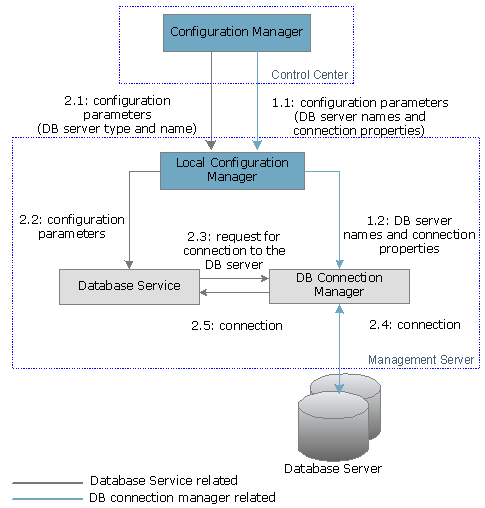
Database Connection Manager
For each defined database server of a certain type, the system maintains a separate database connection manager. The connection manager pools a limited number of ready-to-use connections to that database server and provides them to Database Services on request. The connection pooling approach delivers the following benefits:
- Optimal usage of network and host resources
- A Database Service does not need to know of or transmit the server username, password, location, and other low-level connection parameters.
- The connections to a database server and other server-type specific resources (e.g. concurrently open JDBC statements) can be limited.
- The connection properties of a database server can be configured independently from Database Services.
The database configuration process is carried out locally on each backend host on host startup. First, the local configuration manager configures local database connection managers with the mappings of database server names to connection properties, defined in the current system configuration. Connection managers receive the server configurations and only preserve them internally at this stage. Opening physical connections is delayed until Database Services are also configured and start producing connection requests.
Upon the first request for connection to a given server, the connection manager creates a new physical connection pool to that server and provides the requesting Database Service with a proxy to that pool. Subsequent requests for connection to the same server receive the same initially created pool.
When a request for a connection instance comes to the pool proxy used by the Database Service, the pool provides a ready connection if available, otherwise it creates a new one if the connection limit has not been exceeded. If the pool has opened all connections up to the limit and no free connections are available to service the request, the Database Service execution thread making the request is blocked until a connection becomes available.
The connection manager takes the information needed to initially contact the database server, as well as the connection limit (and other resource limits if defined), from the configured connection properties of that server.
If a database server becomes unavailable, the corresponding database connection manager detects this event, unsets the connection proxies of all Database Services configured with that server, raises an Alert Board Service alert and starts a background connection retrieval thread. In short intervals (30 seconds), the thread checks if the database server has come back online. If so, the connection manager restores the connection to the database server and sets new connection proxies to concerned Database Services.
Database Service
When the Database Service receives its configuration, it requests a connection to its configured database server(s) from the database connection manager(s) on the corresponding backend host. If a connection is available, the Database Service receives a connection pool proxy to the server and is able to access and store data on it.
Supported Database Server Types
RM uses the RDBMS type of storage as it offers more freedom and flexibility in storing data with various application. RM accesses data on RDBMS servers via JDBC.
Every Database Service, which uses an RDBMS database server, is responsible for validating the format of and creating (if necessary) the SQL tables it uses for data storage. A Database Service performs those operations upon receiving a connection to its configured database server. RM's JDBC connection manager implementation provides ready abstractions and APIs for SQL table validation and creation. See the "Database Service Catalog" section below for details on that topic.
RDBMS Server Properties
Database Server Property | Description |
|---|---|
Name | The name of the database server. Must be unique within the scope of the RM system. |
Type | JDBC |
JDBC driver class name | The class name of the JDBC driver for accessing the RDBMS over JDBC. This class implements java.sql.Driver and is RDBMS-specific. |
URL | The URL to the database server. It is JDBC driver specific. |
Driver JAR | The JAR file holding the JDBC driver. If the driver JAR file is omitted, the system considers that the JDBC driver classes are available in the system classpath of backend hosts, which will use the database server. |
Username | A RDBMS-valid username. |
Password | The password set for the specified username. |
Connection Limit | The maximum number of parallel connections to the database server. |
Statement Limit | The maximum number of cached prepared statements per connection. |
Document Database Server Properties
Database Server Property | Description |
|---|---|
DB_NAME | The name of the database server. Must be unique within the scope of the RM system. |
rw_DBPASS | The password for the readWrite user. |
r_DBPASS | The password for the read user. |
MONGODB_IP | The network address of the MongoDB database |
Database Service Catalog
The database connection manager responsible for a specific RDBMS server keeps track of the Database Services situated on the server by maintaining a catalog of Database Services.
The Database Service catalog is stored on the database server itself in a special table. Each catalog entry corresponds to one Database Service.
On the one hand, the entry contains the ID of the RM system the Database Service entry belongs to. A Database Service can create a catalog entry in order to protect its data from overlapping with the data of the same Database Service but associated with another RM system.
On the other hand the Database Service catalog, together with the JDBC Connection Manager APIs, provides an enhanced mechanism for SQL table maintenance. Except the RM system ID, each catalog entry contains the name and the version of the corresponding Database Service. Every time a Database Service receives a connection to a database for the first time, it can use the connection manager API to validate the format of tables potentially existing in the database against its current table format. If the format is incompatible, the service can check whether the Database Service catalog on the server contains records for a previous version of the same service. If it does, and the old table format can be converted to the new format, the new service version can convert the old tables and preserve existing data (if necessary).
See Developer Guide for more details about using the Database Service catalog in your Database Services.
Existing Databases Services
Following is a list of the Database Services which RM initially provides.
It is possible to define a custom Database Service to store specific data, not supported by RM by default. For more information about developing such a Database Service, refer to Developer Guide.
Database | Description |
|---|---|
System Package | |
System Database | Manages important information about the RM system configuration, including:
|
Login Database | Maintains logs about user logins to the RM system. |
Events Database | Manages information about scheduled events generated in RM. |
Foundation Package | |
Certificate Database | Manages information about the certificates in RM. |
Profiles Database | Manages information about the platform profiles defined in RM as well as stores the compatibility relations between them and between their attributes. |
Generic Device Management Package | |
Control Unit Database | Manages information about the devices along with their components added to RM. |
Tree Database | Manages information about the devices, related to their tree organization. This includes path to the device node, platform profile, device owner. Part of the tree database logic is implemented in the System package. |
Scripts Database | Manages information about the scripts defined in the RM script inventory, including script tree structure and the script names and text. |
Operations Database | Manages information about the operations in RM, holding all fields characterizing an operation and its state. |
User Management Package | |
Users Database | Manages data about users, user groups, and device contexts. Data can be distributed over an RDBMS server. |
Custom Storage Types
RM can be extended with other database storage types in additon to RDBMS. This can be done by providing an appropriate database connection manager for the corresponding storage type. See Developer Guide fr further details on developing custom connection managers.
User Interface
Through the management console, you can define database servers and enter their connection properties. You can also view and configure the available Database Services. Refer to User Guide for more details.
Database Access APIs
RM provides backend APIs for developing your own Database Service as well as a front-end API for Database Services and database servers configuration. Refer to Developer Guide for more details.