Prerequisites
- To be able to contact a JDBC-enabled RDBMS server, you need a JDBC driver, which will translate JDBC commands into the appropriate SQL statements and execute them on the server. The driver class must be present in the classpath of the backend server host before launching the process of database migration.
- It is required that before adding a database server to the system this server is running.
Changing System Database
You can modify the connection settings of a RDBMS server from the System Configuration dashboard view. It is possible in both modes of the view - runtime mode and system configuration mode.
- Open the dialog for specifying the connection properties of the RDBMS server:
- In runtime mode click the System Database button from the administrative toolbar at the top of the System Configuration view.
- In system configuration mode use System Database -> Change System Database.
- In Change System Database dialog, fill in the required connection properties, which are described in the Conceptual Guide "Basic Concepts".
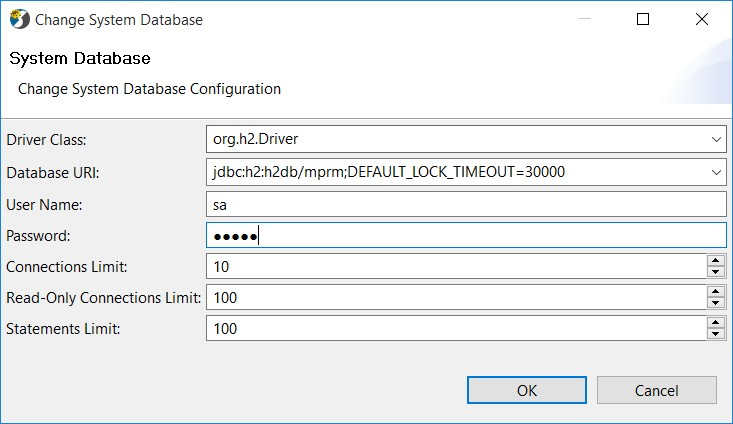
- Click OK.
As a result, RM will try to contact the new server. Upon success RM system would restart on top of the new server. You have to login to the new configuration.
Depending on the content of new RDBMS storage, during the subsequent startup of the Management Console you might have to execute some tasks - regarding the arrangement of backend servers within the system:
- In case the RDBMS storage is empty - RM would auto-configure with default configuration data, which will be saved persistently to the storage.
- In case you are starting RM with data for another RM e.g. physical database on the RDBMS server contains data for another RM:
- Such a situation may occur in rare cases, when installing RM over a previous version and starting it without resetting the database.
- In this case, RM will enter error state, and at its startup RM Console will inform you that the system is out of service. Click OK to continue configuring.
- Depending on the system configuration you set up, another warning message might appear informing you that the variety of RM data in the existing database will be reused. Click OK to continue with applying the configuration settings.