Setting Conditional Permissions
The RM provides remote management over the permissions available in the OSGi Framework of the device. Conditional Permissions sub-node is visible only when org.osgi.service.condpermadmin.ConditionalPermissionAdmin is registered
Defined permissions on the device are available under the OSGi Policy node of the OSGi device tree. The node shows the permissions locally set, as well as the ones defined remotely from RM.
To set a conditional permission:
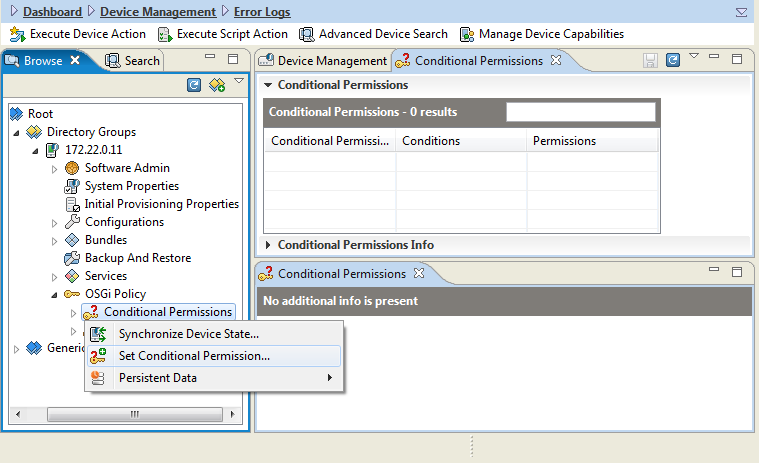
- Right-click the Conditional Permissions node of the device's OSGi Policy node and use the Set Conditional Permission option from the popup menu.
- In the Set Conditional Permission dialog, that appears, specify the following information:
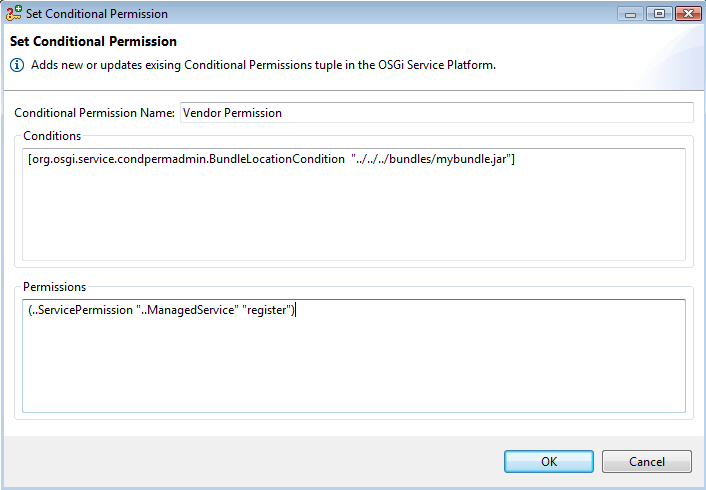
- Conditional Permission Name – The name of the conditional permission.
- Conditions – The collection of encoded conditions which must be satisfied to have the associated permissions granted by the OSGi Framework. Enter condition info as defined by the OSGi Core Specification. Each condition should be in a new line.
- Permissions – The set of permissions that will be granted if the defined conditions become satisfied. Enter permission info as defined by the OSGi Core Specification. Each permission should be in a new line.
- Having defined the conditions and permissions of a conditional permission, in the Set Conditional Permission dialog click the OK button to complete the operation.
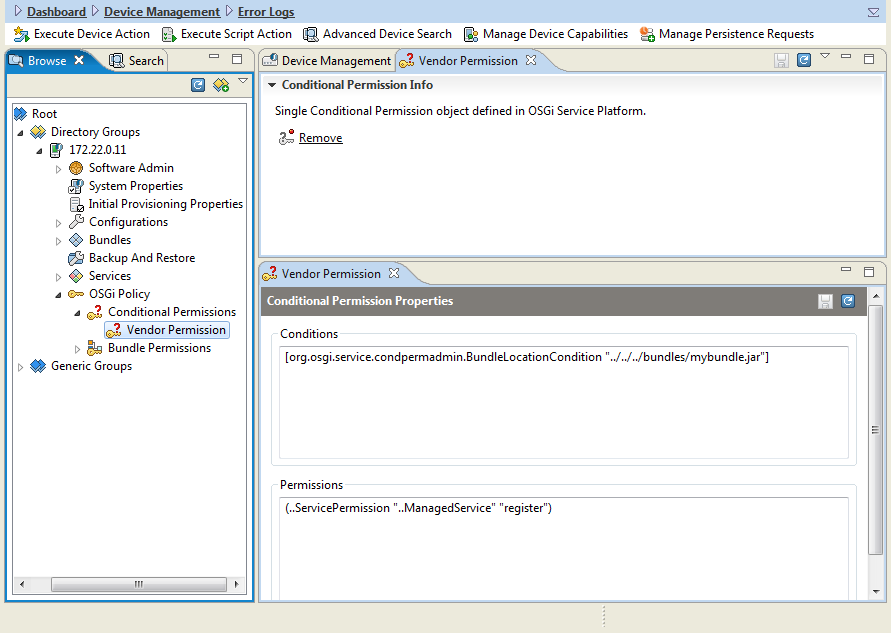
- On success, the defined conditional permission will appear in the OSGi Policy/Conditional Permissions node of the device's tree under the specified name.
Setting Bundle Permissions
To associate a set of permission with a specific bundle location on the device:
- Right-click the Bundle Permissions node of the device's OSGi Policy node and use the Set Bundle Permissions option from the popup menu.
- In the shown Set Bundle Permissions dialog, specify the following information:
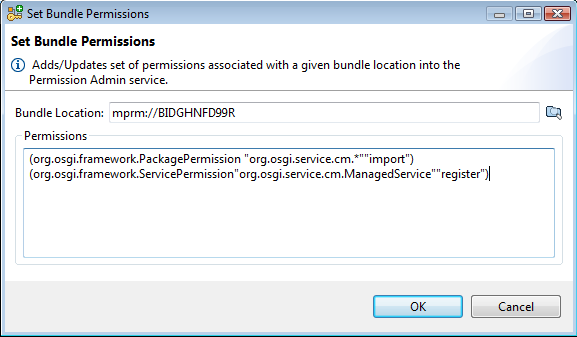
- Bundle Location – The location of the bundle related to the system of the OSGi device. Select the bundle from the components tracker.
- Permissions – The set of permissions that will be granted to the bundle with the specified location. Enter the encoded permission info as defined by the OSGi Core Specification. Place each permission in a new line.
- Having specified the bundle location and the permissions for the location, in the Set Bundle Permissions dialog click OK to complete the operation.
On success, the bundle location permission will appear in the OSGi Policy/Bundle Permissions node of the device's tree under the specified location.
Editing Existing Permissions
To edit a defined conditional or location permission from the console, simply select the permission in the OSGi Policy node on the left and edit its properties on the right in a way similar to adding a permission as previously described.
Deleting Device Permissions
To delete a permission, select it from the OSGi Policy node of the device's tree, and call Remove from the popup menu or from the action list in the Conditional Permission Info pane on the right.