After starting Remote Manager, the polling from Rollouts won't start until you fill a specific configuration. To find it, open the Remote Manager UI and select the "System Configuration" perspective from the top menu. Then in the "Configurations" tab, from the left panel search for "DDI", and a configuration with name "Edge DDI Client Config" will show up. It contains:
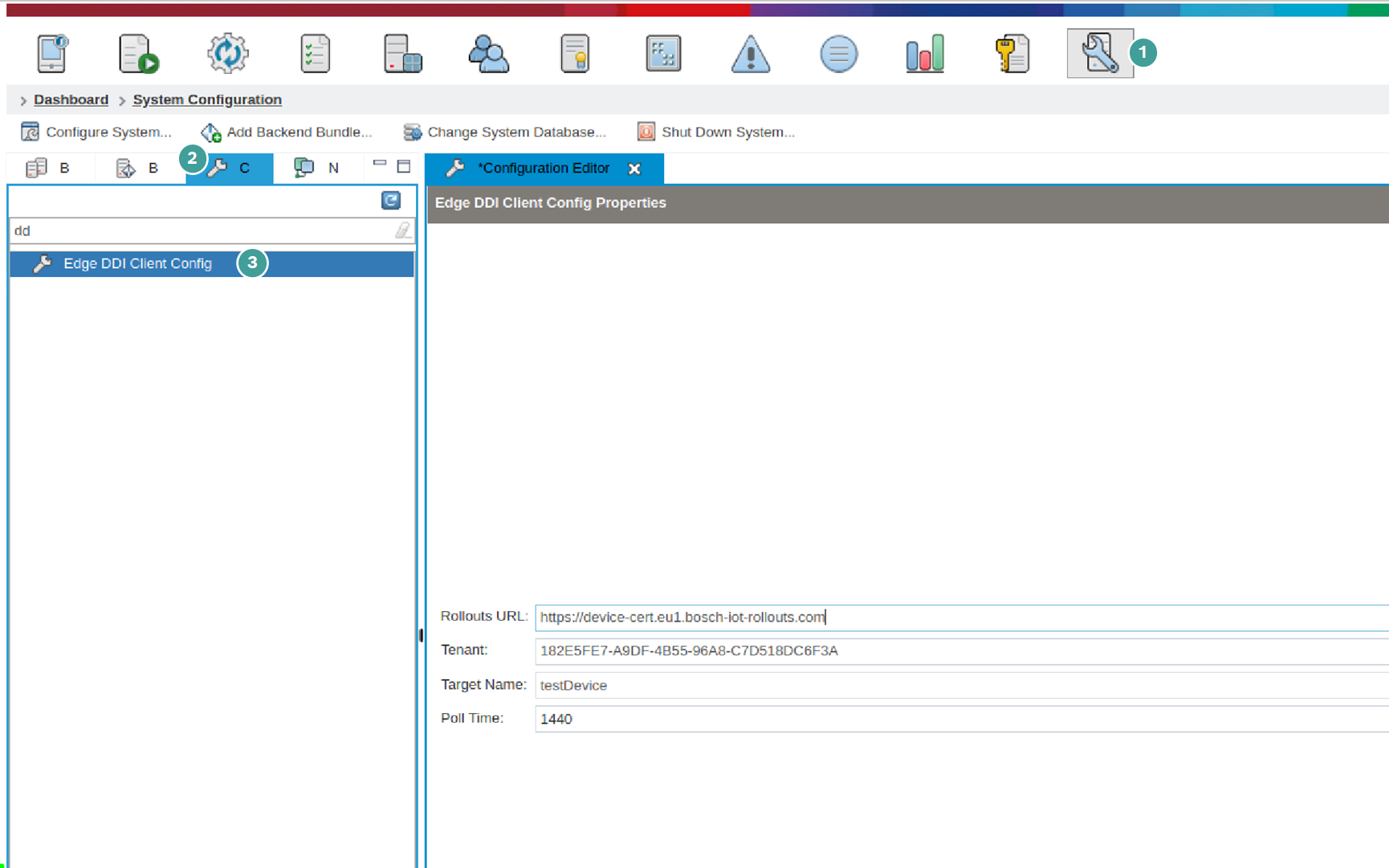
The URL where Remote Manager will try to connect to Rollouts.
The Tenant of your Rollouts.
The Target Name, that will represent this Remote Manager instance in Rollouts.
Keep in mind that once you register your Remote Manager with the specified name, changing it will result in a new target in Rollouts. We've provided you with an option to chose a user friendly name for the Remote Manager instance, but it's basically immutable once you set it. Also this property should be equal to your Remote Manager client certificate CN.
The Poll period time in minutes - this property defines the period in which Remote Manager will ask Rollouts for updates.
All the fields are mandatory. You have to fill all of them and click the Save icon, or Ctrl + S.
After this you should be able to communicate to Rollouts securely.