Overview
Getting alerts from managed OSGi devices is possible only for devices which have the AlertService running. See the OSGi Device Alert document from Conceptual Guide for more details.
Device Alerts
Device Alerts feature of the console shows a list of the alerts risen for the selected OSGi device. It is hidden by default.
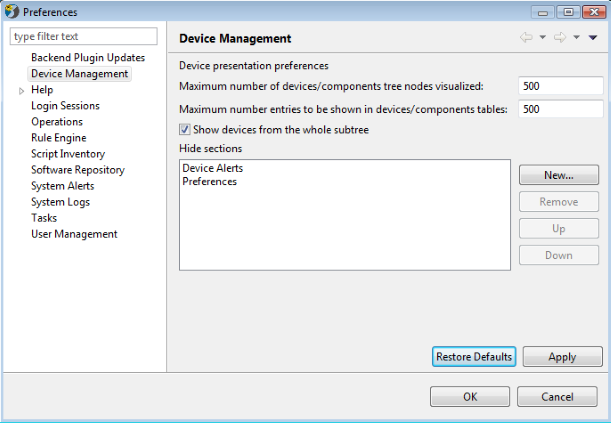
To activate it go to "Settings" on the console dashlet, the "Preferences" menu opens. Choose "Device Management" and select "Device Alerts" in the "Hide sections" filed.
Click the "Remove" button. Apply the configuration and confirm with "OK".
"Restore Defaults" hides the section from the console.
To get the specific device raised alerts:
- Select the target OSGi device from the list of registered devices.
- Expand the Device Alerts section from the right pane.
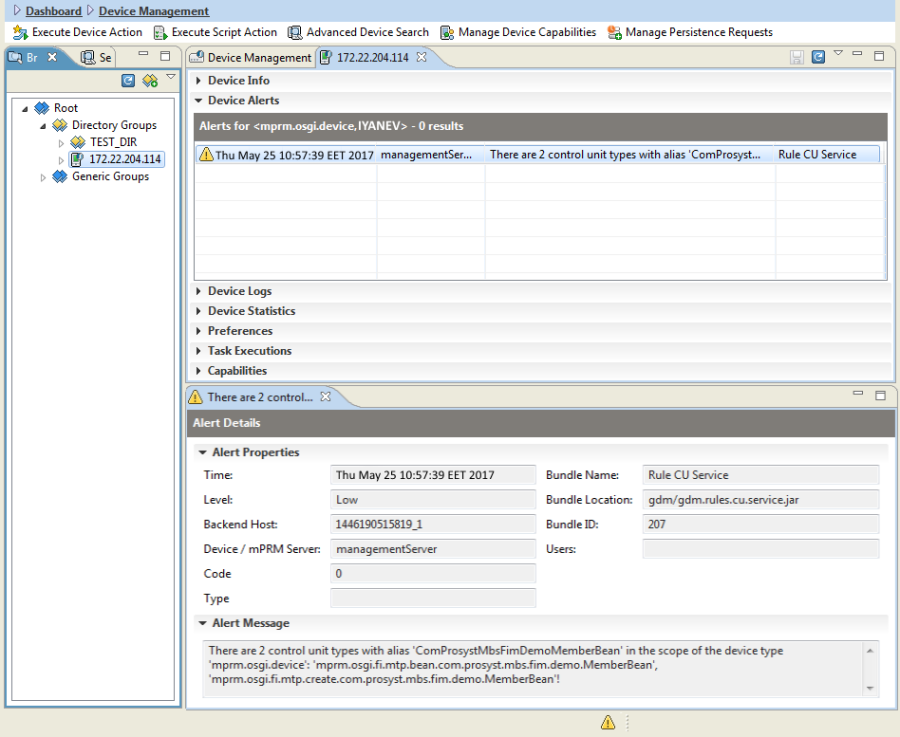
The following properties for a selected alert appear underneath:
- Time – Contains the exact date and time of the alert's raising.
- Level – Indicates the error level (Critical, Middle or Low) of the alert.
- Backend Host – Contains the ID of the host originating the alert.
- Device/RM Server – Contains the ID of the managed device for which the alert is raised or of the MS if the host raising the alert has the management server role.
- Code – Optional property. Used with "Type" property to define alerts in multiple sub-systems.
- Type – Optional property. Defines the alert type as originating in an application or system etc.
- Bundle Name – Shows the name of the bundle that originated the alert.
- Bundle Location – Indicates the URL of the bundle, originator of the alert.
- Bundle ID – Contains the ID of the bundle sending the alerting message.
- Users – Optional property. An alert might be targeted to specific user(s) or user role(s). For example alerts dedicated to alarm the "Bundle-Owner<bundle>" users, or generally the "administration" or "system" users.
- Message – Contains the message describing the alert. It has a popup menu that allows you to copy the text.