Using the RM User Management API.
User Management API
The User Management API allows you to access and manage RM user information from non-RM applications/systems or backend bundles. The overall principles and terms of the RM user management are described in the User Management Conceptual Guide document.
The RM User Management API has two main parts:
Backend API – Its main package is
com.prosyst.mprm.backend.useradmin, which provides the backend user management.Frontend API – It consists of the
com.prosyst.mprm.admin.useradminpackage, which provides the frontend user management.
Using the Backend RM User Management API
The Backend User Admin Service is provided by the UserAdmin Bundle (packages/user/useradmin.jar). It registers the Backend User Admin under three service interfaces:
org.osgi.service.useradmin.UserAdmin– the generic OSGi User Admin.com.prosyst.mprm.admin.useradmin.AUserAdmin– the RM frontend User Admin service.com.prosyst.mprm.backend.useradmin.PUserAdmin– the RM backend User Admin.
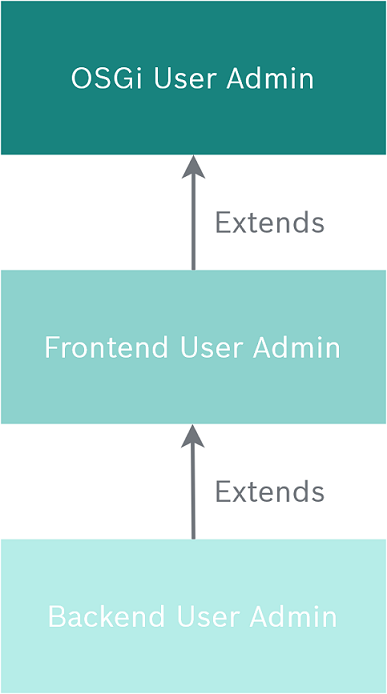
The frontend User Admin interface actually inherits the conventional OSGi User Admin. The backend User Admin extends the frontend User Admin (as shown in the following figure):
If you are writing an application that will be used on the backend, you can access the RM User Manager by getting it as service reference. You have two options:
You can get directly service reference to the
com.prosyst.mprm.backend.useradmin.PUserAdmininterface. This is the most convenient way. As thePUserAdmininterface inherits theUserAdminandAUserAdmin,you can use their methods when you need it. You'll need to use the generic methods for adding/removing roles, managing credentials, etc.The other method is to get reference to the
org.osgi.service.useradmin.UserAdminorcom.prosyst.mprm.admin.useradmin.AUserAdmininterface. Then, if you want to use the methods ofPUserAdmin,cast the obtained service instance to thePUserAdmininterface. ThePUserAdminmethods allow you to manage RM-specific user information.
Creating/Removing Users and Groups
Roles are created/removed with the methods inherited from the UserAdmin interface (createRole and removeRole). Generic role information such as credentials, properties, authorization, etc. is also obtained through the methods of this interface. Use the createRole(String name, int type) method to create a user or group with the given name. If you want to create a user, the type parameter must have value org.osgi.service.useradmin.Role.USER. If you want to create a group, the type must be org.osgi.service.useradmin.Role.GROUP.
..... //Creating user User service_desk1 = (User) userMan.createRole("receptionist", Role.USER); ..... ..... //Creating a group Group operators = (Group) userMan.createRole("operators", Role.GROUP); .....To add a role to a group, use the addMember(Role role) method of org.osgi.service.useradmin.Group.
Use the removeRole(String name) method to remove a user or a group.
Example
The following code example illustrates the usage of the backend RM User Admin Service. It creates a new group named "family" and adds a new main user called "Charlie" to it, who owns a device "Home-DVD". Then it creates a subuser of "Charlie" named "Dana", belonging to a subgroup "children". Besides, there are created two parametric groups - "device-manager" and "device-owner" , and the relation between these two groups is that a device owner for a certain device is always manager of this device. Therefore, as the user father (Charlie) is the owner of the "Home-DVD" device, he is the "device-manager" of the device.
.....public class Example implements BundleActivator { private ServiceReference ref; private UserAdmin userAdm; private PUserAdmin userMan; public void start(BundleContext bc) { ref = bc.getServiceReference(UserAdmin.class.getName()); userAdm = (UserAdmin) bc.getService(ref); if (userAdm instanceof PUserAdmin) { userMan = (PUserAdmin) userAdm; } else { throw new BundleException("Not a Remote Manager User Admin"); } // Create users User father = (User) userMan.createRole("Charlie", Role.USER); User child = (User) userMan.createRole("Dana", Role.USER); // Create groups Group family = (Group) userMan.createRole("family", Role.GROUP); Group children = (Group) userMan.createRole("children", Role.GROUP); // Create roles hierarchy family.addMember(father); children.addMember(child); family.addMember(children); // Create parametric groups Group manager = (Group) userMan.createRole("Device-Manager(<home_dvd_device_path>)", Role.GROUP); manager.addMember(father); // Check parametric group implications //should print true System.out.println(userMan.getAuthorization(father).hasRole("Device-Manager(<home_dvd_device_path>)")); //should print false System.out.println(userMan.getAuthorization(child).hasRole("Device-Manager(<home_dvd_device_path>)")); // Set the user's password. Dictionary creds = father.getCredentials(); creds.put(PUserAdmin.PASSWORD, father.getName().getBytes()); Dictionary cred = child.getCredentials(); cred.put(PUserAdmin.PASSWORD, child.getName().getBytes()); // If the currently logged user isn't an administrative account, // ManagementException will be thrown. } /* Ungetting services and nullifying objects */ public void stop(BundleContext bc) { if(ref != null) { bc.ungetService(ref); ref = null; } userAdm = null; userMan = null; }}Using the Front-end RM User Management API
If you are writing a standalone application that needs to access the functionality of the RM User Admin, you need to use the frontend User Management API (the com.prosyst.mprm.admin.useradmin package). You can get to it using the Remote Access Client module (com.prosyst.mprm.rac.RemoteAccessClient).
You will also need to include in the classpath the path to the user-rac.jar JAR file, located in the lib/rac directory.
The remote interface representing the user admin is com.prosyst.mprm.admin.useradmin.AUserAdmin. AUserAdmin extends the org.osgi.service.useradmin.UserAdmin interface. Besides the OSGi specification defined methods for creating and managing roles, it contains methods for obtaining RM specific information.
Creating a Dynamic Group
Use the createDynamicGroup(String name, String filter) method to create a new dynamic group with specified name and filter. The filter parameter is an LDAP filter with user properties. For example:
(&(Position=operator)(Department=Support1))The createDynamicGroup method returns the created dynamic group in the form of a com.prosyst.mprm.admin.useradmin.ADynamicGroup object. You can manage the dynamic group in the same way as ordinary groups because the ADynamicGroup interface inherits the AGroup and org.osgi.service.useradmin.Group interfaces.
Finding Members and Roles
Use the findBasicMembers(String fullGroupName, boolean str_only, String mask) and findDynamicMembers(ADynamicGroup d, boolean namesOnly, String timeZone, String mask) methods to retrieves the members of the specified or dynamic group (ADynamicGroup) that match the specified mask.
Use the findRoles(int types, boolean all, boolean inc, String mask) method to get the roles, managed by this UserAdmin with the specified type, that have names matching the specified mask.
Getting Members and Roles
Use the getBasicMembers(String fullGroupName) and getDynamicMembers(ADynamicGroup d, boolean namesOnly,String timeZone) methods to get name of the members of the specified or dynamic group (ADynamicGroup), either as roles or as ordinary String-s.
Use the getRoles(String filter, int types, boolean all) method to get the roles, managed by this UserAdmin with the specified type, that have properties matching to the specified filter criteria.
Getting Enumeration of Members and Roles
Use the getEnumeratedBasicMembers(String fullGroupName, boolean str_only) and getEnumeratedDynamicMembers(ADynamicGroup d, boolean namesOnly, String timeZone) methods to retrieve the basic members or the members of the specified/dynamic group (ADynamicGroup) as an enumerator either containing roles or ordinary String-s
Use the getEnumeratedRoles(String filter, boolean inc), getEnumeratedRoles(String filter, int types, boolean all, boolean inc) and getEnumeratedRoles(String filter, String name, int type, boolean inc) methods to get the roles managed by this UserAdmin with a specified type that have properties matching the specified filter criteria.