Overview
Managing TR-069 devices through RM means performing the administration of TR-069 through the RM backend.
The current document describes the overall mechanism of TR-069 device management, and the components enabling it.
TR-069 Device Management Mechanism
The figure below shows the components involved in TR-069 device management.
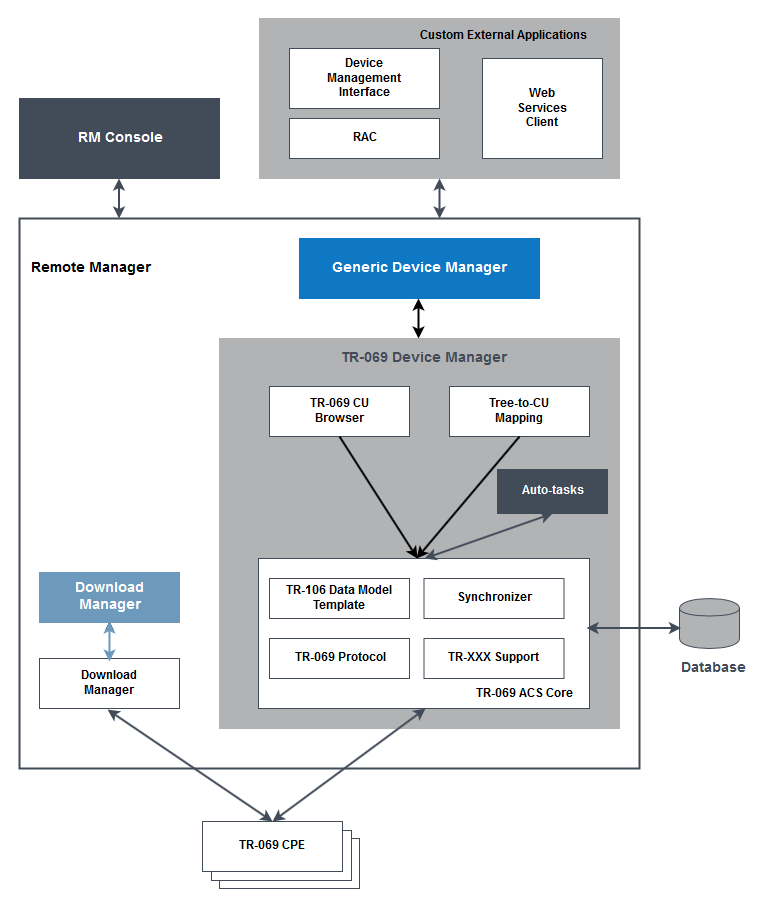
TR-069 CPE - A device that is compliant with CPE part of the TR-069 remote management specification (see "References", located at the bottom of the page).
TR-069 Device Manager - The backend component in the control center and in each MS host responsible for TR-069 device management. It sends basic commands to devices, and records the information about a device's state, ID, etc. in the RM database.
The TR-069 Device Manager consists of the following modules:
TR-069 ACS Core - delivers an implementation of the TR-069 protocol and provides low-level APIs for the TR-069 device management. The core also supports the data model introduced in TR-106, device synchronization and a number of additional TR-XXX specifications such as TR-069 Annex F, TR-069 Annex G and SMM (part of TR-157 amendment 3, which is not officially released yet).
TR-069 CU Browser - represents TR-069 devices in a generic way as sets of browsable control units.
Tree-to-CU Mapping - transforms specific sub-nodes of TR-069 devices into control units that provide more comprehensive representation of the device functionality. Refer to the Tree to Control Unit Mapping document for details about using this mapping mechanism.
Auto-tasks - executes pre-defined actions (synchronize, set parameter value, etc.) when a defined event (register, connect, etc.) occurs on devices matching certain criteria. Refer to the "Auto-Tasks" section for details on the auto-task approach nature.
Generic Device Manager - The central unit in the RM device management model. It is responsible for:
Registering and communicating with providers of device types
Maintaining the structure of the device management tree
Providing execution of task and rules.
Distributing devices among management servers and among the separate hosts of a single management server in the case management server clusters.
Device Management Interface - Provides a unified API for management of available devices and their resources. It provides access to the following functionality:
Management of the device tree structure
Ability to search for specific devices
Ability to retrieve a device's state
Execution of actions on a specific device or device resource
Execution and progress tracking of mass management operations
The Device Management Interface is available to remote RAC-based applications as well as to clients of the Device Manager Web Service. For detailed information about the communication within and to the RM system, refer to the documentation of the System Package.
Activities of TR-069 Device Management
Registering a TR-069 Device
Registering the device includes creating a record about the device in the RM database. This record includes information about the device state. At the time of registration, the device is placed in a particular location in the device management tree, and assigned to the particular management server responsible for that location.
There are two methods of registering TR-069 devices:
Manually - by the RM administrator and
Device-initiated - when the managed device establishes the initial connection with RM.
More information about how to register and manage a TR-069 Device can be found in the User Guide - see "Registering a New TR-069 Device" in Registering and Managing TR-069 Devices.
Connecting a TR-069 Device
Basically, there are two methods of initiating a device connection with the RM system:
Connection initiated by the device - if a device changes a parameter, marked for active notification; when rebooting or when performing periodical connection for example.
Connection initiated by the backend - possible only for already registered devices. The backend triggers the device by sending a GET HTTP request to the ConnectionRequestURL of the device, and the device starts a connection in return. In fact, this method implies the same activities as the device-initiated connection.
To be able to connect to the device to RM, the device integrator must have provisioned the device with the backend ACS URL as follows:
http://<rm_host>[:<rm_http_port>]/acs[/<device_group>]
https://<rm_host>[:<rm_https_port>]/acs[/<device_group>]
where:
<rm_host> stands for the DNS name or IP address of the host running the RM server
<rm_http_port> and <rm_https_port> are the ports allocated on the RM server host for HTTP and HTTPS connection respectively. This number can be skipped if RM uses the standard port for HTTP (80) or for HTTPS (443).
<device_group> - optionally, a path to a group in the RM device management tree can be specified where the connected device will be placed.
Maintaining Management Sessions
When there is an established management session with the managed device, the RM backend can monitor the device's state and execute management commands. The specifics of device management sessions are explained later in this document.
Unregistering a TR-069 Device
A device can be unregistered from RM if the administrator decides to stop managing it through the system. In this case, the device's records are entirely deleted from the database of the system.
Device Management Sessions
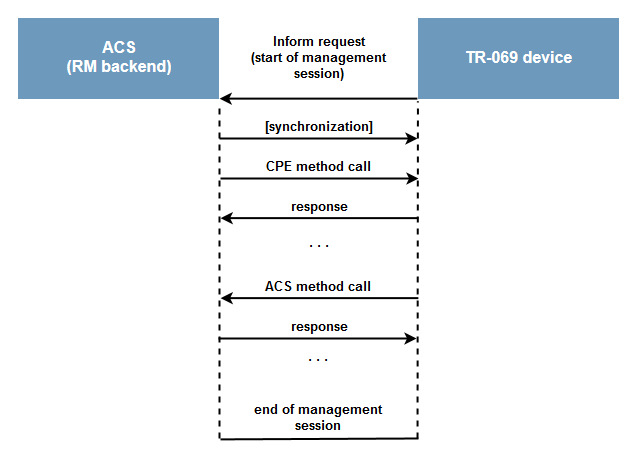
The following figure illustrates a typical management session between the RM backend and the managed TR-069 device:
Session Maintenance Models
The RM supports two models of maintenance of management sessions established by a specific device:
Transactional sessions – default. The device connects and RM refreshes the device's configuration and stores this information in its device database so that the device operator is able to view it later. If there are some commands pending on the device, on connection the devices receives them, and after the device reports the outcome of the command execution, the connection is closed. In this mode, all device manipulation actions performed by the device operator are stored in a persistent queue and executed the next time the device opens a connection.
Persistent sessions – in this extended mode, RM explicitly keeps active the session initiated by the device as long as possible, which allows direct interaction between the device and the device operator. This model allows the device operator to execute management operations on the device and receive the execution outcome immediately - it is not necessary to wait till the next time the device connects to RM or to trigger connection via a connection request, because device is persistently online. Using persistent sessions is suitable for development and debugging purposes as they provide more immediate access to the device.
Use persistent sessions only for test or debug purposes or in situations where managed devices do not support "connect" from the ACS. This session model is not recommended for production cases as it might cause faults in downloading as well as in other two-phase methods.
You can configure RM to use the required session maintenance model for a single device or for a group of device by using the mprm.tr069.persist inheritable tree property (see "Inheritable TR-069 Device Properties" in TR-069 Device Management Configuration).
Device Synchronization
In general, there are two types of synchronization of the TR-069 devices:
Automatic synchronization- synchronization for automatically keeping device records in the RM database consistent. It can be launched and its target parameters can be additionally configured by means of auto-tasks.
On-demand synchronization - synchronization that is explicitly requested by the device operator.
Automatic Synchronization
When the device is connecting for the first time, RM by default tries to synchronize certain pre-defined parameter nodes. For example, such nodes can be {root}DeviceInfo, {root}ManagementServer and the other children of {root}, where {root} stands for Device. or InternetGatewayDevice..
The administrator can additionally define an auto-task for full device synchronization on device register - the information about the whole configuration state of the device will be recorded in the system database. Then, upon each subsequent connection to the backend, only the information about changed parameters marked for active or passive notification (received into an Inform method) will be updated.
On-Demand Synchronization
The RM provides options for synchronization of the whole device parameter tree or just of its sub-tree. It is implemented as control unit synchronize actions. When the Synchronize action is fired through the GUI, through a script command or programmatically, the synchronization process includes requesting information about all aspects of the device's configuration state, and update it in the RM database.
Parameter Value State Depending on the Notification Attribute
Depending on the automatic-on-connect synchronization and the notification attribute of a parameter, its value saved into RM compared with the actual value will be:
Up-to-date if the last change of a device parameter value has been performed via RM.
Otherwise:
Up-to-date if the parameter is marked for active notification.
If the parameter is automatically synchronized on connect or is marked for passive notification, adequate to the value received from the device upon the last on-demand/on-register synchronization which has included the parameter or upon the last connection.
Adequate to the value received upon the last on-demand/on-register synchronization which has included this parameter
The mechanism of synchronization, provided by the TR-069 Device Management package, does not rely on some knowledge of the device data model. Therefore, it implies heavier synchronization, but on the other hand it allows support of arbitrary data models.
Configuring Device Automatic Synchronization
Via configuring the notification attribute, the device operator is allowed to select preferred up-to-date level of any device parameter. Automatic synchronization can be executed on device register and on device connect - for each of the two cases the operator can specify different synchronization targets.
Using the automatic synchronization, in addition with an appropriate settings of the notification attributes of the device parameters, and the possibility to define custom synchronization scope, provides a powerful mechanism for the device operator to have:
Up-to-date information about the property values, that are of greatest importance.
Relatively up-to-date information about property value of secondary importance.
No information, about the property value, which does not make sense.
Considering all the mentioned benefits of our TR-069 device synchronization mechanism, the device operator can support the consistence of the RM database, with minimum network traffic and device overload.
In addition, to save system resources, the device operator can exclude certain sub-nodes from the automatic synchronization by using the Exclude Paths node setting (see "Inheritable TR069 Device Properties" in TR-069 Device Management Configuration).
TR-069 Device Actions and Task Management
Our TR-069 Device Management model fully supports the CPE WAN Management Protocol (TR-069 specification) requirements, and in addition it provides even more flexible features.
Auto-Tasks
By means of auto-tasks for each registered TR-069 device, you can "set up" automatic execution of actions like setting parameter value, setting notification attribute, and so on.
An auto-tasks consists of the following main components:
Filter - Specifies the conditions needed to launch the task's actions. The filter can contain one event sub-filter and optionally several CPE ones.
Event filter - Contains one or more device events whose occurrence will trigger execution. Currently, the RM supports the events "register", "connect" and "inform".
CPE filters - Specify the conditions that a CPE has to fulfill so as to have the actions of the auto-task launched by the RM. Additionally, you can parameterize a CPE filter by using a parameter with key "root" and value equal to "InternetDeviceGateway." or "Device." - in this way you can indicate that the auto-task is to be performed on an Internet Device Gateway or on another TR-069-enabled device.
Actions - Specify a TR-069 action which will be executed as a result from a filter match. The RM supports actions corresponding to the main methods of the TR-069 specification - "synchronize", "set-parameter-value" and "set-parameter-attributes". All actions require the path to the target TR-069 parameter. You can additionally use the {root} variable inside this path to represent the CPE root object ( "InternetDeviceGateway." or "Device.").
The RM uses a specific XML format for auto-task definition. Auto-task XML files should follow the initial_config/tr069_autotasks/autotask-schema.xsd schema, and must be placed on the RM backend in the initial_config/tr069_autotasks directory - directly there or in a sub-folder.
Instant Actions
If a device is offline, actions for it cannot be executed until the device goes online again. The RM backend can be configured so that, depending on the offline action device mode, actions defined for devices, gone offline, can lead to opening a session from the device and then to instant action execution, launching an operation for the first device connect, or immediate error. Therefore, there is no need to wait passively until the next device "connect" as is the standard mechanism for management operations. More information about setting up TR-069 device management of RM is available in the TR-069 Device Management Configuration document.
Task Execution
The RM provides a powerful mechanism for refined execution of control commands over one or more mobile devices by means of task execution. A task is a "command in action" - i.e. it is a real task fulfilling the management actions defined in a script. The parameters of each created task can be monitored at any moment. In addition, you can schedule a task or make it periodic by defining a rule.
Rules can be defined for a group of devices by executing task/s over a device group (device scope), or specifically for a single device by executing tasks while it is offline. For more information about the concept behind task management and rules, refer to Scripting and Rule-based Management.
Access Device Parameters Structure
Most conveniently, the parameters of a device can be accessed by using the Parameter Browser, which represents them as a collection of component control units so that they become accessible in the RM device management tree in a unified way. The Parameter Browser offers a raw view of the CPE parameters, that is, only the synchronized ones are shown and you can execute only low level actions on them. You use the control units from the parameter browser Registering and Managing TR-069 Devices by using the Console or Plugging Vendor-Specific Methods by using the RM Device Management Interface API.