Overview
A service application represents a software component, available in the Software Repository which is marked as Service Application and can be delivered and managed through the Application Management Module.When a client bundle from the RM Software Repository is marked as a service application, all components with the same content identifier are treated as service applications suitable for different devices. The RM gives an opportunity different variants of service application suitable for different devices to be managed. E.g. win-based and linux-based variants of given service application may be provided with the same contentID.
Application management is available for OSGi devices
Application Management can be done through Messaging, TR-69 or OMA-DM
All client bundles in the Software repository can be declared as a Service Application
In order to Deploy Service applications to a device a suitable component plugin must be available
RM Provides out of the box support for OSGi bundles, Deployment Packages and Compositions (bundle groups)
Architecture
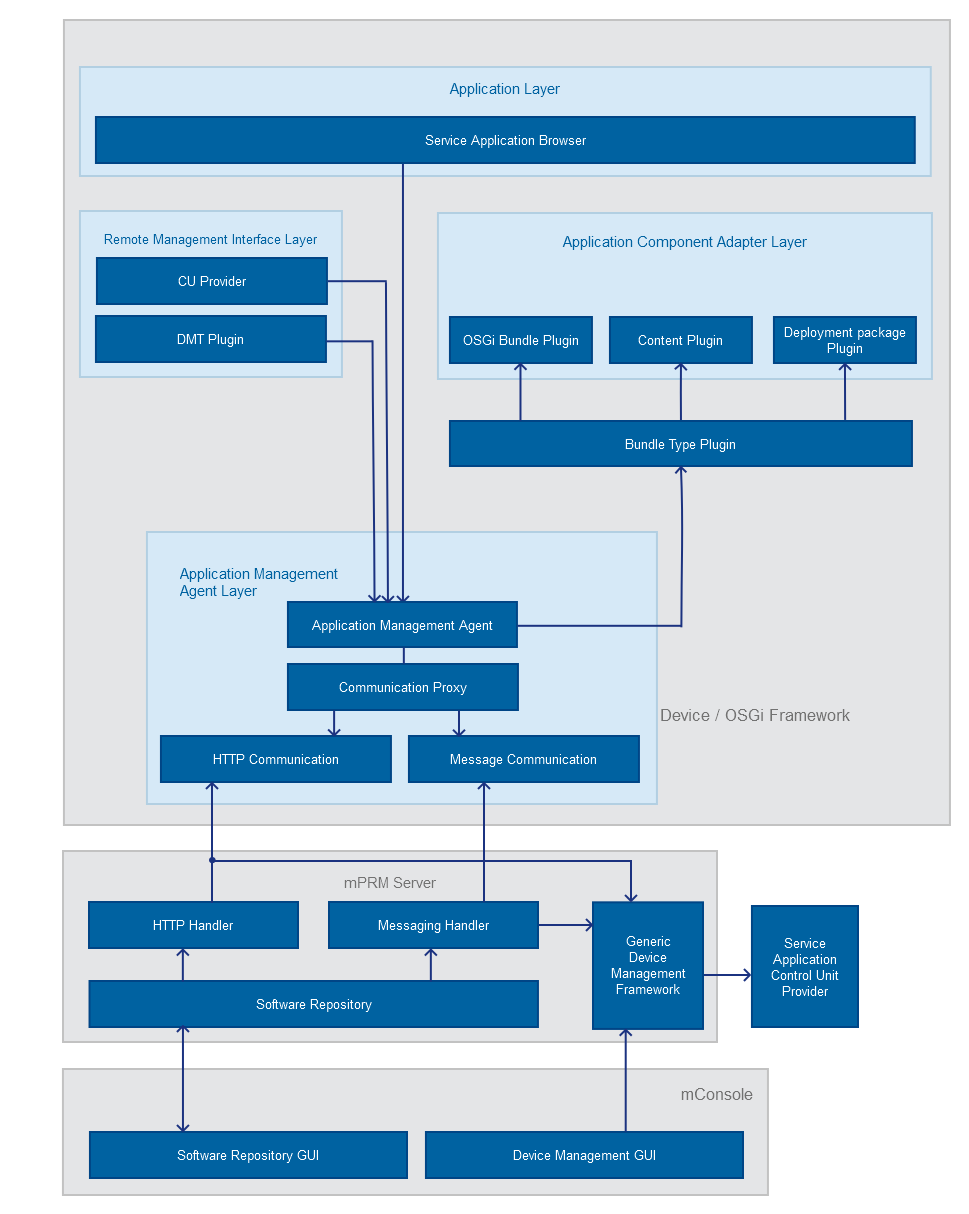
RM Console Layer
This layer provides a visual representation of the software components available in the Software Repository and the applications running on a specific device.
RM Backend Layer
Service App CU Provider
The Service App CU Provider provides the specific control units used to mark a software component as a service application. It uses custom Service Application database to keep the information about existing service applications.
Service App Communicator
The Service App Communicator is responsible for handling the device requests about service applications. When a device requests RM service applications, this module is responsible for checking service application requirements' regards the capabilities of the requesting device and to return only suitable applications.
The communication between the Service App Communicator and the device may be done over the Gateway Software Protocol or over the HTTP protocol depending on the device platform.
Device Layer
The Device Layer is divided into the following layers:
Application Management Agent Layer
The Application Management Agent is the main component of this layer. It is a part of the Device-Side Agents API and ensures the management and monitoring of service applications on behalf of the client device. The Application Management Agent communicates with the RM backend through a Communication Proxy and uses the plug-ins from the Application Adapter Layer to manage the delivery of the deployment units.
The implementation of the Communication Proxy provided for this layer is based on both, the Gateway Software Protocol meant for OSGi devices and the HTTP protocol.
Application Component Adapter Layer
This layer contains Content Plug-ins responsible for managing the lifecycle of the service applications deployed on the device. To be able to recognize and properly handle specific service applications, a device should have the corresponding Application Component Plug-ins running on it. The RM provides two plug-ins of this type: one for managing OSGi bundles and one for handling Deployment packages.
Remote Management Interface Layer
This layer holds the DMT Plug-in and CU Provider components. They allow the remote management of service applications through the console.
Application Layer
This layer can contain a browser implementation specific for different types of devices and vendors.
Service Application Attributes
A service application has all general and custom attributes of the client bundle it is created from. When the service application is installed on a specific device it provides the following properties:
Name - Contains the unique name of the service application.
Service ID - Holds the unique service identifier of the service application which is the same as the content ID of the client bundle marked as service.
State - Indicates the current state of the service application. It can be started or stopped.
Description - Holds a human readable description of the functionality provided by the service application.
Version - Holds the version of the service.
Properties - Contains the available client bundle catalog properties which may be used to filter the service applications by using user defined categories.
Resources - Contains the resources of the service application.
Service Application Operations
Publishing/Importing of Service Applications
The service applications can be published in RM Software Repository in two ways:
By explicit declaring/marking the existing client bundles from the Software Repository as Service Applications. This can be done either through the RM Management Console (Service Applications) or trough the RM APIs. It is possible to mark a single component (e.g. OSGi bundle) or a composite bundle (e.g. Bundle Group) as a Service Application. When a client bundle is declared as a Service Application, all client bundles with the same Content ID will be marked as well (I.e. an application marker applies to the Content ID and not a separate client bundle in the Software Repository.).
By importing the application via a PAR file. Service Application can be packages in PAR file archives, which contain all components and meta-data of the application. The PAR file can then be imported in the Software Repository. The format of the PAR files containing service application is described in PAR File Structure. Importing of such PAR files inserts all application components (included in the PAR) in the Software Repository and creates a Bundle Group, which is automatically marked as Service Application.
Discovery of Service Applications
The applications available in the RM Software Repository can be listed, searched and filtered by applications running on the OSGi devices. This can be done through the API of the RM Application Management Agent. For more information refer to the Programmer Guide. Applications in the Software Repository can also be browsed using the RM Management Console - Service Applications.
Installing Service Application on Devices
Service Applications installation can be done in one of the following ways:
On the RM back end - by using the RM Management Console (Service Applications), by an RM script in task/rule, or through the RM APIs (Service Applications on the Backend)
From within the client OSGi device - by using the APIs of the RM Application Management Agent. Custom application bundles running on the device can install applications available in the RM Software Repository using the OSGi service provided by the RM Application Management Agent. The application is installed by specifying the Service ID (which corresponds to the Content ID of the client bundle in the Software Repository) and optionally version of the application. If the version is not specified the RM will select the highest version available in the Software Repository, which is suitable for the given device based on the devices capabilities. If there are multiple client bundles with the same Client Bundle ID and version (specified or higher), the RM selects the "most suitable" for the device, by applying bundle requirements to the devices capabilities matching algorithm. When installing composite application (e.g. Bundle Group), the RM/RM Application Management Agent installs all components that are part of the application.
Monitoring applications installed on a OSGi Device
Applications which are deployed on specific OSGi device can be listed:
on the RM side - via the console (Service Applications) or via RM APIs (API).
on the OSGi device - via the RM Management Agent APIs (API). For every application it is possible to see its current state - started/stopped, as well as app meta-data, like service ID, version, display name, description, icon, catalog properties and resources.
Updating of Service Applications on Devices
Updating a service application can be done through the RM backend or the RM Management Agent API (on the OSGi device side). When updating a service application the application versions used in the update can be specified or can be omitted - in which case the RM will automatically select the highest available version in the Software Repository (which is "suitable" for the device). Updating of composite application will replace all changed components from the old version with the ones of the new in the following way:
all components which existed in the old version and do not longer exists in the newer version will be uninstalled from the device.
all components which have different versions will be updated
all components which exists in the new version, but not in the previous one will be installed.
all components which exists in both the new and the old installation and have the same version will not be updated.
Note: It is possible to downgrade an application by specifying an older version that will be used in the update.
Start/Stop/Uninstall of Service Applications on Devices
Applications installed on the device can be started, stopped and uninstalled. This is possible either trough the RM backend or through the device side RM Management Agent API. Starting/Stopping/Uninstalling of an applications, means Starting/Stopping/uninstalling of all components in the application except if the application being Stopped/Uninstalled contains components, which are part of other applications installed on the device.
Configuration
Application Availability
no.capabilities.mode - The default value is false and no capabilities are used when applications are sent to the device, i.e. all applications are sent. If true - the two other properties hardware.capabilities.mode and strict.capabilities.match are taken into account.
hardware.capabilities.mode - The default value is true - the device should send its capabilities and no search into GDM is made Otherwise, the capabilities stored in GDM are used.
strict.capabilities.match - The default value is false - only requirements which are explicitly stated are matched. If requirement with given name has no related capability that is known for the device the requirement is skipped. If true - requirements are strictly matched to capabilities.
Properties for Applications Imported from PAR Files.
mprm.applications.component.policy - The default value is version - components are linked by specifying a concrete version (loose link). If the value is changed to bundleId - components are linked by the concrete bundle id (strict link).
Installation and Setup on Devices
Viewing and managing service applications on devices is possible when Application Management is enabled on the devices.
Application Management Agent lists existing apps, but it does not know how exactly to install/start/stop/uninstall them. It delegates these tasks (install/start/stop/uninstall) to related component adapters. Therefore it must have some component adapter bundles on the device e.g. OSGi Bundle Plugin bundle or Deployment Package Plugin bundle.
There are several ways to enable Application Management.
Enabling Application Management When Registering a New Device Through the console
When you register a new device through the console - select Register Device Action > Register OSGi Device. In the Optional Administration Features dialog (see Providing Optional RM Features) select the following check-boxes:
Application Management Agent – enable support for Service Applications;
CU Application Remote Management Interface – enable Service Applications to be represented as client control units (CU-s) and be managed via CU admin of RM;
If you want to access Service Applications remotely via console, this optional feature should be enabled on the device.
Control Unit Management Agent – enables control units registered on the client to be managed by RM
You must select also at least one of these alternatives:
OSGi Bundle Component Plugin (responsible for management of OSGi Bundles);
Subscription Deployment Package Plug-in (responsible for management of Deployment Packages).
Enabling Application Management When the Device Is Already Registered
On an already registered device - from the Software Repository install the bundles for Service Application Management on devices. Use the console to locate the following bundles under "mprm.agentx.services" OSGi bundle category:
mprm.service.application_management_agent – use "Smart Deploy" for it;
mprm.service.cu_interface – use "Smart Deploy" for it;
mprm.osgidm.control_unit_agent.
You must select also at least one of these alternatives:
mprm.service.osgi_bundle_component_plugin;
mprm.service.deployment_package_plugin;
If the device is connected over OMA-DM protocol, you must select:
com.prosyst.mprm.service.dmt_plugin – it provides OMA-DM/DMT interface to service applications. Use "Smart Deploy" for it.
Enabling Application Management Manually
The installation of the appropriate bundle JAR files can be done from the packages/ssm folder directly on the OSGi framework on the device:
Application Agent bundle– ssm.application.agent.jar;
Messaging Adapter for Application Agent bundle (ssm.application.comm.msg.agent.jar) or HTTP Adapter for Application Agent bundle (ssm.application.comm.http.agent.jar) if RM Messaging is not available on the device.
You must select also one or more of these alternatives:
OSGi Bundle Plugin for Application Agent bundle – ssm.application.plugin.osgibundle.agent.jar
Deployment Package Plugin bundle – ssm.application.plugin.dp.agent.jar
CU Application Remote Management Interface bundle – ssm.application.cu.agent.jar and the bundle it depends on: com.prosyst.mprm.osgidm.clientcu.agent.jar.
And in case the device is connected over OMA-DM protocol:
Service Application DMT Plugin bundle – ssm.application.dmt.agent.jar
APIs
The information about the Service Application Management APIs is available here