Features
With the Rest API protocol, the user can organize:
different scenarios for registration of Rest API provided devices;
different scenarios of device authentication;
transferring of necessary monitoring data to the Remote Manager backend;
synchronization sessions for optional optimizing the data transfer volume;
receiving control commands from the Remote Manager to the device;
configuring the client-side behavior with arbitrary custom configurations applied from the Remote Manager – like rate of sensor value updates, enabled/disabled specific synchronizations and any custom meaningful settings applicable for the exact use case;
static and dynamic definition of the exported remotely-manageable device resources.
More details are to be found in the REST API provided.
Devices Represented as Control Units
Device resources are represented via Control Unit abstraction as described below.
The protocol is based on the concept of Control Units (CU) defined by the GDM framework and it is considered the reader of this documentation to have some basic knowledge on it:
a device is represented in Remote Manager as one Device Root Control unit and zero or many Component Control units under it, potentially organized hierarchically in parent-sub relations;
the control unit has type and id. Global identification is formed by the four elements:
control unit type
control unit id
device type
device id
the Control Unit has a set of State Variables and Actions;
the type of the Control Unit identifies the set of State Variables and Actions available for all Control Units having the same Control Unit type. Thus, all Control Units of a given type have the same interface – one and the same set of State Variables and Actions.
the Control Unit type requires metadata associated with it to describe the set of State Variables and Actions.
HTTP/REST Queries
There are two major aspects of Device Management:
to transfer monitoring data from the device to the backend
to transfer commands from the backend to the device.
Since nature of the rest calls is one-direction initiative, the principle is:
sending monitoring data from device to backend:

sending commands from backend to device:

Control Unit Representations and Metadata
The first step in creating a Rest API client is to decide what resources will be exported to Remote Manager and how they should be represented as Control Units (CU).
Then the Control Unit Metadata should be defined and provided to the Remote Manger.
The Control Unit Metadata is normally provided in xml format. Metadata optionally can be escorted by icons to get a better visualization of the represented device resources in the Remote Manager UI.
The Metadata can be provided to the Remote Manager in the following ways:
Statically
the xml-s can be put inside the <RemoteManager>/initial_config/restcu directory and will be loaded by Remote Manager on start up;
the xml-s can be uploaded to the Remote Manger via Rest API call, as described in the Programmer Guide. This should be done only once as initialization step, since metadata for a given Control Unit type is common for all Control Units of this type.
Dynamically – the device itself can send xml-s to the Remote Manager. Since the xml-s are considered to be a heavy load and needed to be provided to Remote Manager only once (even for a million common devices), the protocol defines a way for Remote Manager to tell the device if the given metadata is actually needed or not.
Device Registration
A device can be registered in one of the following ways:
explicitly from device side – the Rest API Protocol has a dedicated method for device registration. It is possible to organize the work flow so that the device to receive credentials or other management information as result of this method invocation.
implicitly from device side – for simpler use cases the device may not use explicit dedicated method to register itself to the Remote Manager. Instead, the Remote Manager registers the device implicitly once it receives some data synchronization request for a device unregistered so far.
explicitly from the Administration interfaces of Remote Manger – in case the Metadata of the Device Root Control Unit type has defined a Constructor action, the registration could be done by the admin operator of the Remote Manager – either via the Management Console UI or via Administration APIs.
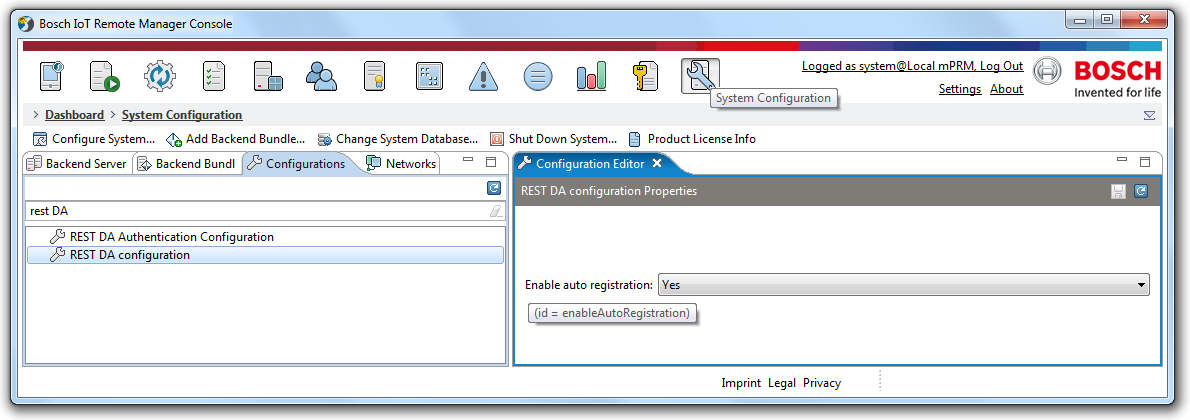
The REST Device Adapter has a configuration to allow the devices to be autoregistered or not:
Registration Plugin and Credentials Plugin
The REST Device Adapter provides the ability to plug into the system special handling of the device registrations to enable arbitrary initialization scenarios. The system supports:
registration plugin – that can be optionally implemented for a specific device type to undertake the registration of a device. It may contact external systems, make arbitrary verification or any special processing;
credentials plugin – that can be optionally implemented for a specific device type to generate specific credentials that will be sent to the device in result of explicit registration (case 1).
Authentication
The REST Device Adapter supports standard and pluggable mechanisms for device authentication::
Standard implementations of Basic, Digest and SSL Certificate Authentications:
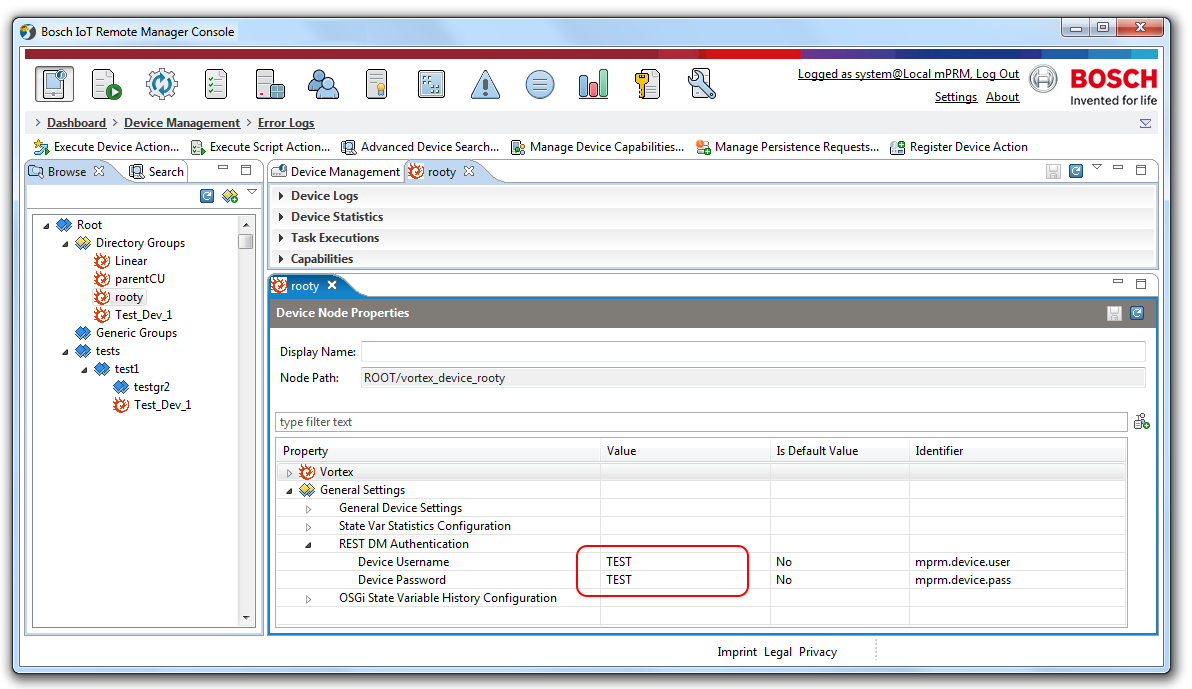
Basic Authentication – The user and the password are configured as Node Properties at the level of device group, subtree, the whole tree potentially. Being set for a node, they apply for the whole subtree below. These node properties are:
mprm.device.usermprm.device.passThere are two possible ways to handle this authentication:
to use generic credentials for all devices – set for the ROOT node of the Device Management Tree (or some subtree);
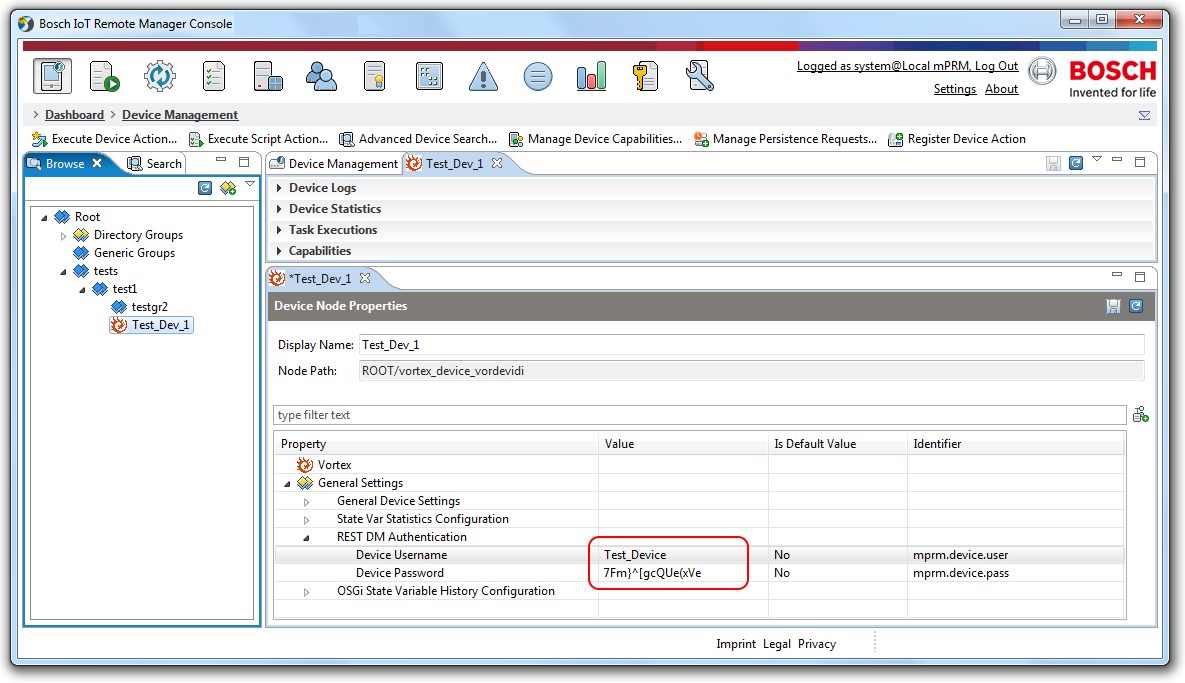
to generate unique user and pass per device – dynamically assigned to devices, which register automatically.
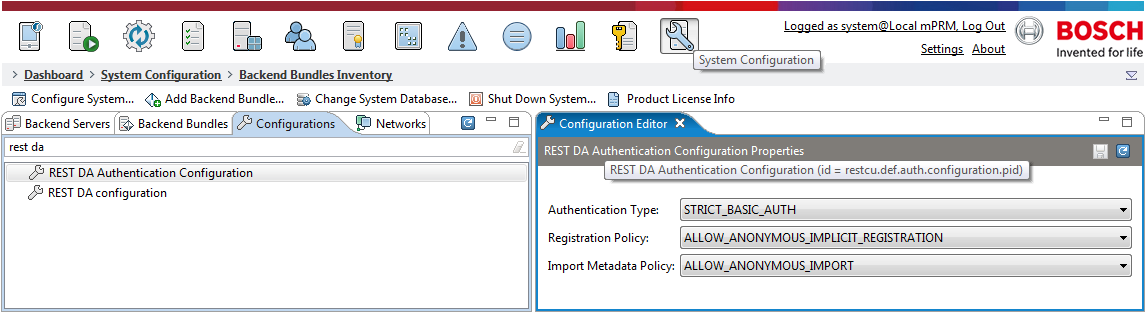
Certificate based Authentication – There is a configuration provided to set the default authentication – REST DA Authentication Configuration. It supports:
Basic Authentication and
HTTPS Client Authentication.
Custom Authentication – it is possible to define a brand new authentication mechanism via plug-ins at the backend.These plugins takeover the handling of the various authentication scenarios – access tokens, external systems, specific validation sequences, etc.
The supported plugins are:
Credentials plugin – for generating of credentials during registration;
Authentication plugin – for checking the credentials during each REST call.
The Authentication plugin can be used in combination with Credentials plugin – refer to Device Registration.
The Authentication plugin is used on every REST API call from a device to check the device authentication, while the credentials plugin can be used during the registration to generate and provision dynamically credentials to the device.
Unique credentials can be provided to the device in some external way – hard-coded or other, to skip the usage of the Credentials plugin and the dynamic provisioning of credentials.When the desired authentication mechanism is configured, the device is expected to provide the authentication data in its REST API HTTP calls, i.e. Basic, Digest, SSL Certificate or other (like token) credentials.
Data Synchronization
The Rest API Protocol defines various methods for providing device data to the backend. But the very basic of all is for sending control unit (CU) state(s):
The basic methods for synchronizing control units data are:
sending control unit states:
put /rspi/restda/{deviceType}/{deviceId}/dataProviders send CU data in the form of events:
new/removed Control Units,
changed state variables,
changed hierarchy relations,
appeared/disappeared CU types.
The method also has a flag – resetOldCUData, instructing the backend whether to keep or delete any previous CU data stored in database for that device.
Retrieving backend stored control unit state(s):
get /rspi/restda/{deviceType}/{deviceId}/dataProviders retrieve all the CU data stored in the System database so that they calculate what changes need to be synchronized there.
Other important methods for sending device data to backend are:
opening/closing of sessions
sending the control unit types in the scope of a given device
sending the control unit metadata if the backends needs so (for dynamically generated control unit)
Rich and Simple Devices
Simple Devices/Sensors
The simple standalone device just sends data for the change of its sensor value:
only when there is a change or
periodically.

This depends on the allowAutoRegistration property, which can easily be set through the common REST DA Configuration.
Rich Devices
The management of rich devices is more complex, but flexible. It can be organized according to the specific necessities of the device.

Examples of possible synchronization flows
Session-based Device client, supporting buffered (delta) changes since last sync
One way for a Device Client to act is to buffer the ongoing changes locally and send them to the backend on different initiations:
periodically,
on-demand,
on connection-loss and recovering, etc.
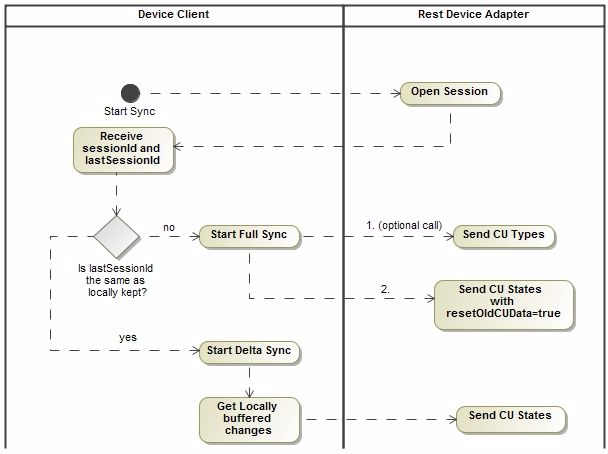
This Device Client should also keep the last sessionId of previous communication with the Backend and check the server lastSessionId to decide whether to do full or delta synchronizations.
The Full synchronization might start with "sending the control unit types" call where the Device Client gives information to the Backend about the available CU types on the target device. But the REST Device Adapter does not rely on having this information provided by such a call. If metadata for such a type is already available, i.e., the type is not dynamically generated (refer to Providing Control Unit Metadata), the REST Device Adapter will implicitly manifest to the GDM the CU type such a Control Unit Type is present for this device whenever a Control Unit data comes for it.
The Full synchronization could be done by providing the Control Units data via the Sending control unit state(s) call using a resetOldCUData flag set to true in order to instruct the Backend to delete any old Control Unit information on that device and start saving it from scratch.
Provider, calculating delta changes on Backend side
This kind of Provider can be Session-based or Session-less as well.

Simple session-less Provider, that only sends sensor data updates
It is possible for a Device Client to simply send sensor value updates anytime by using nothing more than the “Send control unit state(s)” call, i.e. without openSession, and without calling „sending the control unit types”.
In this scenario the REST Device Adapter:
checks if the CU type is provided for this devices and if not, provides it
saves the CU State in database.
Specific Device Adapter Configuration
Often, it might be necessary from the administrator-side to apply specific configuration to the way Control Units data is sent by the devices. Such configuring might be related to:
rate/frequency of sensor values update,
granularity of represented data,
skipping or allowing of some types of data and/or events or
switching to specific synchronization behavior.
Since different device types might have different targets of meaningful configuring, a formal form of such a Configuration would be too complex to handle any possible needs.
Instead it is defined that:
each Provider/Device-type can define its own configuration property names and values;
the REST Device Adapter remains agnostic about the meaning of different Configurations;
the Configurations can be set as Node Properties via the GDM APIs and Remote Manager UI (in agnostic to the REST Device Adapter way);
the Providers can obtain Configuration for a specific Device by simply asking the System that will retrieve the specific Node Properties. We add a dedicated method in the REST API Protocol on behalf of the Device Clients to retrieve the currently applied configuration with a custom-defined semantics.
get /rspi/restda/{deviceType}/{deviceId}/settings