Overview of the DMT API
The guide in this document is designed for developer's who are acquainted with the OMA specifications, with RM's generic device management framework and with the basic principles in RM's management of OMA DM enabled devices.
The RM offers an API for accessing the DMT of connected OMA DM devices and for executing OMA DM commands on the DMT nodes. The DMT API is implemented by the DMT Engine, part of the Mobile Device Manager, and is available on the OSGi frameworks of the management servers (MSs) participating in the RM system. For more information on the basic principles of RM mobile device management, refer to Basic Concepts .
The main components of the DMT API are placed in the com.prosyst.syncml.dm.manager.dmt package.
During development, you might also use the files lib/api/mobile-api.jar and lib/api/syncml.jar for compilation and code assistance.
There is no front-end API specially dedicated to DMT management - instead call the OMA DM control units exported by RM and third parties through the Generic Device Manager available in the Generic Device Management Package.
DMT Management Architecture
The DMT stack implemented in RM has the following basic layers:
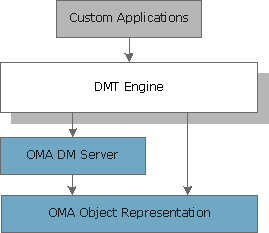
Custom Applications - Access a device's DMT and send management commands to it.
DMT Engine - Provides a refined Java representation a device's DMT and a command interface to that DMT. The DM server is used to perform the actual delivery of commands to the remote device, and the object representation layer - to specify the commands that the DM server must handle.
The DMT Engine allows the composition of multiple OMA DM commands into higher-level operations. This feature enables applications to contain more straightforward implementation of actual management logic that the direct tracking of each and every OMA DM command.
Custom applications have to use only the OMA object representation to specify tree mutation commands. The usage of the DM server is completely hidden and its public API needs not to be called by the custom applications.
As previously mentioned, the public API of DMT Engine is in the
com.prosyst.syncml.dm.manager.dmtpackage. Its usage is the subject of this guide.OMA DM Server - Contains basic logic for maintaining OMA device management sessions. It supports tracking of command responses and status, and provides correct message exchange. Applications only fill in the exact management commands that need to be executed. The DM server's public API is in the
com.prosyst.syncml.dm.serverpackage.OMA Object Representation - Allows OMA messages to be represented as Java object hierarchies. The OMA Object Representation API is
com.prosyst.syncml.common.elements.
DMT API Structure
The main component of the DMT API (com.prosyst.syncml.dm.manager.dmt) is the Dmt interface, implemented by RM. It represents the DMT of a device and by using it custom management applications can execute macro commands the device during a specific management session.
DMT Representation
DMT is organized asynchronously in order to reduce the number of threads needed to control the management session. This means that along with each operation request, the using application passes to the DMT instance a callback listener (DmtListener) to which the DMT will later report the results. The device-specific Dmt instance delivers the results of a command to a DmtListener packed into a DmtResult object. The DmtResult contains only the data retrieved from the remote device. Calling applications may transfer the data of multiple DmtResults into a higher level view of the remote device's DMT.
DMT Plugin
In order to use the DMT API, custom management applications have to implement the DmtPlugin interface and register it as a service in the OSGi framework of the management server, which will be responsible for the relevant OMA DM device(s).
The DMT Engine collects all DMT Plugin service from the OSGi service registry and on every device connection calls them so as they can perform management operations on the device. Of course, certain DMT Plugins may choose not to execute any management commands on a particular device or in the context of a particular session. During a "management sweep", each DMT Plugin receives for a short period of time a reference to the Dmt object managing the device session.
DMT Context
A DMT Context (DmtContext) allows DMT Plugins to retrieve the active Dmt object for an already connected device. A DMT Context is passed to every DMT Plugin when the plugin is registered as a service.
The use of DMT Context objects enables each DMT Plugin to queue commands to the device after the plugin has been notified about the management session with the device. This is quite useful if the DMT Plugin runs another thread to build management operations - that thread may retrieve the relevant Dmt object once an operation is constructed to queue it up into the Dmt object and hook a respective callback listener.
Accessing Device DMTs
As previously discussed, your application can access device DMTs and execute management operations on them by implementing a DmtPlugin service and registering it as a service in the management server's OSGi framework.
As a DMT Plugin, your application has two options for getting the Dmt object representing a device's DMT - at initialization right after the plugin service has been registered and when a device becomes online.
On Plugin Registration
When the DmtPlugin service of your application is registered in the MS's OSGi framework, the Mobile Device Manager implementing the DMT API will initialize the application with a DmtContext object by calling the init method of the plugin. Then, to access the DMT of a specific connected mobile device, call the getDmt method of DmtContext passing as arguments the device type in the form of <manufacturer>/<model> and the device ID usually corresponding to the IMEI. <manufacturer> and <model> are respectively the values of the ./DevInfo/Man and ./DevInfo/Mod, and device ID is the value of the ./DevInfo/DevId.
The code snippet bellow gets the DMTs of all mobile devices by using the Generic Device Manager service (com.prosyst.mprm.admin.devices.DeviceManager). As each device is available as a device root control unit, the example checks for control units of the type mprm.generic.oma-dm.device, which is reserved for OMA DM enabled devices, and for each found device (represented by its device ID) retrieves its DMT.
The following code snippet bellow demonstrates using a device-specific DMT on plugin registration.
import com.prosyst.mprm.admin.devices.ControlUnitID;import com.prosyst.mprm.admin.devices.DeviceControlUnit;import com.prosyst.mprm.admin.devices.DeviceManager;import com.prosyst.mprm.common.ManagementException;import com.prosyst.mprm.data.Enumerator;import com.prosyst.syncml.dm.manager.dmt.*;import com.prosyst.syncml.common.elements.*; public class MyDmtPlugin implements DmtPlugin { private DeviceManager deviceMngr; . . . // Method inherited from DmtPlugin public void init(DmtContext ctx) { if (ctx == null) { return; } this.ctx = ctx; printDmts(); } // Retrieves the DMTs for the connected mobile devices by using // the generic Device Manager private void printDmts() { try { Enumerator omaDevices = deviceMngr.getRoot().getControlUnits("mprm.generic.oma-dm.device", null, true); while (omaDevices.hasMoreElements()) { ControlUnitID device = (ControlUnitID) omaDevices.nextElement(); DeviceControlUnit deviceCu = deviceMngr.getControlUnit(device); String id = (String) deviceCu.queryStateVariable("DevId"); String model = (String) deviceCu.queryStateVariable("Mod"); String manufacturer = (String) deviceCu.queryStateVariable("Man"); Dmt dmt = ctx.getDmt(manufacturer + "/" + model, id); if (dmt == null) { System.out.println("[MyDmtPlugin] error getting DMT "); return; } else { printDeviceDmt(dmt); } } } catch (ManagementException e) { e.printStackTrace(); } catch (Exception e) { e.printStackTrace(); } } // Prints information about a device's DMT private void printDeviceDmt(Dmt dmt) { . . . }}When an OMA DM Device is Successfully Connected to RM
After a DMT Plugin is registered and initialized with a DMT Context, it is possible that a management session begins with some remote device. Each DMT Plugin will receive access to the Dmt object for the newly-connected device. In such a case, the engine will call the deviceOnline method of your DmtPlugin passing the Dmt object. If needed, you can launch OMA DM-based commands on the device through the Dmt instance as further described.
Getting Device Properties
Once you have a reference to the Dmt object for a specific device, you can retrieve its device properties available in the ./DevInfo management object by using the getDeviceProperties and getDeviceProperty method. The property names are exported as constants in the \DmtPlugin interface and besides the OMA-defined properties you can also get the type of the mobile device (property name is DEVICE_TYPE) as defined in the relevant device definition XML file in the syncml/device directory (see Defining a Custom Device Type from Extending the Mobile Device Management Schema).
Browsing the DMT
A device-specific Dmt object allows you to browse the structure of the remote DMT and get the properties of certain DMT nodes. The Dmt object transparently to the application executes OMA "Get" commands on the specified root node and fetches the result to a DmtListener implemented by your application.
To get the properties of a node like name, format, type, value, timestamp, ACL, etc., use the getProperties method of Dmt. The result will be delivered to your DmtListener in the form of a DmtResult. To get a property of the target node, call the getProperty method of DmtResult providing as the name argument the proper field of the DmtResult interface.
To get a specific DMT sub-tree, call the getSubtree method of the relevant Dmt. Depending on the node depth you want to use, call the getSubtree method in the following ways:
Get the sub-tree down to the bottommost leaf nodes at the end of each branch - In this case, you have two options:
Provide value true for the tryStruct argument. This will cause retrieval of the whole sub-tree by means of an OMA DM "Struct" Get command. The true value of the trySruct argument is taken into account only if the omadm.device.struct preference or inheritable property is also true.
Use a double wildcard "**" (Dmt.DOUBLE_WILDCARD) as the last segment name to trigger recursive retrieval of descendants. The node whose path is formed by the segments up to the "**" one will be considered as base node of the sub-tree.
Get only the children of the specified node
Provide value false for the
tryStructargument and specify the URI of the base node with no wildcards.Get the descendants of the specified node up to two levels down
Provide value false for the
tryStructargument and specify the URI of the base node with an added "*" wildcard ((Dmt.WILDCARD)) at the end (<base_node_URI>/*).
For the getting the children of a base interior node you can also use the getProperties Dmt method on that node. Then, in the operationCompleated method of the dedicated DmtListener retrieve the children node names by using the getChildren method of the DmtResult argument of operationCompleated.
The code snippet bellow fully lists the content of the OSGi Configuration Management Object (<path_to_osgi_root>/Configuration), which is defined by the OSGi Mobile Specification Release 4 and is available on OSGi-enabled mobile devices. In RM such OSGi-enabled mobile devices are supported by the Mobile OSGi Device Management Package and their device type is mprm.osgi-meg.device.
import com.prosyst.mprm.admin.devices.ControlUnitID; import com.prosyst.mprm.admin.devices.DeviceControlUnit;import com.prosyst.mprm.admin.devices.DeviceManager;import com.prosyst.mprm.common.ManagementException;import com.prosyst.mprm.data.Enumerator; import com.prosyst.syncml.dm.manager.dmt.*;import com.prosyst.syncml.common.elements.*; public class MyDmtPlugin implements DmtPlugin { private static final String OSGI_CONFIGURATION = "./OSGi/Configuration/"; private static final String MEG_DEVICE_TYPE = "mprm.osgi-meg.device"; . . . // Method inherited from DmtPlugin public void deviceOnline(Dmt dmt) { // Checking if the newly-connected device is OSGi-compliant String deviceType = dmt.getDeviceProperty(Dmt.DEVICE_TYPE); if (deviceType.equals(MEG_DEVICE_TYPE)) { printOSGiConfigs(dmt); } } // Prints the whole sub-tree of the OSGi Configuration MO private void printOSGiConfigs(Dmt dmt) { dmt.getSubtree(OSGI_CONFIGURATION + Dmt.DOUBLE_WILDCARD, false, new DmtListener() { public void operationCompleated(DmtResult result) { printNodes(null, result); } public void operationFailed(Exception exc) { exc.printStackTrace(); } }); } // Prints recursively all available configurations private void printNodes(String node, DmtResult result) { System.out.println("[MyDmtPlugin] ---------------------"); String children[] = result.getChildren(node); if (children != null && children.length > 0) { System.out.println("[MyDmtPlugin] ---------------------"); for (int i = 0; i < children.length; i++) { String uri = (node == null ? (OSGI_CONFIGURATION + children[i]) : (node + "/" + children[i])); printNodes(uri, result); } } } . . .} Executing Commands on the DMT
The device-specific Dmt object supports execution of OMA DM commands defined as Java objects through the OMA Object Representation API.
Commands must be issued in an uninterrupted chain - each command's outcome is reported to a DmtListener provided by your application. The listener is expected to continue the command chain by requesting another macro command and hooking another DmtListener or hooking itself. Therefore, the DmtPlugin implementation of your application should track the state of each management session via objects associated with the device's ID and type.
You can execute itemized commands (Add, Replace, Delete, etc.) and search requests one by one, as well as in a set of commands as a sequence command or as an atomic command. Execution of OMA DM commands is launched by using the execute method of the relevant Dmt object.
The code snippet bellow contains commands organized in a sequence for adding a new DM server account to the standard DM Account management object (./DMAcc).
import java.util.Vector;import com.prosyst.mprm.admin.devices.ControlUnitID; import com.prosyst.mprm.admin.devices.DeviceControlUnit;import com.prosyst.mprm.admin.devices.DeviceManager;import com.prosyst.mprm.common.ManagementException;import com.prosyst.mprm.data.Enumerator; import com.prosyst.syncml.dm.manager.dmt.*;import com.prosyst.syncml.common.elements.*; public class MyDmtPlugin implements DmtPlugin { private static final String ADD_CMD_ID = "myplugin.add"; private static final String MY_DM_SERVER_ACCOUNT = "MyDMServer"; private boolean accountExists = false; . . . private void addDMServerAccount(final Dmt dmt) { checkIfAccountExists(dmt); if (accountExists) { return; } Vector addCmds = new Vector(); String addrNode = "./DMAcc/AppAddr/" + MY_DM_SERVER_ACCOUNT; String authNode = "./DMAcc/AppAuth/" + MY_DM_SERVER_ACCOUNT; // Forming the Add commands buildAddCommand(addrNode, false, null, addCmds); buildAddCommand(addrNode + "/Addr", true, "http://mydmserver", addCmds); buildAddCommand(authNode, false, null, addCmds); buildAddCommand(authNode + "/AAuthType", true, "syncml:auth-basic", addCmds); // Creating the Sequence command of Add commands AbstractCommand[] cmdArray = new AbstractCommand[addCmds.size()]; addCmds.toArray(cmdArray); Sequence dmServerCmds = new Sequence(ADD_CMD_ID, cmdArray); // Executing the Sequence command dmt.execute(dmServerCmds, new DmtListener() { public void operationCompleated(DmtResult result) { System.out.println("Account MyDMServer added!"); dmt.clear(); } public void operationFailed(Exception exc) { System.out.println("Adding nodes MyDMServer failed!"); exc.printStackTrace(); } }); } private void checkIfAccountExists(Dmt dmt) { // If getProperties fails, this means that such a node does not exists // in the DMT. dmt.getProperties("./DMAcc/Addr/" + MY_DM_SERVER_ACCOUNT, new DmtListener() { public void operationCompleated(DmtResult result) { setAccountExists(true); } public void operationFailed(Exception exc) { setAccountExists(false); } }); } protected void setAccountExists(boolean b) { accountExists = b; } . . .}DMT Plugin Service Registration
Having implemented a DmtPlugin in your application so as to integrate it in RM mobile device management, register the plugin as a service in the OSGi framework of a backend host having the management server role.
import org.osgi.framework.BundleActivator;import org.osgi.framework.BundleContext;import org.osgi.framework.ServiceRegistration;import com.prosyst.syncml.dm.manager.dmt.*;public class MyDmtPluginActivator implements BundleActivator { public void start(BundleContext bc) throws Exception { pluginReg = bc.registerService(DmtPlugin.class.getName(), new MyDmtPlugin(), null); } public void stop(BundleContext bc) throws Exception { if (pluginReg != null) { pluginReg.unregister(); } }}
References