Management Console
Through the RM Console you easily access the Host info and the system properties, and execute helpful console commands to facilitate the troubleshooting.
Host Info Tab
The Host Info tab of the RM Console Editor shows the deployed bundles on the UI framework.
A bundle can be in "started" or "stopped" state. You can change the state by choosing to start, stop, or restart it from the menu after a right click with the mouse: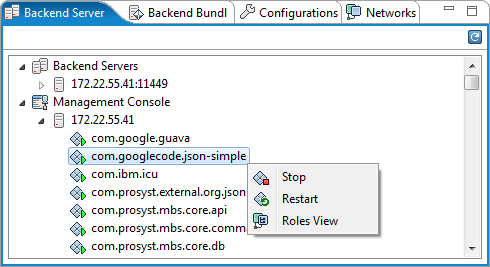
Management Console Tab
The Management Console tab of the RM Console Editor allows the user to execute commands on the UI framework.
Some helpful commands are:
- ss – lists the installed bundles
- pr – lists the system properties
- bundle <bundleId> – displays details for the specified bundle
You can see all commands by executing "help" command.

System Properties Tab
The System Properties tab of the RM Console Editor shows the System Properties and Environment Variables of the UI framework. However, you cannot change them.