Overview
The current document describes the overall mechanism of MQTT device management, and the components enabling it.
Managing MQTT devices through the RM means performing the administration of devices through the RM backend. As already explained in other documents, this enables the RM administrator to perform remote administration and monitoring of devices running in different physical locations without any need for the end device user to handle the administration.
MQTT Device Adapter Architecture
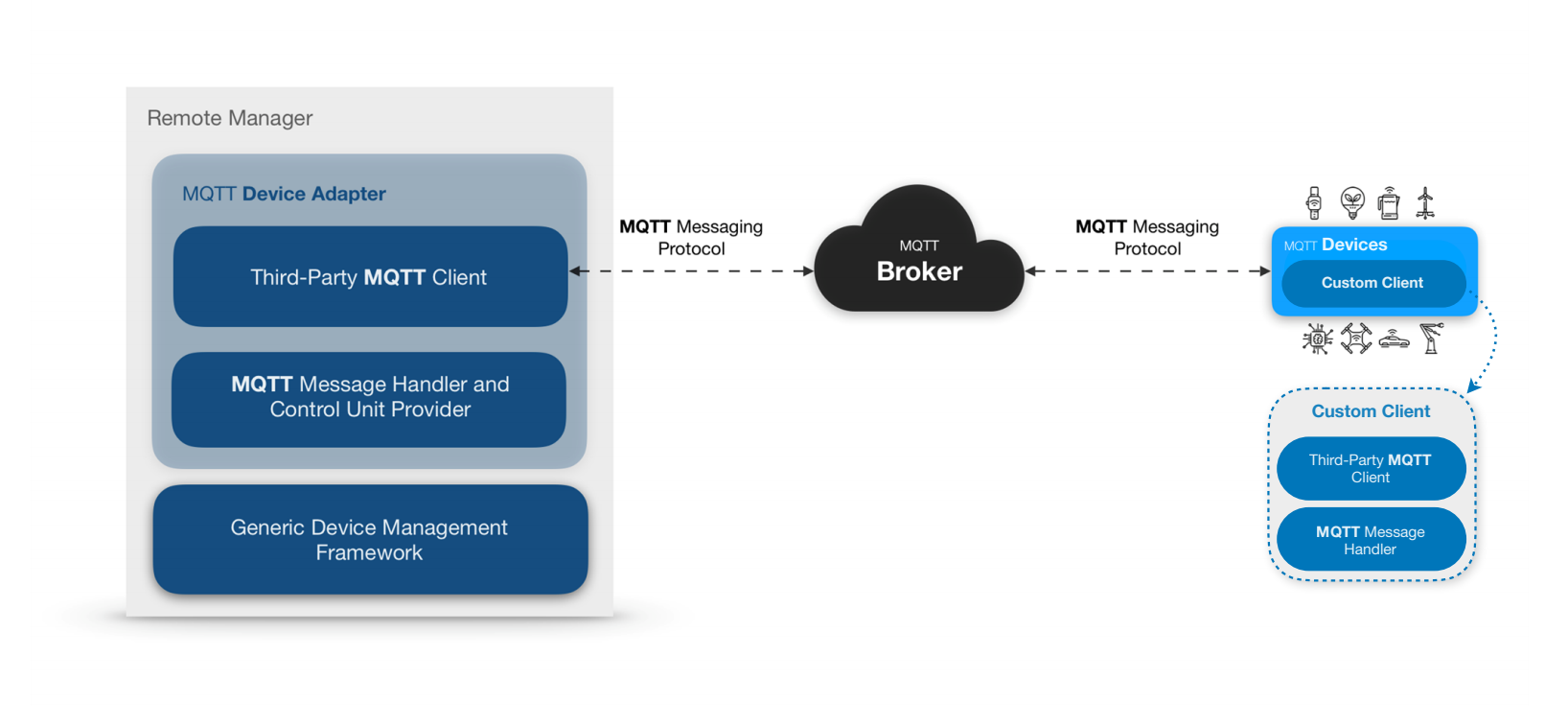
Custom Client – Custom Client implementation on the device side. The implementation is a responsibility of the User and can be written in any programming language - Java, Python, C etc. For more information and Java reference code visit the MQTT Simulator page.
Generic Device Management Framework – the existing framework in the Remote Manager.
MQTT Message Handler & Control Unit Provider – handles MQTT messages according to the defined MQTT Device Adapter messaging protocol and provides respective Control Unit representations to the Generic Device Management Framework.
Third-Party MQTT Client – third-party library used to send and receive messages via MQTT.
MQTT Broker – third-party module (or cloud service) out of our system for MQTT communication.
MQTT Messaging Protocol – MQTT Device Adapter messaging protocol for device management.
Devices Represented as Control Units
Device resources are represented via Control Unit abstraction as described below.
The protocol is based on the concept of Control Unit (CU) defined by the GDM framework and it is considered the reader of this documentation to have some basic knowledge on it:
a device is represented in Remote Manager as one Device Root Control Unit and zero or many Component Control Units under it, potentially organized hierarchically in parent-sub relations;
the Control Unit has type and id . Global identification is formed by the four elements:
Control Unit type
Control Unit id
device type
device id
the Control Unit has a set of State Variables and Actions ;
the type of the Control Unit identifies the set of State Variables and Actions available for all Control Units having the same Control Unit type. Thus, all Control Units of a given type have the same interface – one and the same set of State Variables and Actions.
the Control Unit type requires Metadata associated with it to describe the set of State Variables and Actions.
Control Unit Metatyping
Control Unit Metadata is an XML representation of a given Control Unit. It needs to be initially provided to the backend before working with Control Units and the MQTT Device Adapter itself. Several methods are available for providing Metadata:
Statically
the xml-s can be put inside the <RemoteManager>/initial_config/mqttcu directory and will be loaded by Remote Manager on startup;
the xml-s can be uploaded to the Remote Manger via Rest API call, as described in the Developer Guide. This should be done only once as initialization step, since Metadata for a given Control Unit type is the same for all Control Units of this type.
Dynamically
The device itself can send xml-s to the Remote Manager via MQTT message. Since the xml-s are considered to be a heavy load and needed to be provided to Remote Manager only once (even for a million common devices), the protocol defines a way for Remote Manager to tell the device if Metadata for the given type is actually needed or not - refer to CU Types page.
Configurations
The RM provides the functionality for properties and settings to be set on a given device or device group. The MQTT Device Adapter provides the functionality for those settings and properties to be pulled by the device. For more details check the Settings page.
Control Unit Data Transfer
The MQTT Device Adapter supports receiving, managing and storing Control Unit data such as sensor data, configurations, troubleshooting information, software and hardware information and other, as well as sending the Control Unit's data back from the backend to the device on demand. This functionality is described in more details in the CU Types and CU Data pages.
The MQTT Device Adapter defines various methods for providing device data to the backend. But the very basic of all is for sending Control Unit (CU) state(s).
Devices can send CU Data in the form of events:
new/removed Control Units
changed state variables
changed hierarchy relations
appeared/disappeared Control Unit types
A flag –
resetOldCUDatais introduced, informing the backend whether to keep or delete any previous Control Unit data stored in database for that device.
The device can also retrieve all the CU Data stored in the System database so that they calculate what changes need to be synchronized there.
Other important methods for sending device data to backend are:
opening/closing of sessions
sending the Control Unit types in the scope of a given device
sending the Control Unit Metadata if the backends needs so (for dynamically generated Control Unit)
Data Synchronization with Sessions
Session-based Device client, supporting buffered (delta) changes since last sync.
One way for a Device Client to act is to buffer the ongoing changes locally and send them to the backend on different initiations:
periodically
on-demand
on connection-loss and recovering, etc.
This Device Client should also keep the last sessionId of previous communication with the Backend and check the server storedSessionId to decide whether to do full or delta synchronizations.
Simple session-less Provider, that only sends sensor data updates
It is possible for a Device Client to simply send sensor value updates anytime by using nothing more than the “Send control unit state(s)” call, i.e. without opening a session, and without sending the Control Unit types.
In this scenario the MQTT Device Adapter:
checks if the CU type is provided for this devices and if not, provides it
saves the CU State in database
Device Management
Actions can be performed on a given device either by invoking one of its Instant Actions, creating a Management Rule or executing a Task. Supported Control Unit actions are explicitly defined in the Control Unit Metadata with an ID and optional input/output arguments. The MQTT Device Adapter protocol implementation sends management commands from the backend to the device when a given Action is triggered.
Instant Actions
Instant Action can be performed from the GUI on a particular device. If the device is offline, actions cannot be executed until the device goes online again. There is a timeout for execution confirmation of Instant Actions. If an Action is not confirmed before it timeouts, it will be automatically confirmed with an Error.
Task Executions
The RM provides a powerful mechanism for refined execution of control commands over one or more mobile devices by means of Task execution. A Task is a "command in action" - i.e. it is a real task fulfilling the management actions defined in a script. The parameters of each created Task can be monitored at any moment. In addition, you can schedule a Task or make it periodic by defining a Rule.
Rules
Rules can be defined for a group of devices by executing Task/s over a device group (device scope), or specifically for a single device by executing Tasks while it is offline. For more information about the concept behind Task management and Rules, refer to Scripting and Rule-based Management.
Rich and Simple Devices
Simple Devices / Sensors
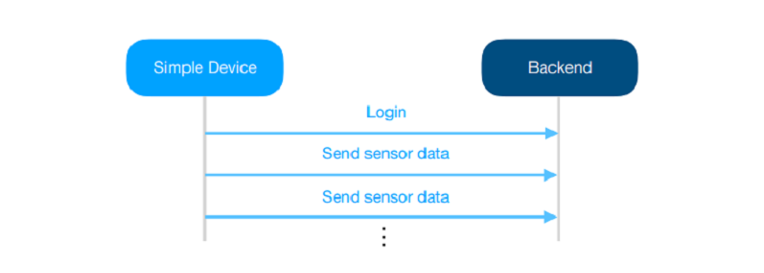
The simple standalone device just sends data for the change of its sensor value:
only when there is a change
periodically
Rich Devices
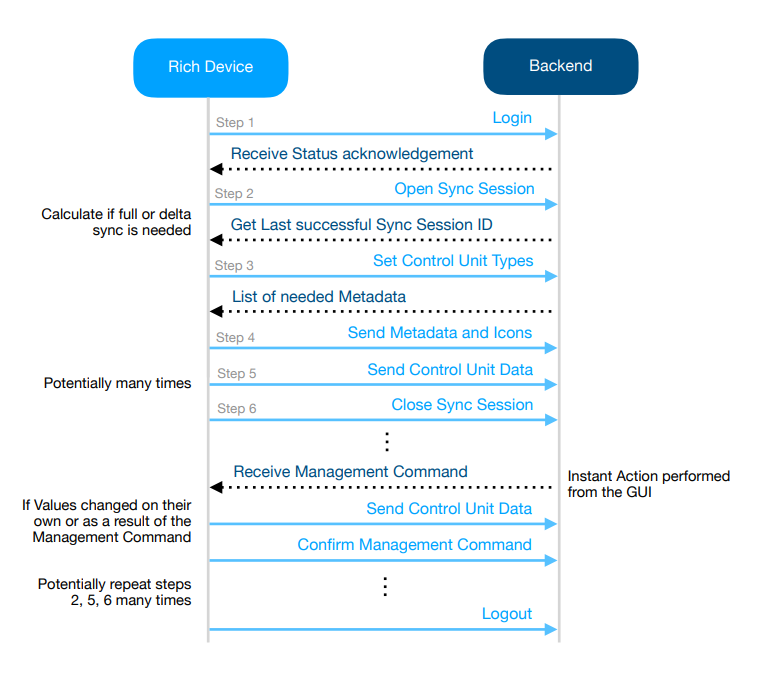
The management of rich devices is more complex, but flexible. It can be organized according to the specific necessities of the device.
Security Concept
In order to establish a secure communication channel through the MQTT Device Adapter, the connection needs to be secured from both the broker and the backend sides.
Broker Security
The broker can be configured to deny subscriptions with wildcards on certain topics based on user groups. This prevents unauthorized third party to eavesdrop on the device communication channel.
Backend Security
Authentication
The system provides basic authentication out of the box (username and password), as well as the ability to implement custom authentication logic, depending on the clients' needs. More information can be found on the Login page.
Token
Additional security is added by introducing a Token. It is used as a verification unit subsequent to the initial authentication by including it in every message's payload from the device to the backend. It is also included as a level in the topic of all messages from the backend to the device thus guaranteeing unique communication channel.
For more information about token verification visit the Messaging page.