Overview
The legacy Management Script of Remote Manager provides textual representation means of single commands and defines lexical constructions for writing composite commands (batch commands and conditional commands).
The recent releases of Remote Manager - since version 6.0 - have adopted the Groovy scripting language for defining the management actions, as explained in Scripting in Remote Manager. However, the legacy commands described below can still be used.
Regarding single commands, the current document covers only the generic means for device management. Currently, the only system-provided single command is control unit command, which is the only representation of generic means for device management.
Since v6.0, Remote Manager requires that all commands called using the legacy script format should be used with target.executeLegacy("<command>").
For example the OSGi Device Management Package provides commands like:
target.executeLegacy("SET SYSTEM PROPERTY \"my.test.prop\" = \"myval\" ");
for setting a system property in the JVM of an OSGi-enabled device
target.executeLegacy("OSEXEC \"myApp.exe\" ");
for executing OS commands on the operating system of an OSGi-enabled device.
For other OS commands, refer to the OS Commands Interpreter conceptual document.
Of course, the script language can be extended with brand new commands at any time, for example when customizing RM for management of a new device type, by developing specific providers and custom script plug-ins providing commands reflecting the specific needs for device management.
All single commands, system-provided and provided by different plug-ins, can be combined in single procedures as well as in common composite constructions of commands, i.e. there can be batch commands of single commands from different providers, and they all can be put under a common control unit filter.
Document Conventions
To avert misunderstanding the explanations that follow, please consider the rules involved in the current document:
Command parameters, specifics, comparison and logical operators, etc. are delimited by "<" and ">" and written in this font. For example: <action>, <control_unit_filter>, etc. They contain alphanumeric combinations that are to be submitted by the administrator and may need to be enclosed by inverted commas (if specified in the explanations!).
Optional parts are enclosed by [...]. However, optional parts usually allow modification of expressions' actions so it is not all the same if you include or exclude them.
Basic Principles
The RM script is used to create RM management commands. A set of commands defined through the RM script is called a procedure.
There are two types of RM commands: single and composite. The RM script provides syntactic rules for creating both single commands and composite commands (batch and conditional) from the single ones. The script representation of each single command is unique and reserved for this command only.
So, to summarize, a command definition is:
target.executeLegacy("<Command> ::= <BatchCommand> | <ConditionalCommand> | <SingleCommand>")Single Commands
A single command is the simplest definition of a command. A single command consists of a keyword reserved for this command only.
For example, a script procedure containing a single command is:
target.executeLegacy("INVOKE my.cu.type myAction(arg1, arg2)");
This command would invoke a control unit action myAction on control units of type my.cu.type.
Batch Commands
A batch command is a set of other commands. In the RM script, a batch command is created by separating the inner commands it contains with semi colon ( , and the whole command block is enclosed within {...}. If the block contains only one command, the comma may be omitted. The comma may also be omitted from the last command in the block. So, a command block may look like this:
target.executeLegacy(" { <command>; <command>; .... <command>; }")Conditional Commands
A conditional command is a command that contains an execution condition. The execution condition consists of a control unit filter, that specifies a feature that a control unit or a device must have in order for the command to be executed on it. Combinations of several control unit filters can be applied for finer filtering.
The definition of a conditional command is:
target.executeLegacy(" <ConditionalCommand> ::= <Command> (control_unit_filter)")Consider the following conditional command:
target.executeLegacy(" { Invoke my.device.configuration set.property(\"My Property\", \"My Value\"); Invoke my.device.configuration add.property(\"New Property\", \"New Value\"); } (stateVar: \"PID\" == \"my.configuration.pid\")")
This conditional command consists of two single commands, each of them calling an action of the my.device.configuration control unit. The first action is set.property that sets a new value to an already existing property, while the second action is add.property that adds an entirely new property to a configuration. To locate the exact my.device.configuration control unit that is needed, the (stateVar: "PID" == "my.configuration.pid") is applied over the available control units of this type. It searches for control units that have state variables with "PID" equal to "my.configuration.pid".
The execution of this conditional command goes through the following stages:
- All control units of type my.device.configuration are listed.
- The resulted set of control units is filtered according to the (stateVar: "PID" == "my.configuration.pid") control unit filter.
- Execution of the the composite single commands is initiated over the filtered subset of control units.
Composite Commands
So, let's see the relationship between single, batch and conditional commands represented by this figure:
Figure 1. The structure of our conditional command example. It shows the relationship between single, batch and conditional commands 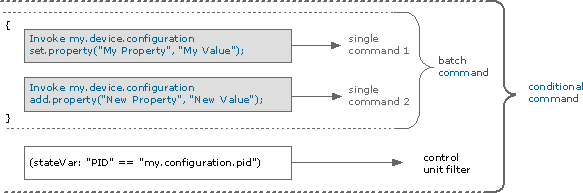
The commands contained in a conditional or batch command are not necessarily single; they can be other conditional and/or other batch commands. In fact, you can create quite sophisticated commands containing numerous commands of different types, some of them containing inner sets of commands and conditions.
As an example , let's extend the previous conditional command with some additional functionality:
target.executeLegacy(" { { Invoke my.device.configuration set.property(\"My Property\", \"My Value\"); Invoke my.device.configuration add.property(\"New Property\", \"New Value\"); } (stateVar: \"PID\" == \"my.configuration.pid\") { Invoke my.device.bundle \"$create.install\"(\"mybundle.jar\"); Invoke my.device.bundle start(\"mybundle.jar\"); } } ON (DEVICE_TYPE == \"my.device.type\")")The first part of this command is the same as the one depicted in Figure 1. Its second part is a batch command that creates new control unit of type my.device.bundle to install a bundle on a device. Then it calls the start action of the same control unit type to start the bundle installed by the previous command. The entire procedure is executed only over devices whose type is "my.device.type".
When this procedure is appointed for execution, the following actions are performed:
- The ON (DEVICE_TYPE == "my.device.type") filter is applied on the available devices. It searches for devices of type "my.device.type". The entire command will be executed over the resulting subset of devices.
- Execution of the single commands called on the my.device.configuration control units takes place. As there is a control unit filter defined for these commands, first the target set of control units of type my.device.configuration is determined. Then each command is executed over it.
- Execution of the commands called on the my.device.bundle control unit is initiated.
The sophisticated structure of the entire command is depicted in Figure 2:
Figure 2.The structure of the compound conditional command shown in the example 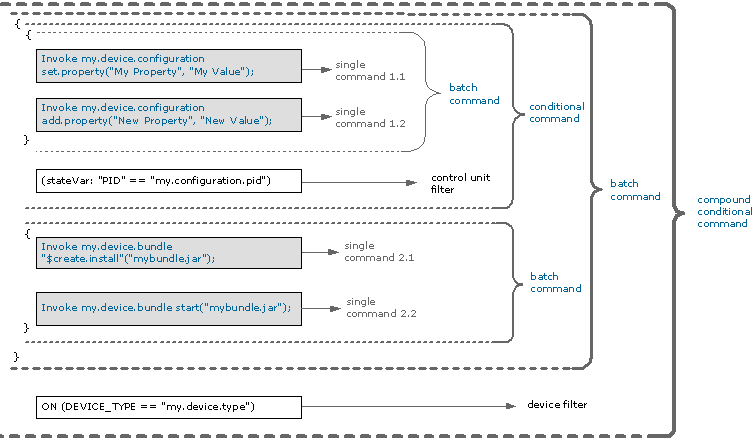
An interesting thing can be observed about this command: we could re-write it so as to contain a different set of commands producing exactly the same result:
target.executeLegacy(" { { Invoke my.device.configuration set.property(\"My Property\", \"My Value\"); Invoke my.device.configuration add.property(\"New Property\", \"New Value\"); } (stateVar: \"PID\" == \"my.configuration.pid\") & ON (DEVICE_TYPE == \"my.device.type\") { Invoke my.device.bundle \"$create.install\"(\"mybundle.jar\"); Invoke my.device.bundle start(\"mybundle.jar\"); } ON (DEVICE_TYPE == \"my.device.type\")")The structure of this command is illustrated in Figure 3.
Figure 3. The structure of the same conditional command, re-written in a new form.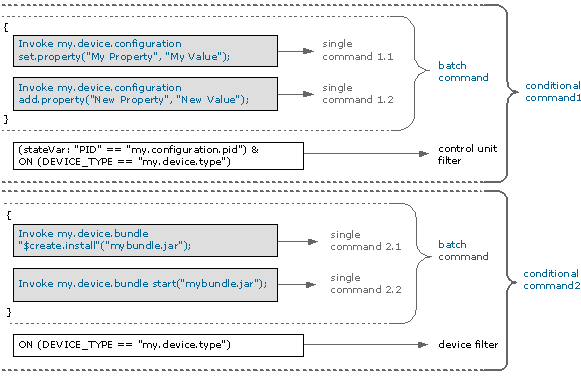
Composition Rules
- A block of commands is enclosed within { and }, and multiple commands are separated with ";" from each other. The ";" can be present or can be omitted after the last command entry in the block.
- The keywords reserved for the script commands, filters, conditions, comparison operators, etc. are CASE INSENSITIVE. The values of command arguments, however, can be case sensitive!
- White spaces in a procedure are ignored by the script parser, so you can format the procedure text in any way convenient for you.
- You can add comments to the procedure. There are two types of recognized comments - starting with two slashes (this comments the rest of the current line), and enclosed in slash&asterisk (this comments everything between the two asterisks):
//your comment goes here
or
*/your comment goes here/*
System-Provided Commands
Control Unit Commands
Control unit commands enable invoking control unit actions. The general form is:
target.executeLegacy("Invoke <cu_type> <action_list>")Where <cu_type> is the control unit type and the <action_list> is the list of control unit actions.
Action List
The action list can consist of:
- Single action - In this case the action list looks like this:
<action_id>(action_arguments)
Where <action_id> is the action ID and the (action_arguments) are the action's input arguments. For example: target.executeLegacy("add.property(\"New Property\", \"New Value\")");
If the action does not accept arguments, the (action_arguments) should stay empty. For example:
"&destroy"()
The supplied arguments are automatically converted to the appropriate type according to the metadata provided by their control units. With multi-value arguments (arrays, Vectors) the argument can be supplied like this:
<action_id>("arg1", (value1, value2,.., valuen), "arg3")
----------,----------/
You can also pass null as value:<action_id>("arg 1", null, "arg3")
Dictionary arguments are passed like this:
<action_id>({"prop1"="value1","prop2"="value2",..,"propn"="valuen"})
------------------------,------------------------/
Dictionary
Although arguments are implicitly cast to the proper types, you can explicitly define the type cast like this:
<action_id>("arg1" as String, "arg2", "1" as Integer, ("0.97", "0.98", "0.99") as Array(float))
-----,----/ -,/ -----,--/ ---------------,-----------------/
arg1 arg2 arg3 arg4
- Multiple actions - When the action list consists of multiple actions, they should be given as a comma separated list and enclosed within {...}:
{<action_id1>(action_arguments1),<action_id2>(action_arguments2),..,<action_idn>(action_argumentsn)}
For example:
target.executeLegacy("{\"$create.install\"(\"mybundle.jar\"), start(\"mybundle.jar\")}")
A control unit command example:
target.executeLegacy("Invoke my.device.type {action1(\"arg1\" as String, (\"0.97\", \"0.98\", \"0.99\") as Array(float)), action2(), null, (1, 2, 3, 4)}")System-Provided Control Unit Commands
RM provides special single command definitions appointed to execute administration actions over control unit, as follows:
- Create control unit - The general form of this command is:
target.executeLegacy("Invoke <cu_type> \"$create.<cu_constructor>\"(constructor_arguments)");
This command uses the $create prefix to indicate that what follows is the constructor of the control unit type specified in in the <cu_type attribute>. The <constructor_ arguments> attribute should contain the constructor arguments declared for the specified constructor. For example:
target.executeLegacy("Invoke my.device.bundle \"$create.install\"(\"mybundle.jar\")")
- Destroy control unit - The general form of this command is:
target.executeLegacy("Invoke <cu_type> \"$destroy\"()");
In this command the <action_ID> attribute is set to "$destroy" to indicate the destruction of all control units of the specified control unit type.
- Synchronize control unit - The general form of this command is:
target.executeLegacy("Invoke <cu_type> \"$sync\"()")
Here the <action_ID> attribute is set to "$sync" which means that all control units of the given control unit type are going to be synchronized.
Call Command
The CALL command invokes a script from the procedure inventory, passing values to the parameters available in it (if the script contains parameters). General syntax:
target.executeLegacy("CALL <script_name> ([<call_params>])")Where <script_name> is the name of the script in the procedure inventory to be called. The called script can be a normal procedure containing or not containing parameters. When executing a script containing a call command, the call command will be replaced by the list of commands from the called script. If the called script contains parameters, the parametrized parts of it will be replaced with the values supplied as <call_params> by the caller script.
Creating a Parametrized Procedure
Parametrizing a procedure is useful if you want to re-use the same procedure text with different options. Parametrizing RM scripts is done in a manner similar to the parametrizing of DOS batch-scripts. The places of the parameters in the called script are given as %1, %2 and so on. When calling a parametrized script, parameter values are given as Strings (enclosed by ""), so there could be specified as parameter values not only single words, but also arbitrary texts.
Let's clarify the explanations with a simple example that uses control unit commands. We'll create a simple procedure named "Called_Script":
target.executeLegacy(" { Invoke my.device.bundle \"$create.install\"(%1); Invoke my.system.props add.property(%2); } ON (DEVICE_TYPE == %3)")This procedure will invoke the "$create.install" action of the my.device.bundle control unit with arguments specified with parameter %1 and the add.property action of the my.system.props control unit with arguments specified with parameter %2. The whole procedure is executed only on devices of type specified with parameter %3.
A parametrized procedure cannot be executed on its own, for it doesn't contain full execution information. It must be invoked by another procedure defining its parameters. Notice also that we can parametrize any part of the procedure - device filters, action arguments, etc.
Calling a Parametrized Procedure
To invoke a parametrized procedure via a CALL command, you must pass values to ALL parameters defined in the called script's text. The <call_params> part of the command's syntax (see the beginning of this section) describes the values of the parameter(s) defined in the called scripts. A call parameter value is a String and is written in inverted commas. Multiple call parameters are separated by commas. The values of the call parameters in the caller script must be given in the same order as they are defined in the called script. The first <call_param> shows the value of the %1 parameter, the second <call_param> shows the value of the %2 parameter, and so on.
To illustrate calling a parametrized procedure, we'll create a procedure named "Caller_Script". It will invoke the procedure named "Called_Script", shown in the Creating a Parametrized Procedure section:
target.executeLegacy("CALL \"Called_Script\" ("\"mybundle.jar\"", "\"my.bundle.debug\"", "\"true\"", "\"my.device.type\"")");When you include a String that contains quotation marks (""), do not forget to escape the quotes by \".
In the above procedure we invoked the "Called_Script" with the following parameters: the "mybundle.jar" value for parameter %1, and the "my.bundle.debug","true" for parameter %2 and the "my.device.type" for parameter %3 .
Calling the "Called_Script" in the "Caller_Script" will have the same result as the following procedure:
target.executeLegacy(" { Invoke my.device.bundle \"$create.install\"(\"mybundle.jar\"); Invoke my.system.props add.property(\"my.bundle.debug\", \"true\"); } ON (DEVICE_TYPE == \"my.device.type\")")
The CALL command can also be used to invoke scripts that do not contain parameters. For example, let's have a called script named "Add_Property" with the following contents:
target.executeLegacy("Invoke my.system.props add.property(\"my.bundle.debug\", \"true\")");
Obviously, this procedure does not contain any parameters. Anyway, we can invoke it through the following CALL command:
target.executeLegacy("CALL \"Add_Property\" ()")Control Unit Filters
Control unit filters allows you to specify the control units whose actions you wish to invoke.
A filter is a standard logical expression with logical operators, which operands are conditions describing the searched targets - devices, control units, control unit state variables etc.
Logical Operators
Operator | Description |
|---|---|
| | Logical "OR". |
& | Logical "AND". |
! | Logical negation. |
The priority of logical operators starting from the highest to the lowest is: !, &, |. Parenthesis can be used to determine different priorities.
Each filter defines different conditions to act as operands in its logical expression. The conditions defined by all the search filters use comparison operators for defining the matching of a searched attribute against the specified value.
Comparison Operators
Comparison Operators
Operator | Description |
== | Checks if the specified attribute is equal to the given value. |
!= | Checks if the specified attribute is different to the given value. |
startsWith | Checks if the specified attribute starts with the given value. |
endsWith | Checks if the specified attribute ends in the given value. |
includes | Checks if the specified attribute contains the specified value at some place. |
Filter Operands
Attribute Condition
Syntax and semantics. These specify control units by their attribute values. Attribute conditions are matched with the properties provided as metadata for the control units. Script syntax:
[<att_target>] <attribute> <comparison_operator> <search_value>For example: (stateVar:“myStateVarName” == “someValue”)
<attribute> ::= TYPE | ID | VERSION | DEVICE_TYPE | DEVICE_ID | <attribute_name> | <attribute_names><attribute_name>::= <stri>ng | <identifier><att_target> ::= (stateVar:) | (capability:) | (nodeProps:)Where:
- <att_target> - (Optional) Explicitly indicates that what is specified in the <attribute> clause is a name of a control unit state variable, or a device capability, or a device node property. The targets "capability:" and "nodeProps:" are only allowed when the attribute condition is used inside a device condition, i.e. it specifies device-filtering criteria.
- <attribute> - Specifies the name of the searched attribute.
- <comparison_operator> - Contains a standard RM script comparison operator (see the "Comparison Operators" section).
- <search_value> - Represents the attribute's searched value.
Following is a short description of filtering attribute targets:
- Standard attributes - If one of the keywords ID, TYPE, DEVICE_TYPE or DEVICE_ID is present as <attribute>, the condition is considered to be on respectively the control unit ID, control unit type, device type or device ID of the filtered control unit instance.
- State variable – The condition is on a state variable of the filtered control unit instance.
- Device capability – The condition is on the capabilities of the filtered device.
- Node property – The condition is on the node properties of the filtered device.
Custom attribute condition. Except for generic filtering attributes, script filters can accept custom filtering attributes with individually-defined mapping on the underlying resources. Such custom attributes are handled by condition matcher plugins, and attribute conditions containing custom attributes are forwarded for evaluation to those plug-ins.
For example, a device provider may provide filtering on log messages related to particular devices of its controlled type, assuming that log messages are not represented as control units and thus such filtering is not possible with the generic filtering attributes.
See also "Matching Attribute Conditions" below.
Parent Control Unit Condition
Defines filtering the control units on conditions concerning their parent control units. Its lexical syntax is:
target.executeLegacy("HAVING PARENT (<control_unit_filter>)")Where <control_unit_filter> is a control unit filter.
Sub Control Unit Condition
Defines filtering the control units on conditions concerning their sub control units. Its lexical syntax is:
target.executeLegacy("HAVING CHILD (<control_unit_filter>)")Where <control_unit_filter> is a control unit filter.
Device Condition
Defines filtering the control units on conditions concerning the devices to which they belong. Its general syntax is:
target.executeLegacy("ON (<device_filter>)")The <device_filter> differs from the standard control unit filter only by the operands that can take part in it. Operands in device filter could be:
Device Attribute Conditions – Its a standard attribute condition (see the "Attribute Condition" section) that have to specify in its <att_target> clause a device capability or a device node property:
[<device_att_target>] <attribute> <comparison operator> <search value> <device_att_target> ::= (capability:) | (nodeProp:)
Containment Conditions - This operand defines filtering the devices that contain certain control units. Its lexical syntax is:
CONTAINING (<control_unit_filter>)
Where the <control_unit_filter> is a standard control unit filter.
Matching Attribute Conditions
In straight examples, an attribute condition may look like one of the following cases:
(propName == “propVal”) or(stateVar: propName == “propVal”) or(nodeProp: propName == “propVal”) or(capability: propName == “propVal”)
Matching of the attribute condition proceeds in the following way:
- If there is an explicitly specified target (i.e. "stateVar:" or "nodeProp:" or "capability:"), the system matches against the respective explicit target .
- If no explicit target is present (i.e. the case is (propName == "propVal") ), the system checks if propName is one of the keywords ID, TYPE, DEVICE_TYPE or DEVICE_ID, and matches respectively against the control unit ID, control unit type, device type or device ID.
- Otherwise (no explicit target and not a standard attribute (id, type, etc.)), the system checks if there is a condition matcher plugin registered to match the propName attribute. If yes, forwards the condition to the custom matcher.
- Otherwise, the system matches the condition as follows:
- If the control unit has state variable with name propName, the system matches against the state variable value of the filtered control unit.
- Else, if the device of the filtered control unit has a capability with name propName, the system matches against that capability.
- Else, if the device of the filtered control unit has a node property with name propName, the system matches against that property.
- Else, matching ends with FALSE.
Complete Syntax Definition
The following is the complete formal definition of the language.
<Management_procedure> ::= <Commands> [";"] <EOF><Commands> ::= <Command> [";" <Commands> ]<Command> ::= <BatchCommand> | <ConditionalCommand> | <SingleCommand><BatchCommand> ::= "{" <Commands> [";"] "}"<ConditionalCommand> ::= <Command> <Control_Unit_Filter><SingleCommand> ::= <ControlUnitCommand> | <Call_Command> | <Custom_Scrtipt_Command><ControlUnitCommand> ::= "INVOKE" ["CONTROL" "UNIT"] <CUType> <ActionList><CUType> ::= <string> | <identifier><ActionList> ::= <CUAction> | "{" <CUActions> "}"<CUActions> ::= <CUAction> [";" <CUActions><CUAction> ::= <ActionName> "(" <ActionArgs> ")"<ActionName> ::= <string> | <identifier><ActionArgs> ::= <ActionArg> ["," <ActionArgs>]<ActionArg> ::= <single_value> | <multi_value><single_value> ::= <property_value> ["AS" <single_value_type>]<property_value> ::= <string> | <Identifier> | <number> | <Boolean> | "null" | <dictionary><multi_value> ::= "(" <property_values> ")" ["AS" <multi_value_type>]<property_values> ::= <property_value> ["," <property_values>]<dictionary> ::= “{” [<dict_props >] “}”<dict_props> ::= <dict_prop> [“, ” <dict_props>]<dict_prop> ::= <property_name> “=” <property_value_list><property_name> ::= <string> | <identifier>// Case sensitive value types<value_type> ::= ("Array" | "Vector") "(" <simple_type> ")"<single_value_type> ::= "byte" | "short" | "int" | "long" | "char" | "boolean" | "float" | "double" | "String" |"Byte" | "Short" | "Integer" | "Long" | "Character" | "Boolean" | "Float" | "Double"<Call_Command> ::= "CALL" <script_name> "(" <call_params> ")"<call_params> ::= <call_param> [","<call_params>]<call_param> ::= <string> | <param><param> ::= "%" <number><Custom_Scrtipt_Command> ::= lexical syntax is custom defined// FILTERS<Control_Unit_Filter> ::= "(" <cu_OR> ")"<cu_OR> ::= <cu_AND> ["|" <cu_OR> ]<cu_AND> ::= <cu_UNARY> ["&" <cu_AND> ]<cu_UNARY> ::= ["!"] <cu_PRIMARY><cu_PRIMARY> ::= <cu_filter_operand> | "(" <cu_OR> ")"<cu_filter_operand> ::= <attribute_condition> | <parent_cu_condition> | <sub_cu_condition> | <device_condition><attribute_condition> ::= [<att_target>] <cu_attribute> <comp_op> <property_value><att_target>::= “stateVar” “:”<comp_op> ::= "==" | "!=" | "startsWith" | "endsWith" | "includes"<cu_attribute> ::= "DEVICE_TYPE" | "DEVICE_ID" | "TYPE" | "ID" | "VERSION" | <identifier> | <string> | <att_names><att_names> ::= (<string> | identifier) [att_names]