Configuring through the RM Console
The Download Server settings can be changed through the console. The settings tab is located at Dashboard>System Configuration>SR Download Configuration: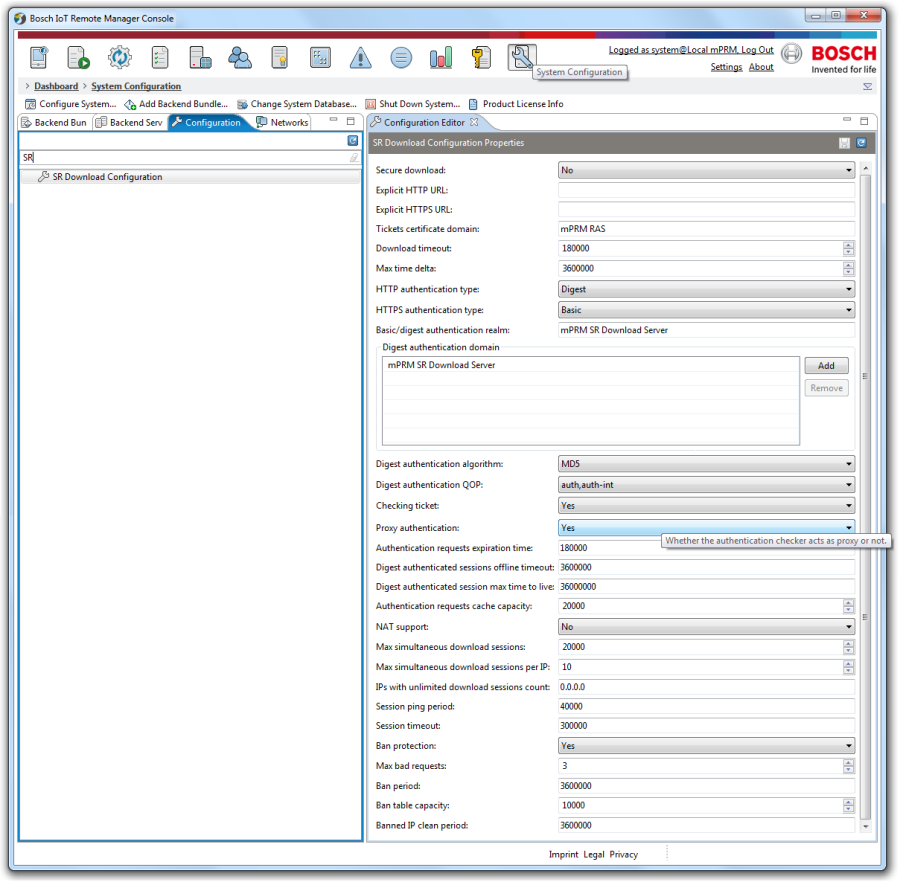
Figure 25: . Download Server configurations.
The following settings are available:
- Secure download: No/Yes – Select if HTTP or HTTPS will be used
- Explicit HTTP URL – Specifies explicitly the URL where the HTTP server is
- Explicit HTTPS URL – Specifies explicitly the URL where the HTTPS server is
- Tickets certificate domain – The certificate domain the download manager will use
- Download timeout – The Time for expiration of download tasks in milliseconds
- Max time delta – Maximum difference between the clocks of the client and server in milliseconds
- HTTP authentication type: Digest/Basic/Anonymous – The type of authentication when the client connects through HTTP
- HTTPS authentication type: Digest/Basic/Anonymous – The type of authentication when the client connects through HTTPS
- Basic/Digest Authentication Realm – The realm of the Download Server for Basic or Digest authentication.
- Digest authentication algorithm: MD5/MD5sess – The authentication algorithm used for digest authentication
- Checking ticket: Yes/No – Enable/disable ticket checking Proxy authentication: Yes/No – Specifies weather the authentication checker acts as a proxy
- Authentication request expiration time – in milliseconds
- Digest authenticated session offline timeout – in milliseconds
- Digest authenticated session max time to live – in milliseconds
- Authentication requests cache capacity – FIFO queue
- NAT support: Yes/No – If the server URL is unknown to the device, use NAT to support download URL creation
- Maximum simultaneous download sessions
- Maximum simultaneous download sessions per IP
- IPs with unlimited session count – IPs who's session count is unlimited bu the server
- Session ping period – The period of time which the server uses to check if sessions have expired in milliseconds
- Session timeout – The time after which the session is considered expired in milliseconds
- Ban protection: Yes/No – Enables/Disables ban protection
- Max bad requests – The maximum number of bad requests an IP can make before it's banned
- Ban period – The period for which an IP will stay banned in milliseconds
- Ban table capacity – The number entries in the table where the banned IPs are kept
- Banned IP clean period – The period of time after which the banned table is cleaned of banned IPs
Download Policy Configuration
If the configuration is set as:
- CHECKING_TICKET_ENABLED=false,
then the anon parameter is false by default. In that case the user authentication is obligatory.
User Right to Download all Software Repository Components
In order to give the user rights to download all components provided by the SR, the configuration has to be set as follows:
- CHECKING_TICKET_ENABLED = true
The request parameter anon in the download URL has to be true.
User Right to Download Software Repository Components Accessed by the User
The configuration has to be set as follows:
- HTTP_AUTH_TYPE = 1(Basic)/2(Digest)
- HTTPS_AUTH_TYPE = 1(Basic)/2(Digest)
and the request parameter anon in the download URL has to be false or:
- CHECKING_TICKET_ENABLED = false.