Contains information about creating a database service.
To define your own logical database in RM, you should implement a Database Service to manage specific data on a database server. Such a Database Service can benefit from the mechanism for database server configuration offered by RM. In addition, other modules can configure a Database Service if needed.
For more information about the basic principles of the RM database access, refer to Basic Concepts.
Basic Principles
Following is the description of the database configuration and connection processes performed by RM and the components involved in them.
The components participating in the configuration and connection of a Database Service are:
- RM Configuration Manager - Represents the part of RM, which handles system configuration including configuration of Database Services.
- Database Connection Manager - Represents the module, which provides and manages connections to a particular database server. There is a different database connection manager for a specific database server type.
- Configurable DB Service - Should be registered in a backend host framework to show that the Database Service wants to be configured via RM. The service's configuration parameters can include the name and type of the server to place the database on as well as additional ones.
- Connection User - Should be registered in a backend host framework to indicate requesting a connection to a particular database server.
- Custom Database Service - Should be registered in a backend host framework to provide other bundles with custom methods for using the database associated with the Database Service.
Instances of the services will be copied to all backend hosts, on which the related Database Service is deployed.
The following figure shows the sequence of operations which take place during Database Service configuration.
RM database configuration and connection mechanism: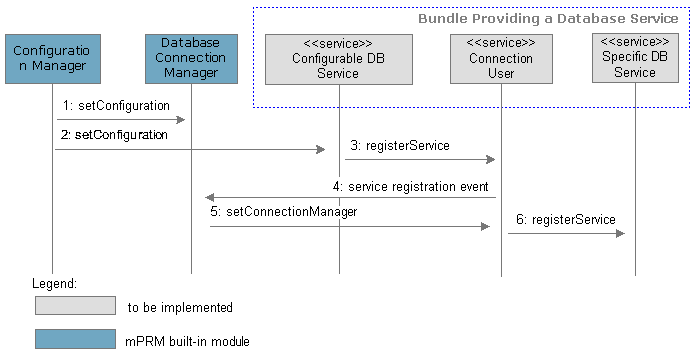
- During the RM configuration process the system administrator defines database servers, which can be treated as collections of named connection properties. The database server connection properties are grouped by their server type and sent to the appropriate database connection manager (determined through a "server type" service registration property). On request, the database connection manager will use the connection properties to provide a ready or open a new connection to the server when needed.
- On service registration or on receiving a configuration request, the configuration manager configures the exported Configurable DB Services according to their registration properties. The configuration, the configuration manager passes, contains the name of the database server(s) to be used by the Database Service besides the other defined properties.
- Using the received configuration, the Configurable DB Service registers a Connection User service, which can be further used to get a connection to the database server of interest.
- The database connection manager receives an event about the Connection User service registration and reads the name of the target database server.
- The database connection manager contacts the Connection User service offering a connection to the corresponding database server.
- The Database Service can now register a specific service for writing/reading data in/from a database server over the supplied connection. This service can be used by other bundles on a backend host framework for direct access to stored data.
Accessing the Database Service APIs
The APIs for developing custom Database Services are available only to bundles deployed on a backend OSGi framework.
Implementing a Configurable DB Service
To become configurable, a Database Service must implement a Configurable DB Service (com.prosyst.mprm.backend.database.ConfigurableDBService) on a backend host framework with a registration property indicating the logical database it handles.
The configuration properties of a Database Service form a dictionary(ies) whose ID(s) should be provided at service registration, and which should be declared in a database configuration XML(s). If there is no change in a Database Service configuration on part of the system administrator, RM sends the Database Service a dictionary generated out of the configuration XML with the default values declared there.
Declaring Configuration Properties
A Database Service should provide meta data describing its configuration properties. The meta data tells the system how to treat configuration parameters. Configuration meta data structure is defined by the Metatype Specification in the OSGi Service Platform Specification Release 3.0. The configuration meta data of a Database Service should be placed in an XML.
A Database Service can have one or more dictionaries of configuration properties, each identified through a service Persistent IDentity. A separate XML should keep the meta data associated with a configuration dictionary (with a service PID). The meta data of a property includes the property ID, name, type and cardinality.
RM also supports database factory configurations for definition and generation of multiple Database Service configuration instances. A configuration factory is also represented by a service PID, called Factory PID (FPID) for conciseness. Each singleton configuration, produced out of a factory configuration, is automatically assigned a PID. In this case, one configuration XML holds the meta data of the configuration factory and the configurations to be initially loaded.
When being configured, a Database Service receives a dictionary/dictionaries with the new values of its declared configuration properties. The properties are identified by their IDs. The number of dictionaries depends on the number of declared service PIDs for the Database Service.
Database Server Properties
To be able to move its data to a database server(s), specified in an RM-universal way, a Database Service should declare and process the properties with the following IDs:
- For using only an RDBMS server
- dbserver.name.JDBC - Represents the name of the database server holding the Database Service data.
- When using Mongo DB storage:
- dbserver.type - Represents the data storage type.
- dbserver.name.JDBC - Represents the name of the RDBMS server.
The properties above have analogous static fields in the com.prosyst.mprm.admin.system.DatabaseServerConfiguration interface (see Useful Constants for more details about the fields).
These properties, as well as custom ones, can be easily set from the console. See User Guide for more details.
A Database Service can have other configuration properties if needed.
Service Registration Properties
A Configurable DB Service must be registered with the following properties:
com.prosyst.mprm.admin.system.DatabaseConfiguration.DATABASE_NAME- Indicates the logical database name, which must be unique within the scope of an RM system. RM uses the database name to locate and pass configuration parameters to a Database Service.ConfigurableDBService.DB_SERVICE_PID- Indicates the service PID(s) or the FPID of the Database Service configuration properties.
It is possible to provide other service registration properties if needed by other bundles on a backend host framework.
Database Configuration XML and Manifest Headers
The meta data of Database Service configuration properties is kept in a database configuration XML whose location must be specified in the bundle manifest with the Database-Config or the Database-FactoryConfig header.
DTD
The database configuration XML has the DTD defined for the OSGi Configuration Admin implementation in Bosch IoT Gateway Software. The DTD contains elements, whose meaning is defined by the OSGi Metatype Specification.
For more information on the DTD elements, refer to the documentation of the Bosch IoT Gateway Software Framework package (accessible after login).
Database configuration DTD:
<?xml version="1.0" encoding="UTF-8"?><!--DTD generated by XML Spy v3.0.7 NT (http://www.xmlspy.com) XML meta data representation of one MetaTypeProvider --><!ELEMENT metatype-provider (objectclass, configobject*)><!ELEMENT objectclass (locale, name, id, description, icon*, (attribute+))><!ELEMENT configobject (id, (attribute*))><!ELEMENT locale (#PCDATA)><!ELEMENT name (#PCDATA)><!ELEMENT id (#PCDATA)><!ELEMENT description (#PCDATA)><!ELEMENT icon (#PCDATA)><!ATTLIST objectclass load CDATA #IMPLIED><!ATTLIST icon size CDATA #REQUIRED><!ELEMENT attribute (name?, id, description?, type?, cardinality?, key*, value?, (selected-pairs)?)><!ATTLIST attribute modifier CDATA #REQUIRED load CDATA #IMPLIED><!ELEMENT selected-pairs ((scalar, scalar)+)><!ELEMENT key EMPTY><!ELEMENT cardinality (#PCDATA)><!ENTITY int "int"><!ENTITY byte "byte"><!ENTITY boolean "boolean"><!ENTITY string "string"><!ENTITY long "long"><!ENTITY short "short"><!ENTITY char "char"><!ENTITY double "double"><!ENTITY float "float"><!ENTITY biginteger "biginteger"><!ENTITY bigdecimal "bigdecimal"><!ELEMENT type (#PCDATA)><!ATTLIST key name CDATA #REQUIRED value CDATA #REQUIRED><!ELEMENT value (scalar | array)><!ELEMENT array (scalar+)><!ELEMENT scalar (#PCDATA)>It is recommended that the properties in a configuration XML have default values. In this way, the Database Service will be able to function properly without the need for the system administrator to explicitly configure it.
When using the RM-manageable database server properties, include the following attributes in the database configuration XML (listed by property ID):
- dbserver.type
- Should be set if Mongo DB will be used.
- Type: string
- Cardinality: 0
Possible values: A list of dot-separated database server types.
- one or more dbserver.name.<type>
- Should be specified if the dbserver.type property indicates Mongo DB storage.
- Type: string
- Cardinality: 0
- one or more <type>.<property>
- Optional. It is specific for the associated database server type.
- Cardinality: 0
An example database configuration XML:
<?xml version="1.0" encoding="UTF-8"?><!DOCTYPE metatype-provider SYSTEM "conf.dtd"><metatype-provider> <objectclass load="true"> <locale>en</locale> <name>Users Database Configuration</name> <id>mprm.userdb.pid</id> <description>RM Users Database configuration.</description> <attribute modifier="req"> <name>Type</name> <id>dbserver.type</id> <description>Database server type.</description> <type>&string;</type> <cardinality>0</cardinality> <value> <scalar>JDBC</scalar> </value> <selected-pairs> <scalar>JDBC Server Mode</scalar> <scalar>JDBC</scalar> </selected-pairs> </attribute> <attribute modifier="req"> <name>JDBC Server Name</name> <id>dbserver.name.JDBC</id> <description>JDBC database server name.</description> <type>&string;</type> <cardinality>0</cardinality> </attribute> </objectclass></metatype-provider> Database-Config and Database-FactoryConfig Headers
Database-Config: xml=<path_to_xml_file>;pid=<config_object_pid>;database=<database_name>; scope={common | ms} Database-FactoryConfig: xml=<path_to_xml_file>; pid=<config_object_factory_pid>;database=<database_name>; scope={common | ms}
where:
- xml is the path to the database configuration XML within the bundle JAR.
- pid is the service PID of the configuration dictionary whose meta data is in the XML. For a factory configuration, this is the service Factory PID.
- database is the logical name of the database under which the Configurable DB Service is registered in the backend framework.
- scope is the Database Service scope, which can be common - all Database Service copies in an RM system have the same configuration, and ms - the Database Service on each management server can have different configuration.
For example, a Database-Config manifest header may contain the following:
Database-Config: xml=dbconfig/userdb.xml;pid=mprm.userdb.pid;database= Example Database;scope=common
Processing Passes Configurations
A Database Service receives its configuration properties through the setConfiguration method of the ConfigurableDBService interface. For each service PID there, the setConfiguration method contains a separate java.util.Dictionary.
Database Server Parameters
On Database Service configuration, RM provides values of the database server properties, declared for the service in its configuration XML.
For example, for an RDBMS storage the dictionary of the setConfiguration method will contain the dbserver.name.JDBC property with the database server name configured by the system administrator.
Useful Constants
The com.prosyst.mprm.admin.system.DatabaseServerConfiguration contains constants representing the IDs of database server-related configuration properties.
DatabaseServerConfiguration Constant | Value |
|---|---|
|
|
|
|
|
|
|
|
|
|
When used in combination, the fields above allow you to easily detect a property ID in the configuration dictionary. For example, the
DB_SERVER_NAME + "." + DB_SERVER_TYPE_JDBC
forms the dbserver.name.JDBC property ID, whose meaning was previously described.
The database server names can be used as service registration properties for the Connection User services.
Implementing a DB Service Using the Database Helper
You can find the Database Helper utility (com.prosyst.mprm.util.jdbc.DatabaseHelper) in system.db-conn.jdbc.utils.
Overview
The Database Handler facilitates the creation of database services into the RM database framework. Although the class does not have any abstract methods, it is declared as abstract, because it should be used with extending. A bundle that wants to use this class as a utility for interaction with the RM database framework should extend the class and provide the database service specific functionality. The DatabaseHelper extends DatabaseUtils hence the extender could easily use the latter's methods and constants without referring to the declaring class.
Setup
1. Specify the database interface
interface MyDatabaseService() { String put( String name, int years);}2. Implement the database interface and extend the DatabaseHelper
interface MyDatabaseServiceImpl() extends DatabaseHelper implements MyDatabaseService { String put( String name, int years) { // do something }}3. Pack the bundle.
The properly created bundle should:
- import
DatabaseHelper - contain
MyDatabaseServiceImpl(MyDatabaseService could be inside or outside the bundle that is used through import) - have proper database config header into the manifest:
Database-Config: xml=db/mydbservice.xml;pid=prm.mydbservice.pid;database=My DB Servce;scope=common
- contain the table creator SQL. It should be /db/create-mydbservice-tables.sql i.e. it should follow the pattern:
/db/create-<db description xml filename without extension (the xml property from the Database-Config)>-tables.sql
- declare MyDatabaseServiceImpl as a bundle activator. There is no need to implement start or stop methods. The default implementation for this is made into the extended DatabaseHelper.
In this case the DatabaseHelper will register on behalf of the extender a database service into the RM database framework and will register an OSGi service with the MyDatabaseService interface. The only necessary thing for the service implementer to do is to implement the service specific methods.
Database Helper Behaviour Customization
The Database Helper behaviour could be highly customized. The extender should:
- override its
start/stop (BundleContext)methods. This could be useful if there is need for registering other services, listeners, trackers. In this case the extender must not forget to call super.start/stop (BundleContext) methods in order to allow the DatabaseHelper to do its work. - override
initProperties()method and prevent the DatabaseHelper from initializing it from the Database-Config header. In this case the extender must provide specific database details by setting the databaseProps by itself or overridinggetDatabasePid(),getLogicalDatabaseName()andgetCreateTablesEntries(). - specify database version. The default version declared by
getDatabaseVersion()is DEFAULT_DATABASE_VERSION. However the extender could overridegetDatabaseVersion().Then the extender's version will be used. - specify the registered service interfaces by overriding
getInterfaceNames() - do some activities when the database service becomes (un)operational:
- Just before the service becomes operational the
<b>start()</b>methods is called. The default implementation just registers the database service. If the extender wants to do something additional it could overridestart()DatabaseHelper to register database service it should callsuper.start()_). - When the service becomes unoperational the
stop()methods is called. The default implementation just unregisters the database service. If the extender wants to do something additional it could override<b>stop()</b>method. If the extender wantsDatabaseHelperto unregister the database service it should callsuper.stop().
- Just before the service becomes operational the
Registering a Connection User Service
To request a connection to a database server (can be specified in a configuration property), a Database Service must provide a Connection User service. There are separate interfaces for Connection User services depending on the database server type.
JDBC Connection User Service
For connection to an RDBMS over JDBC, a Database Service must register a com.prosyst.mprm.backend.dbconnection.jdbc.DBConnectionUser service.
Service Registration Properties
com.prosyst.mprm.admin.system.DatabaseConfiguration.DATABASE_NAME- As previously described, this is the unique name of the database.com.prosyst.mprm.admin.system.DatabaseServerConfiguration.DB_SERVER_NAME- The name of the database server a connection is requested to. This property can be mapped to the one, provided in theConfigurableDBService.setConfiguration()method's dictionary for that database server.
Getting a Connection
The RDBMS connection manager pools a limited number of ready-to-use connections to a specific database server. An exported Connection User service receives access to this pool and can get a ready connection to the database server. All Database Services, using the same database server, share the same connection pool.
A connection pool contains one read connection and up to (connection limit - 1) read-write connections.
A Database Service can get a connection to an RDBMS from the ConnectionManager instance, which RM passes when calling the setConnectionManager method of DBConnectionUser. The ConnectionManager instance is associated with a specific database server and maintains the pool of connections to it.
The Database Service can call the getConnection method of ConnectionManager, which returns a java.sql.Connection to the RDBMS server.
You must use only the data types supported by the RDBMS database connection manager. They are indicated as fields of the ConnectionManager interface.
A Database Service usually creates a collection of SQL tables and writes specific data in it. Developers can benefit from the mechanism for creation and maintenance of tables offered by the Database Access catalog. To write an entry in the catalog and validate the format of a table, the Database Service can use the following sequence of operations:
1. Write a text file containing the SQL statements for creating tables and place it in the bundle JAR.
2. Open that file, most conveniently by using the getClass().getResourceAsStream() sequence.
3. Validate the table format with the format of previously created tables (if any) by calling the validateTables method of ConnectionManager.
- If the tables do not exist, then call the
createTablesmethod. - If the tables are not compatible, perform the correct activities.
4. If the tables are created successfully, or exist and are compatible, call the writeDBCatalogueEntry method to update the entry information about the Database Service in the catalog.
After you obtain a connection to a database server, you can proceed with registering a specific service for database access.
Providing a Custom Service for Data Management
Finally, a Database Service may provide a specific service for access to the database it manages.
Extending RM with a Custom Storage Type
If you want to extend RM storage types (RDBMS and directory) with a new one, you have to provide a custom database connection manager. Your connection manager can maintain a connection pool for each database server.
You can also introduce a custom database connection user service interface (such as com.prosyst.mprm.backend.dbconnection.jdbc.DBConnectionUser) for the specific storage type. The connection manager can then pass connections/connection pools to Database Services through the connection user services registered in the backend framework.
To develop a custom database connection manager, you must implement the com.prosyst.mprm.backend.dbconnection.ConfigurableDBConnectionService interface and register it as a service in the backend framework. Each ConfigurableDBConnectionService service must have the DatabaseServerConfiguration.DB_SERVER_TYPE registration property indicating the storage type the connection manager is associated with.
The ConfigurableDBConnectionService interface defines the following methods:
setConfigurations
This method is called on host reboot due to modifications made on the system configuration on part of the system administrator, a remote access application or a bundle.
Through this method, the database connection manager receives the connection properties of all database servers in the system, including new and already-defined ones.
If the database connection manager employs the connection user model (as it is for RDBMS and directory storage), it can supply the available connection users with updated connections or connection pools by using the information passed through the setConfigurations method. The manager can check if there are ready connection pools or connections to the requested database servers and create new ones if needed.
testConnection
The testConnection method is called when a remote access application or a bundle needs to examine the connection to the target database server. If implemented to do some real work, this method can try to open and close a test connection to the database server using the connection properties, passed on method invocation.
If a Database Access catalog for each database server is supported, testConnection can return a DBCatalogueInfo object for each RM database on the server.
writeDBCatalogEntry
Can be implemented if the custom database connection manager is to maintain a Database Access catalog. This method can be invoked by Database Services or other bundles to record entries in the catalog.
Deployment and Update
A Database Service should be packed in an OSGi bundle. The bundle JAR must hold the class files, the database configuration XML(s) and the manifest associated with the service.
The Database Service bundle must be installed on RM with the console either as a standalone bundle or in a backend bundle package. In this way the system will recognize the Database Service and will provide it with configuration data and database server connection. Subsequently, Database Service copies will be deployed on the specified target backend hosts. See the User Guide for details on installing standalone backend bundles and packages.
Updates of a Database Service (namely, of its bundle) must be done again through the console.
Examples
Example Database Service
Following is a simple Database Service, let's call it "Example Database Service".
The Example Database Service handles a logical database, called "Example Database", which is to be placed only on an RDBMS server. It declares a single dictionary of configuration properties under the exampledb.pid PID. The service bundle contains the required database configuration XML and this XML is specified in the Database-Config manifest header along with the database name, all in the format discussed earlier in this document.
The Example Database Service description covers only the Java code necessary to use the database access mechanism of RM. Examples for the database configuration XML and manifest header are provided in the Database Configuration XML section of this document.
The following listing shows the ExampleDBService class, implementing and registering Configurable DB Service and Connection User services in the backend host framework. It also registers a specific database access service (published under a hypothetical interface called ExampleDatabase).
Registering Configurable DB, Connection User and Specific Database Access Services:
import org.osgi.framework.BundleActivator;import org.osgi.framework.BundleContext;import org.osgi.framework.ServiceReference;import org.osgi.framework.ServiceRegistration;import org.osgi.framework.BundleException;import org.osgi.framework.Constants;import com.prosyst.mprm.backend.database.ConfigurableDBService;import com.prosyst.mprm.backend.database.DatabaseException;import com.prosyst.mprm.backend.dbconnection.jdbc.DBConnectionUser;import com.prosyst.mprm.backend.dbconnection.jdbc.ConnectionManager;import com.prosyst.mprm.admin.system.DatabaseServerConfiguration;import com.prosyst.mprm.admin.system.DatabaseConfiguration;import java.util.Dictionary;import java.util.Hashtable;import java.util.Enumeration;import java.sql.*;import java.io.InputStream;public class ExampleDBService implements BundleActivator, ConfigurableDBService, DBConnectionUser { private BundleContext bc; private ServiceRegistration regConfigurableDBService; private ServiceRegistration connUserServiceReg; private ServiceRegistration exDatabaseReg; static final String LOGICAL_DATABASE_NAME = "Example Database"; private static final int SERVICE_VERSION = 1; private static final String DB_SERVICE_CLAZZ = ConfigurableDBService.class.getName(); private static final String DB_CONNECTION_USER_CLAZZ = DBConnectionUser.class.getName(); private static final String EXAMPLE_DB_CLAZZ = ExampleDatabase.class.getName(); private Dictionary[] configuration; private static ConnectionManager connManager; private ExampleDatabaseImpl exampleDatabase; public void start(BundleContext bc) throws Exception { this.bc = bc; try { // Registering the ConfigurableDBService that is associated // with the "Example Database" database // and declaring the "exampldb.pid" // that identifies Database Service configuration dictionary. Hashtable properties = new Hashtable(); properties.put(DatabaseConfiguration.DATABASE_NAME, LOGICAL_DATABASE_NAME); properties.put(DB_SERVICE_PID, "exampledb.pid"); regConfigurableDBService = bc.registerService(DB_SERVICE_CLAZZ, this, properties); } catch (Exception e) { throw new Exception("[Simple DB Service] Error in starting bundle:" + e.getMessage()); } } public void stop(BundleContext bc) throws Exception { try { if (regConfigurableDBService != null) { regConfigurableDBService.unregister(); regConfigurableDBService = null; } } catch (Exception e) { throw new Exception("[Simple DB Service] Error in stopping bundle:" + e.getMessage()); } } // Method to be implemented in a ConfigurableDBService service public void setConfiguration(Dictionary[] configuration) throws DatabaseException { this.configuration = configuration; unregisterAsDBConnectionUser(); if (configuration != null) { registerAsDBConnectionUser(); } } private void registerAsDBConnectionUser() { Object serverName = getDBServerName(); if (serverName != null){ Hashtable properties = new Hashtable(); properties.put(DatabaseServerConfiguration.DB_SERVER_NAME, serverName.toString()); properties.put(DatabaseConfiguration.DATABASE_NAME, LOGICAL_DATABASE_NAME); connUserServiceReg = bc.registerService(DB_CONNECTION_USER_CLAZZ, this, properties); } } private void unregisterAsDBConnectionUser() { if (connUserServiceReg != null) { connUserServiceReg.unregister(); connUserServiceReg = null; } } private Object getDBServerName() { Object o = null; String dbServerName = DatabaseServerConfiguration.DB_SERVER_NAME + "." + DatabaseServerConfiguration.DB_SERVER_TYPE_JDBC; if (configuration.length > 0) { o = configuration[0].get(dbServerName); } return o; } // Method to be implemented in a DBConnectionUser service public void setConnectionManager(ConnectionManager connectionManager) throws DatabaseException { try { connManager = connectionManager; InputStream in = getClass().getResourceAsStream("CREATE_TABLES.txt"); int result = connManager.validateTables(in); in.close(); if(result == ConnectionManager.TABLES_INCOMPATIBLE) { return; } else if (result == ConnectionManager.TABLES_NOT_EXIST) { in = getClass().getResourceAsStream("CREATE_TABLES.txt"); connManager.createTables(in); in.close(); } connManager.writeDBCatalogEntry(LOGICAL_DATABASE_NAME, String.valueOf(SERVICE_VERSION)); exampleDatabase = new ExampleDatabaseImpl(connManager); exDatabaseReg = bc.registerService(EXAMPLE_DB_CLAZZ, exampleDatabase, null); } catch (Exception exc) { throw new DatabaseException ("[Example Database]: Can't set connection manager!", exc); } } public void unsetConnectionManager() { connManager = null; }}When the Database Service is activated, RM sends it the name of the database server holding the system database by calling the setConfiguration method implemented from the ConfigurableDBService interface. If the system administrator changes the database server, the Database Service will automatically receive the name of the new database server again through the setConfiguration method .
If a correct configuration is received, then ExampleDBService registers a JDBC Connection User service requesting connection to the database server, whose name has been earlier received. By invoking the setConfigurationManager method, the database connection manager automatically supplies ExampleDBService with the ConnectionManager instance, responsible for the corresponding database server.
Having received the ConnectionManager instance, ExampleDBService uses it to create its own table(s), benefiting from the validation support of the Database Service catalog.
Finally, if the table is created successfully on the database server, ExampleDBService registers the ExampleDatabase service in the backend host framework.
Example Database Connection Manager
This chapter provides a simple example of extending RM storage types by supplying a custom database connection manager.
The connection manager is represented by the test.mprm.db.ftpconnection.FTPConnManager class (see the following listing "Implementing a Database Connection Manager"). It introduces a storage over FTP. FTPConnManager registers a ConfigurableDBConnectionService service in the backend framework with a registration property DatabaseServerConfiguration.DB_SERVER_TYPE equal to "FTP".
The example connection manager employs a connection user mechanism for sending connection pools to requesting Database Services. To receive a connection pool, a Database Service should register a test.mprm.db.ftpconnection.FTPConnectionUser service in the backend framework with the DatabaseServerConfiguration.DB_SERVER_NAME indicating the database server of interest.
The connection pools in this example are represented by the FTPConnectionPool class, which is simplified for more conciseness.
ConfigurableDBConnectionService Implementation
The FTPConnManager class associates each database server with a specific connection pool.
When the bundle holding the example connection manager is installed, the FTPConnManager class checks for available FTPConnectionUser services and provides them with connection pools. It also registers a service listener for FTPConnectionUser service registration events. Therefore, newly registered FTPConnectionUser service will receive connection pools as well.
When the setConfigurations method is called on system reboot, for each database server FTPConnManager creates a new connection pool and sends it to the interested connection users.
Implementing a Database Connection Manager:
package test.mprm.db.ftpconnection;import org.osgi.framework.BundleActivator;import org.osgi.framework.BundleContext;import org.osgi.framework.ServiceRegistration;import org.osgi.framework.ServiceReference;import org.osgi.framework.BundleException;import org.osgi.framework.ServiceListener;import org.osgi.framework.ServiceEvent;import com.prosyst.mprm.common.ManagementException;import com.prosyst.mprm.backend.database.DatabaseException;import com.prosyst.mprm.backend.dbconnection.ConfigurableDBConnectionService;import com.prosyst.mprm.admin.system.DatabaseServerConfiguration;import com.prosyst.mprm.admin.system.DatabaseConfiguration;import com.prosyst.mprm.data.system.DBCatalogueInfo;import java.util.Dictionary;import java.util.Hashtable;public class FTPConnManager implements BundleActivator, ConfigurableDBConnectionService, ServiceListener { private BundleContext bc; /* Variables for ConfigurableDBConnectionService service registration */ private ServiceRegistration regConfigurableDBConnectionService = null; private final static String DB_CONNECTOR_CLAZZ = ConfigurableDBConnectionService.class.getName(); /* Variables representing FTP DB server connection properties */ final static String FTP_HOST = "ftp.host"; final static String FTP_PORT = "ftp.port"; final static String FTP_USER = "ftp.user"; final static String FTP_PASSWORD = "ftp.password"; /* Holds the connection pools associated with a specific database server */ private static Hashtable connPools = new Hashtable(); /* Variables for locating database connection users */ final static String SERVICE_FTPCONNECTIONUSER = FTPConnectionUser.class.getName(); private static final String FILTER = "(objectClass=" + SERVICE_FTPCONNECTIONUSER + ")"; /* BundleActivator's start method */ public void start(BundleContext bc)throws Exception { this.bc = bc; try { // Setting appropriate connection pools to // available connection users ServiceReference[] refFTPConnectionUsers = bc.getServiceReferences(SERVICE_FTPCONNECTIONUSER, null); for (int i = 0; i < refFTPConnectionUsers.length; i++) { setPoolToConnUser(refFTPConnectionUsers[i]); } // Watching for new connection users bc.addServiceListener(this, FILTER); // Registering the ConfigurableDBConnectionService service // in the backend framework with storage type "FTP" Hashtable regProps = new Hashtable(); regProps.put(DatabaseServerConfiguration.DB_SERVER_TYPE, "FTP"); regConfigurableDBConnectionService = bc.registerService(DB_CONNECTOR_CLAZZ, this, regProps); } catch (Exception e) { dump("[FTPConnManager]: Error in start method: "+ e.getMessage()); throw e; } } /* BundleActivator's stop method */ public void stop(BundleContext bc)throws Exception { bc.removeServiceListener(this); try { if (regConfigurableDBConnectionService != null) { regConfigurableDBConnectionService.unregister(); regConfigurableDBConnectionService = null; } } catch (Exception e) { dump("[FTPConnManager]: Error in stop method: "+ e.getMessage()); throw e; } } /* Called when there is a new connection user service in the backend framework */ public void serviceChanged(ServiceEvent se) { if (se.getType() == ServiceEvent.REGISTERED) { ServiceReference refFTPConnectionUser = bc.getServiceReference(SERVICE_FTPCONNECTIONUSER); if (refFTPConnectionUser != null) { //Setting a connection pool for the newly registered connection user service setPoolToConnUser(refFTPConnectionUser); } } } /* Common method for printing the stack * traces of exceptions and logging errors * in the system output. */ public static void dump(String str) { System.out.println(str) } /* Implemented to check if there is a ready pool * allocated for the database server. */ public void setConfigurations(String string, Dictionary[]configurations) { if (configurations != null) { for (int i = 0; i < configurations.length; i++) { String dbServerName = (String)configurations[i].get(DatabaseServerConfiguration.DB_SERVER_NAME); if (dbServerName != null) { pool = createNewPool(configurations[i]); connPools.put(dbServerName, pool); // Notifying the interested database connection users notifyConnectionUsers(pool, dbServerName); } } } } /* Not implemented for conciseness */ public DBCatalogueInfo[] testConnection(Dictionary serverConfiguration) throws ManagementException { return null; } /* Not implemented for conciseness */ public void writeDBCatalogEntry(Dictionary serverConfiguration, String databaseName, String systemId, String version) throws DatabaseException { } /* Creates a new pool with connections to the database server */ private FTPConnectionPool createNewPool(Dictionary ftpServerConfiguration) { String host = (String)ftpServerConfiguration.get(FTP_HOST); String port = (String)ftpServerConfiguration.get(FTP_PORT); String user = (String)ftpServerConfiguration.get(FTP_USER); String password = (String)ftpServerConfiguration.get(FTP_PASSWORD); return new FTPConnectionPool(host, port, user, password); } /* Notifies the connection user services. * interested in the storing data * on the specified database server, * that there is a new pool being created. */ private void notifyConnectionUsers(FTPConnectionPool pool, String ftpServerName){ String connUserClazz = FTPConnectionUser.class.getName(); ServiceReference[]sRef = null; try { sRef = bc.getServiceReferences(connUserClazz, "(" + DatabaseServerConfiguration.DB_SERVER_NAME + "=" + ftpServerName + ")"); } catch (Exception exc) { exc.printStackTrace(); } if ((sRef != null)) { for (int i = 0; i < sRef.length; i++) { setPoolToConnUser(sRef[i]); } } } /* Destroys the specified pool. */ private void destroyPool(FTPConnectionPool pool) { pool = null; } /* Passes the appropriate connection pool to the interested connection users. */ private void setPoolToConnUser(ServiceReference refFTPConnUsers) { String dbServerName = (String)refFTPConnUsers.getProperty(DatabaseServerConfiguration.DB_SERVER_NAME); if (dbServerName != null) { FTPConnectionPool pool = (FTPConnectionPool)connPools.get(dbServerName); if (pool != null) { FTPConnectionUser ftpConnUser = (FTPConnectionUser)bc.getService(refFTPConnUsers); ftpConnUser.setConnectionPool(pool); } else { dump("[FTPConnManager]: No connection to the requested DB server!!!"); } } }}Database Connection Pool Implementation
The FTPConnectionPool class, representing connection pools in this connection manager example, does not really provide connections to an FTP server, but is only used to illustrate the connection manager development process.
An example connection pool:
package test.mprm.db.ftpconnection; public class FTPConnectionPool { public String host = null; public String port = null; public String user = null; public String password = null; . . . public FTPConnectionPool(String host, String port, String user, String password) { System.out.println("[FTPConnManager]: NEW FTP CONNECTION POOL!!!"); this.host = host; this.port = port; this.user = user; this.password = password; // Opening limited number of connections to a target FTP server. . . . }} Database Connection User Interface and Implementation
As it was mentioned above, the example connection manager sends connection pools to Database Services by calling their FTPConnectionUser services in the framework. The following two listings show the FTPConnectionUser interface and its simple implementation, which requests connection to a server called "FTP Server". This document does not include the source code declaring the FTPConnectionUser implementation as a configurable Database Services just for conciseness.
The FTPConnectionUser interface:
package test.mprm.db.ftpconnection;public interface FTPConnectionUser { public void setConnectionPool(FTPConnectionPool connectionPool);}An FTPConnectionUser implementation:
import org.osgi.framework.BundleActivator;import org.osgi.framework.BundleContext;import org.osgi.framework.ServiceRegistration;import org.osgi.framework.BundleException; import com.prosyst.mprm.admin.system.DatabaseServerConfiguration;import test.mprm.db.ftpconnection.FTPConnectionUser;import test.mprm.db.ftpconnection.FTPConnectionPool;import test.mprm.db.ftpconnection.FTPConnectionUser;import java.util.Hashtable;public class FTPConnectionUserImpl implements BundleActivator, FTPConnectionUser { private ServiceRegistration regFTPConnectionUserImpl = null; // Methods inherited from interface org.osgi.framework.BundleActivator public void start(BundleContext bc)throws Exception { Hashtable regProps = new Hashtable(); regProps.put(DatabaseServerConfiguration.DB_SERVER_NAME, "FTP Server"); try { regFTPConnectionUserImpl = bc.registerService(FTPConnectionUserImpl.class.getName(), this, regProps); } catch (Exception e) { dump("[FTPConnectionUser]Error in start method: "+ e.getMessage()); throw e; } } public void stop(BundleContext bc)throws Exception { try { if (regFTPConnectionUserImpl != null) { regFTPConnectionUserImpl.unregister(); regFTPConnectionUserImpl = null; } } catch (Exception e) { dump("[FTPConnectionUser]: Error in stop method: "+ e.getMessage()); throw e; } } public void setConnectionPool(FTPConnectionPool ftpcp) { dump("[FTPConnectionUser]: "+ ftpcp.host + "\t" + ftpcp.port); // Getting a connection to the target FTP server and storing data there . . . } /* Common method for printing the stack * traces of exceptions and logging errors * by com.prosyst.util.ref.Log. */ public static void dump(String str) { System.out.println(str); }}References
- Database Access - Conceptual Guide.
- Configurable Database Service API Documentation.
- Database Connection Manager API Documentation.
- JDBC Connection User API Documentation.