The Backup and Restore is enabled by activating the server and client backup and restore bundles.
On the RM
The backend support is wrapped in two bundles:
- File Transfer Backend Service, found in <RM_HOME>/packages/osgidm/osgidm.filetransfer.be.jar
- Backup and Restore Backend Service, found in <RM_HOME>/packages/osgidm/osgidm.backup.be.jar
On the OSGi Device
Make sure the Backup Admin on the device framework is enabled.
Install and start the following bundles:
- Backend File Transfer Service Agent, found in: <RM_HOME>/packages/osgidm/osgidm.filetransfer.agent.jar
- Backup and Restore Agent , found in: <RM_HOME>/packages/osgidm/osgidm.backup.agent.jar
Enabling "Backup and Restore" using the Console
- In case you register a new device in RM through the console:
When started Register OSGi Device wizard, in the Optional Administration Features dialog, select Backup and Restore Agent and File Transfer Service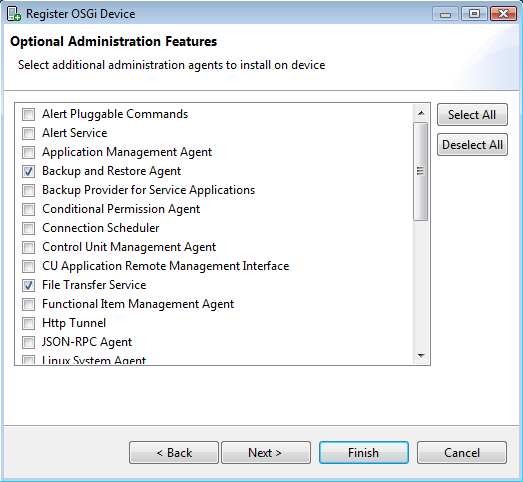
- In case it is already registered device:
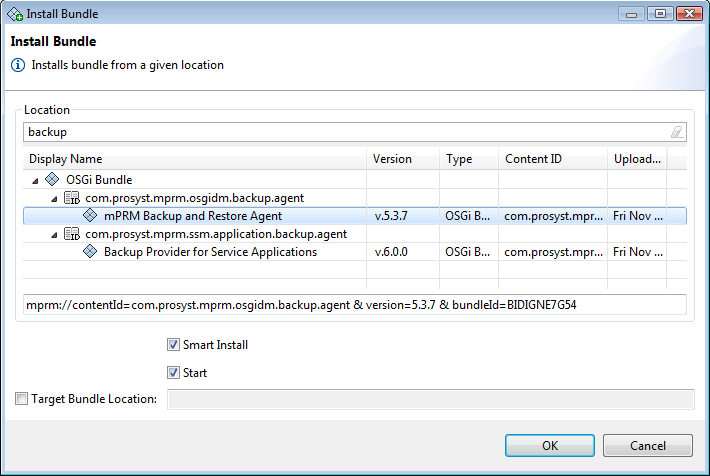
- on the console – install the bundle responsible for the Backup and Restore function: com.prosyst.mprm.osgidm.backup.agent. In the device tree select "Bundles" node, then "Install Bundle" option. A dialog opens. Locate the "RM Backup and Restore Agent" and click on it. Check the "Smart Install" option before starting the installation.
- re-provision the device – use "Initial Provisioning Properties" device sub-node to invoke "Register OSGi Device" wizard. Skip the first two dialogs, clicking "Next" and go to "Optional Administration Features". Select "Backup and Restore Agent" and "File Transfer Service" from the list of features and click "Finish".
- or by manually installing the appropriate bundle JAR files from the packages/osgidm folder directly on the OSGi framework:
- osgidm.filetransfer.agent.jar and
- osgidm.backup.agent.jar.