Overview
The primary purpose of this feature is to provide system configuration backup and restore after unexpected loss, corruption or deletion. Also to restore the device data to an earlier state.
Backup and Restore feature provides the end users a possibility to store the full set or a subset of the system configuration both on the device and on the RM. This configuration is to include general platform properties and settings, user configuration data and data provided by the partner application. To briefly overview the initial set of configuration data that is a target for the backup and restore procedure here is a list of system data that is included in it:
- User access accounts and credentials
- Devices and devices configuration
- Home areas / rooms and device distribution
- Home automation rules and commands
- Protocol level information and settings
The restored configuration would not include bundle configurations.
However to provide backup of the bundles, they must register their own instances of the BackupProvider interface as OSGi services. These services are used by the BackupAdmin service registered by the OSGi Framework when a data backup/restore operation is requested by some third-party entity.
The RM provides both on-the-device and on-the-backend storage for the backup file(s) to ensure that the data will be duplicated and the risk of data loss minimized.
Backup and Restore is based on Backup Admin Service which is an Gateway Software feature. It provides a way for bundles to persist their private data outside the OSGi cache and allows users to initiate a backup of their data (and its subsequent restoring).
For further clarifications of the process on the Gateway Software side and example code snippets showing how to use the BackupAdmin Service to initiate a backup (and later an import) process, please check the corresponding Gateway Software documentation about Backup Admin service. The following description is a just small part of the available information.
Backup Admin Service
The Backup Admin Service is designed with the following goals in mind:
- The processes of backing up and restoring data are media neutral. The API is the same, both when data is stored locally or on a remote site.
- Bundles can store data in any format they require. There are no limitations on the type of data stored and the formats used.
- The Backup Admin Service stores information about the version of the data that is being backed up and provides the version information to bundles when restoring the data.
Once backup is called it will collect the different data and will generate the backup file or will parse it and will distribute the data over the modules when the restore procedure is started.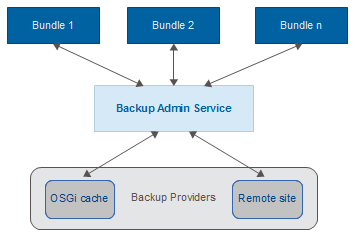
For a guidance on the console Backup and Restore functionality see Backup and Restore User guide.