The alert board module of RM allows bundles running on backend hosts or devices to create alert messages about problems or errors in their performance.
Overview
The Alert Board API allows RM system developers to:
- Create custom bundles capable of sending alerts to the alert board service. These could be bundles for the backend or bundles for devices.
- Read the available alerts on the alert board from custom bundles on the backend or an external application using RAC.
The alert board service of RM consists of one alert board instance on each backend server host. Each alert board supervises the created alerts on its backend host and on the devices managed by this host (if this is an MS). Bundles that need to generate alerts on certain events do this by registering a Supervisable (com.prosyst.mprm.alert.Supervisable) service. On the alert board, the alerts can be viewed by system administrators or retrieved by interested bundles through the local Alert Board Reader (com.prosyst.mprm.admin.alertboard.AlertBoardReader) service.
If you look at Figure 1 you will notice that both backend bundles and device bundles provide their alerts in the same way - by registering the Supervisable service interface. The alert board listens for the registration of such services on the local backend host, and periodically refreshes their alerts.
Bundles on the backend and external applications or systems (RM Console, J2EE application servers, etc.) interested in retrieving the available alerts can access the alert board using the Alert Board Reader service (they do not have direct access to the backend Alert Board services). The Alert Board Reader allows getting alerts using various filtering criteria. The information is transferred using the RM Connection Framework.
The alert board mechanism: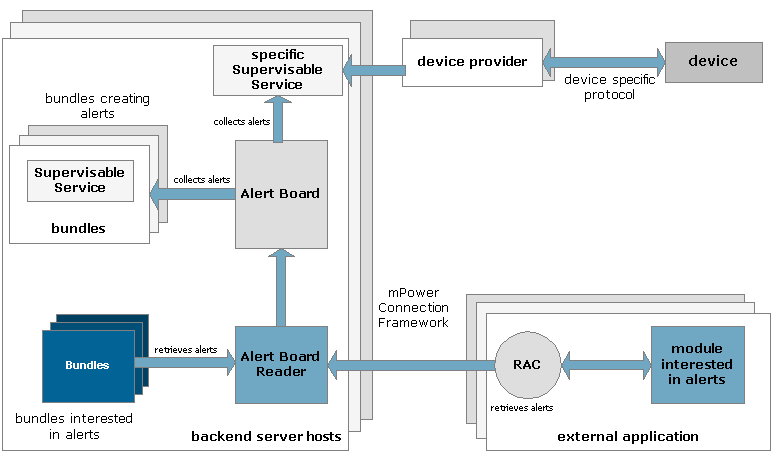
The RM system provides to developers two Java packages that enable alert handling:
com.prosyst.mprm.alert- this API enables custom bundles to fire alert messages (or delete alerts respectively)com.prosyst.mprm.admin.alert- this API enables retrieving alerts available on the alert board.
Alert Properties
All created alerts are represented by com.prosyst.mprm.alert.Alert objects. The Alert constructor exists in three variants:
Alert(int level, java.lang.String message)- This simples constructor allows specifying the severity level and description message of the alert. The target user is presumed to be the system user, and the alert source is generated with default properties.Alert(int level, java.lang.String[] targetUsers, java.lang.String message)- Allows specifying the severity level, target users and description of the alert. The alert source is generated with default properties.Alert(int level, java.lang.String[] targetUsers, java.lang.String message, java.util.Dictionary source)- Allows specifying all alert properties. The data contained in the Dictionary passed as source parameter will replace the default information available in the alert source.
More information about the properties of alerts is available in Alert Board Service Conceptual Guide.
Developing Custom Bundles that Generate Alerts
To create a custom (backend or device) bundle that can fire alerts on certain events, you need to register a com.prosyst.mprm.alert.Supervisable service in the framework. There are two ways to handle the publishing of the Supervisable service.
- The first way is to implement the
Supervisableinterface and register it with the framework. This interface has a single method - thegetAlerts()method.It must be implemented to return the appropriate alert for any malfunctioning. - The other, more convenient way, is to instantiate the
AlertUtilclass from the same package. This class provides implementation of theSupervisableinterface and handles its registration as an OSGi service with the framework.
The Alert Board Service listens for such services and periodically invokes their getAlerts() method to refresh their alerts on the alert board. The time period at which the Alert Board Service will refresh the alerts of a Supervisable service depends on the value of the Refresh Interval property of the alert configuration (see Alert Board Service Conceptual Guide for more information). This means that the alerts raised through the getAlerts() method will not be available immediately on the alert board but will appear after the alert board has invoked the getAlerts() method again.
This lag between the moment an alert is generated and the moment it appears on the alert board can be bypassed by invoking the setProperties method of the org.osgi.framework.ServiceRegistration object representing the Supervisable service. In such case, the alert board receives an event of type org.osgi.framework.ServiceEvent.MODIFIED, which forces the alert board to immediately call the getAlerts() method of the corresponding Supervisable service. This workaround is unnecessary if you decide to use the AlertUtil class instead of the Supervisable interface. In that case, the AlertUtil object automatically invokes setProperties and its alerts are raised on the board immediately.
Using the Supervisable Interface
The usage of this interface requires that your implementation of the getAlerts method will take care of firing alerts whenever the bundle needs human assistance or attention. Additionally, the implementation of the Supervisable interface must be registered as a service.
The following listing illustrates a sample bundle that needs the OSGi User Admin service for its proper functioning, and if the User Admin is cannot be obtained, it sends a critical level alert to all users from the administration group.
Creating alerts using the Supervisable interface:
import com.prosyst.mprm.alert.Alert;import com.prosyst.mprm.alert.Supervisable;import org.osgi.service.useradmin.UserAdmin;import org.osgi.framework.*;public class SupervisableTest implements Supervisable, BundleActivator { private ServiceRegistration supReg; private Alert[] myAlerts; private UserAdmin userAdmin; private ServiceReference uaRef; public Alert[] getAlerts() { return myAlerts; } public void start(BundleContext bc) throws Exception { supReg = bc.registerService(Supervisable.class.getName(),this,null); uaRef = bc.getServiceReference(UserAdmin.class.getName()); if(uaRef!=null) { userAdmin = (UserAdmin)bc.getService(uaRef); . . . //do some work with the successfully obtained User Admin } else { Alert criticalAlert = new Alert(Alert.CRITICAL_LEVEL_ERROR, new String[]{"administration"}, "A critical-error alert! The User Admin is unobtainable!", null); myAlerts = new Alert[]{criticalAlert}; } } public void stop(BundleContext bc) throws Exception { supReg.unregister(); myAlerts = null; }}Using the AlertUtil Class
The AlertUtil class provides useful methods for managing alerts. In addition, it handles the registration of the Supervisable service for you.
Basically, you can perform the following operations through the AlertUtil class:
- To send an alert to the alert board, use the
raise()method - To delete an alert from the alert board, use the
pullDown()method - To delete all alerts previously created by this
AlertUtilinstance, use theclearAll()method - To unregister the Supervisable service and stop sending alerts to the alert board, use the
destroy()method.
The getAlerts() method is not to be invoked by your bundles. It is inherited from the Supervisable interface and is called internally by the alert board to collect the alerts coming from the bundle.
You do not need to "manually" register a Supervisable service when using AlertUtil. However, the AlertUtil implementation does register such a service but this process is transparent for convenience.
The code example shown in the following listing creates a sample bundle that generates alerts when necessary using the AlertUtil class. Like in the "Creating alerts using the Supervisable interface" listing before , this bundle tries to obtain the OSGi User Admin Service from the framework. If it does not succeed in getting the service (i.e the obtained service reference is null), it sends a critical level alert that the User Admin is missing (we presume that, for some reason, the availability of the User Admin service is very important for the functioning of our example service, otherwise we wouldn't have to send alerts). If it succeeds in getting the User Admin, it checks if there is a user named "admin". If it does not find such a user, it sends an alert that there is no "admin" user (which is considered a smaller problem because this alert is only middle level). However, the bundle continues listening for new users by registering a org.osgi.service.useradmin.UserAdminListener service. If the "admin" user is registered afterwards, the "no admin user" alert is deleted.
Creating alerts using the AlertUtil class:
import com.prosyst.mprm.alert.*;import org.osgi.framework.*;import org.osgi.service.useradmin.*;public class SupervisableTest implements BundleActivator, UserAdminListener { private AlertUtil alertUtil; private Alert adminUnavailable; private UserAdmin userAdmin; private ServiceReference uaRef; private ServiceRegistration reg; public void start(BundleContext bc) throws Exception { alertUtil = new AlertUtil(bc); uaRef = bc.getServiceReference(UserAdmin.class.getName()); if(uaRef!=null) { userAdmin = (UserAdmin)bc.getService(uaRef); Role adminUser = userAdmin.getRole("admin"); if(adminUser==null) { adminUnavailable = new Alert(Alert.MIDDLE_LEVEL_ERROR, new String[] {"system"}, "There is no admin user!", null); alertUtil.raise(adminUnavailable); } bc.registerService(UserAdminListener.class.getName(),this,null); } else { Alert uaUnavailable = new Alert(Alert.CRITICAL_LEVEL_ERROR, new String[] {"system"}, "There is no User Admin Service!", null); alertUtil.raise(uaUnavailable); } } public void stop(BundleContext bc) throws Exception { . . .//unregistering the services and nullifying all objects } /** * Inherited from org.osgi.service.useradmin.UserAdminListener. * It is invoked when there is a change in the roles available * in the User Admin. */ public void roleChanged(UserAdminEvent ue) { if (ue.getType() == UserAdminEvent.ROLE_CREATED) { String name = ue.getRole().getName(); //if the "admin" user appers, the alert is deleted if(name.equals("admin")) { alertUtil.pullDown(adminUnavailable); } } }}Reading Alerts from the Alert Board
Reading alerts from the alert board is done using the com.prosyst.mprm.admin.alertboard.AlertBoardReader service. There are two ways to get this service:
Locally on the backend framework using the standard means for accessing OSGi services
Remotely using a RAC.
You can get alerts through the Alert Board Reader service using various selection criteria:
All alerts - Using the
getAlerts()methodAll alerts for a specified user or group - Using the
getAlerts(String user)methodAlerts coming from a specified device- Using the
getDeviceAlerts(String deviceType, String deviceId)andgetDeviceAlerts(String username, String deviceType, String deviceId)methodsAlerts created by backend hosts - Using the
getBackendAlerts(String[] hostRoles)andgetBackendAlerts(String username, String[] hostRoles)methodsMiscellaneous alerts specified by an LDAP search filter - Using the
getByLdapFilter(String ldapFilter)andgetByLdapFilter(String username, String ldapFilter)methods.
The following listing illustrates getting all backend alerts targeted to the users from the administration group.
Getting alerts through the Alert Board Reader:
import com.prosyst.mprm.alert.Alert;import com.prosyst.mprm.admin.alertboard.AlertBoardReader;import com.prosyst.mprm.data.Enumerator;import com.prosyst.mprm.admin.system.Roles; . . . private AlertBoardReader alertReader; . . . //Obtaining the Alert Board Reader instance in the appropriate way . . . String[] hostRoles = new String[] {Roles.MS}; Enumerator alerts = alertReader.getBackendAlerts("Administration", hostRoles); System.out.println("Available alerts:"); while(alerts.hasMoreElements()) { Alert al = (Alert)alerts.nextElement(); System.out.println(al.getMessage()); } . . .Registering an Alert Listener
By registering an alert listener (com.prosyst.mprm.admin.alertboard.AlertListener) you can handle changes in the alerts available on the alert board. Each change is indicated by an AlertEvent. The event could be:
AlertEvent.RAISED_ALERT- If a new alert has been raised on the boardAlertEvent.PULLED_ALERT- If an alert has been pulled down (deleted).
The following listing illustrates creating a very simple alert listener that prints the message contained in the new alert whenever such appears on the alert board.
Creating an alert listener:
import com.prosyst.mprm.admin.alertboard.AlertEvent;import com.prosyst.mprm.admin.alertboard.AlertListener;import com.prosyst.mprm.alert.Alert;public class AlertListenerTest implements AlertListener { public void alertEvent(AlertEvent ae) { if(ae.getType()==AlertEvent.RAISED_ALERT) { Alert newAlert = ae.getAlert(); System.out.println("New alert available: "+newAlert.getMessage()); } }}The alert listener must be added to the Alert Board Reader by calling its addAlertListener(AlertListener) method. The listing shows adding the above-created listener.
Adding the created listener to the Alert Board Reader:
AlertListenerTest alertListener = new AlertListenerTest(); alertReader.addAlertListener(alertListener);