Overview
The Secure Websocket Tunnel provides a functionality allowing a (smartphone-based) client application to accomplish a seamless encrypted communication with a set of predefined communication interfaces on the Gateway. It implements a specific redirection policy for WebSockets communication tunneling to the OSGi devices over the Remote Manager Messaging service. The Secure Websocket Tunnel, which is TCP based, ensures full confidentiality between the client and the server. Furthermore, only servers that are intended to be accessible remotely participate in the communication flow.
From the Remote Manager's perspective the communication traffic inside the tunnel is raw binary data and it needs only some minimal data received during the WebSocket connection establishment to extract information about the target gateway to which to tunnel to. That way it dispels all privacy issues as data is never transferred as plain text, in contrast to other popular brokerage systems.
Key Features
The Secure WebSocket Tunnel provides:
- Seamless device access – The same REST APIs should be available remotely.
- End-To-End Encryption – All the data stays encrypted until received by the Gateway. Man-in-the-middle risk is eliminated.
- Client Authentication – Client authentication via access tokens. This means that only "paired" clients are allowed to connect.
- Low data size overhead – No significant overhead is added by the tunnel.
Example Tunnel-Based Architecture

Addressing of servers is network-neutral and no host names, IP or MAC addresses are required – it is handled via access tokens. These access tokens can be generated, managed and revoked on a per-client basis. So when it comes to the target gateway identification process:
- The access token is generated per client.
- The Client sends the access token while establishing a Websockets connection.
- The Remote Manager keeps access token->Gateway mapping to find the target.
After the secure connection has been established the client device is able to request from the Remote Manager to create a secure connection tunnel to the Gateway that has been registered for this exact token. The mapping between the access token and the Software Gateway is known to the Remote Manager, but not to the client device. Further client authorization may be still enforced if required.
The communication between the Device, the Remote Manager and OSGi Gateway/Client Applications is performed via the WebSockets Secure (WSSSL) protocol, which is based on HTTPS. It introduces a bi-directional communication channel between the parties involved and utilizes an SSL-based client-server authenticated channel to the Remote Manager. RM's Messaging Service is based on the same protocol and is entirely encrypted. As said, the tunneled data represents raw bytes that start their journey from the client device and terminate it at a local TCP server port.
The example scheme bellow represents components that could be involved in Secure Tunneling:

Configuration
The Secure Websocket Tunnel needs to be configured only the first time when used. In order to do so please follow the steps bellow:
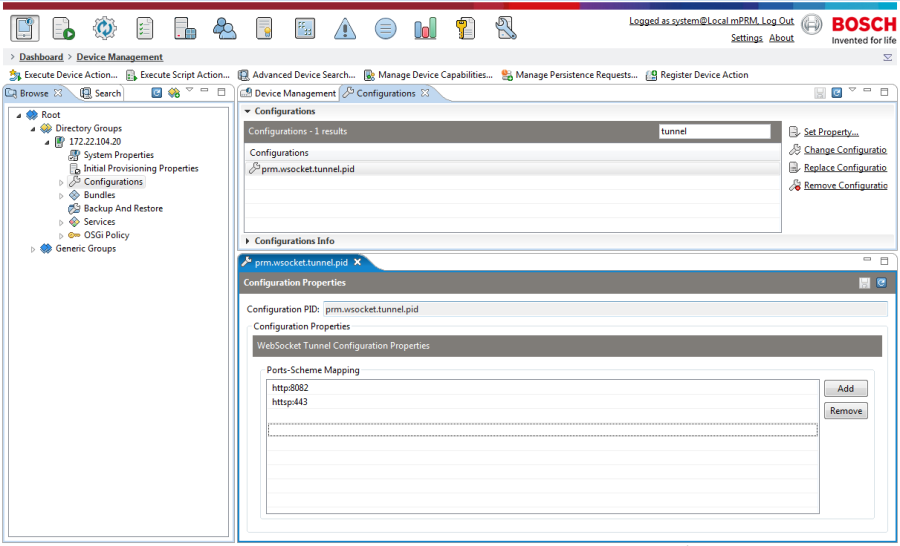
- Check the backend component configuration to verify if all needed tunnel options are set as needed (e.g. allowed protocols).
Port configuration is restricted to only one TLS secured port so no extra care should be taken to close all unnecessary network and communication channels differing from HTPPS/WSS.

The graphic bellow represents an example tunneling configuration:
- Make sure that the OSGi Device-side Websocket Tunnel Component is running on the OSGi device.
- Check the client side component configuration to verify if all needed tunnel options are set as needed (e.g. allowed protocols).
Monitoring
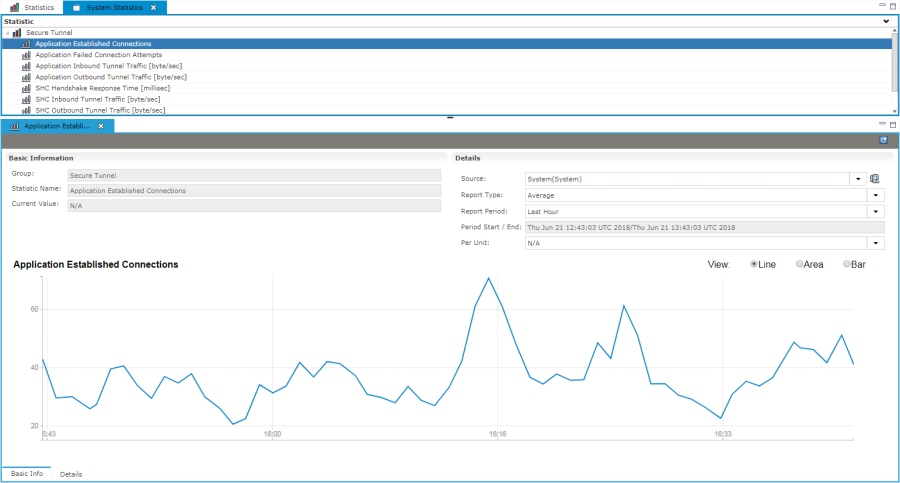
Monitoring of the Secure Tunnel's work is possible from the Statistics' tab (  ). Clicking on the Secure Tunnel option(part of System Statistics) reveals valuable metrics like "Application Established Connections" , "Application Outbound Tunnel Traffic" etc. The type and period of every monitoring option can be customized, as well as the view mode.