Instructions how to setup RM using a static file configuration.
Overview
Static file configuration can be used to set up the RM infrastructure - database servers, backend hosts, management servers, configurations, system properties, etc.
The setup is based on xml file. It should be placed on the host acting as control center (see "Backend Server Hosts" under Backend Infrastructure for more info).
Prerequisites
- Make sure the files mprm.sys and db.sys are not present in <
- RM_HOME>/bin/mserver.
- mprm.scm.init.file - is used to configure the file path/file name which contains the configuration (by default it is scm.xml).
This system property should be added in the default.prs file.
mprm.scm.init.file=<CONFIG_DIR>/scm.xml
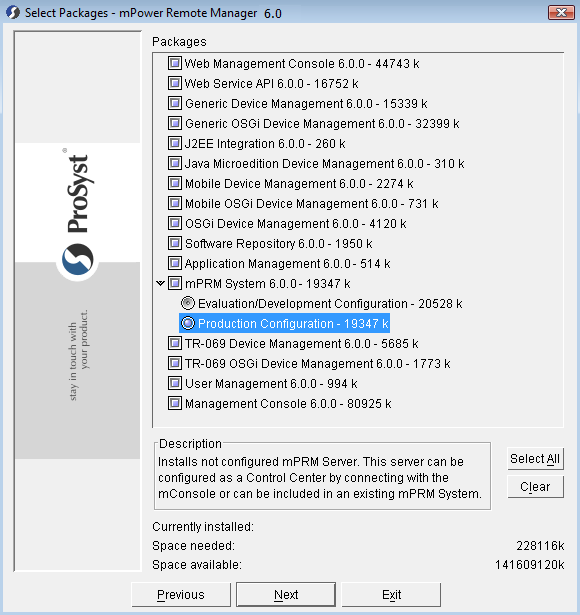
If you have selected Evaluation mode you may need to delete them manually.
In Production mode the two files will not be present/pre-installed.
- In addition the default.prs files of all hosts should be changed, so that they start and wait to be configured. To make this change, add the following two properties in the hosts' default.prs files:
mprm.scm.init=false
mprm.init.eval=false
Setup
In the host that will act as a control center, add xml containing the RM configuration.
Make sure to define the correct IP addresses in xml. This includes the configuration of the database - its IP address, DB type etc.
A system and local host ID could be further configured in mprm.sys see the example below.
Overwriting Configuration Property Values
Remote Manager grants the possibility to overwrite pre-configured backend-bundle property values in the scm.xml file.
When defining a new property value please follow the format:
<backend.bundle.config.pid>.<property-name>=<property-value>
For example:mprm.ms.gm.gm.cluster.external_distribution=true
Keep in mind that changed property values in the scm.xml will be applied on the first system start but will be superseded by any changes that are made via the Management Console, for example.
The version of the config file (<xml version="1.0"> is used for adding settings when incremented. So If additional configuration changes need to be applied from the scm.xml, the <xml version> has to be increased.
Example
An example of the xml file for a simple 2 host cluster configuration is given below.
<hostRoles>roles as comma-separated list</hostRoles> here add also the identifier of the management server this host is bound to (see "Identification Data" under Backend Server Host Configuration.)
<xml version="1.0"><scmConfig> <version>3</version> <dbServers> <jdbcServer isSystemDatabase="true"> <dbServerName>System Database Server</dbServerName> <jdbcDriver>org.h2.Driver</jdbcDriver> <jdbcURL>jdbc:h2:tcp://172.x.x.1/mprm</jdbcURL> <dbUserName>sa</dbUserName> <dbUserPassword/> <readOnlyConnections>10</readOnlyConnections> <readWriteConnections>10</readWriteConnections> <cachedStatementsSize>200</cachedStatementsSize> </jdbcServer> </dbServers> <backendServers> <managementServer> <id>ms</id> <context>ROOT</context> </managementServer> <!-- Control Center --> <backendHost> <hostAddress>172.x.x.7</hostAddress> <hostPort>11449</hostPort> <hostRoles>ms,RAS</hostRoles> </backendHost> <!-- Second Host --> <backendHost> <hostAddress>172.x.x.210</hostAddress> <hostPort>11449</hostPort> <hostRoles>ms,RAS</hostRoles> <backendURLs> <backendURL>stream://:0/httptrprt?transport=http</backendURL> <backendURL>stream://:0/httptrprt?transport=https</backendURL> <backendURL>stream://:0/httptrprt?transport=wss</backendURL> </backendURLs> </backendHost></backendServers></scmConfig>You may also need to define the system.id and mprm.host.id parameters in the mprm.sys file.
#RM System Propertiessystem.id=<SYSTEM_ID>mprm.host.id=<HOST_ID>Configuration XML Content
The full content of a configuration xml is provided below including some clarifications.
<scmConfig> <version>version of config file</version> <dbServers> <!-- System Database Server --> <jdbcServer isSystemDatabase="true"> <dbServerName>server name</dbServerName> <jdbcDriver>driver</jdbcDriver> <jdbcURL>URL</jdbcURL> <dbUserName>userName</dbUserName> <dbUserPassword>userPassword</dbUserPassword> <readOnlyConnections>number of RO conenctions</readOnlyConnections> <readWriteConnections>number of RW conenctions</readWriteConnections> <cachedStatementsSize>size</cachedStatementsSize> </jdbcServer > <jdbcServer isSystemDatabase="false"> ... </jdbcServer> ... <!-- Other Database Server if used from Database Services --> <jdbcServer isSystemDatabase="false"> ... </jdbcServer> <!-- Database Services Configuration --> <dbServices> <dbService> <dbServerName>name of used DB server</dbServerName> <dbServicePid>pid of DB Service</dbServicePid> </dbService> <dbService> ... </dbService> ... <dbService> ... </dbService> </dbServices> </dbServers> <!-- Backend Servers Configuration --> <backendServers> <backendHost> <hostAddress>address</hostAddress> <hostPort>port</hostPort> <hostRoles>roles as comma-separated list.</hostRoles> <hostUser>user of the host</hostUser> <hostPassword>password of the host user</hostPassword> <backendURLs> <backendURL>URL_1</backendURL> ... <backendURL>URL_N</backendURL> </backendURLs> </backendHost> <backendHost> ... </backendHost> ... <backendHost> ... </backendHost> <managementServer> <id>identifier of MS</id> <context>MS context</context> </managementServer> <managementServer> ... </managementServer> ... <managementServer> ... </managementServer> </backendServers> <!-- System properties configuration --> <systemProperties> <systemProperty> <propertyName>name1</propertyName> <propertyValue>value1</propertyValue> </systemProperty> ... <systemProperty> <propertyName>nameN</propertyName> <propertyValue>valueN</propertyValue> </systemProperty > </systemProperties> <!-- Contains only configurations properties which have to overwrite the default values in the bundle configuration --> <bundleConfigurations> <bundleConfiguration> <pid>pid </pid> (for simple configuration) or <factoryPid>factory pid </factoryPid> (for factory configuration) <property> <id>id1</id> <type>must be one of following values : bigdecimal biginteger boolean byte char double float int long short string If an array value is described, the value type must ends with brackets - []. </type> <value> simple value (for non-array property value) or (for array property value) <scalar>value1</scalar> ... <scalar>valueN</scalar> </value> </property> <property> ... </property> ... <property> ... </property> </bundleConfiguration> <bundleConfiguration> ... </bundleConfiguration> ... <bundleConfiguration> ... </bundleConfiguration> </bundleConfigurations></scmConfig>