Provides information about the RM driver locator.
The driver locator allows suitable driver bundles to be located in the RM software repository through the RM Driver Locator, to be downloaded, and installed on demand, when new devices are detected on the device. The RM Driver Locator is compliant with the OSGi Device Access Specification, therefore it provides integration between the OSGi-defined Device/Driver model and RM software delivery functionality.
A Driver Locator encapsulates the knowledge of how to fetch the Driver bundles needed for a specific Device service through a matching filter. The RM Driver Locator is a driver locator implementation which uses the RM management server for driver location and download.
Basic Principles
A driver locator service is responsible for attaching a suitable driver to a newly plugged device under the control of the device manager. When a new device is detected its properties are compared with the driver properties in the software repository. The driver whose properties correspond to the service registration properties of the particular device will be instructed by the device manager to attach to the device object. When the matching driver bundle is started on the device framework, it enables a device registration.
Driver services are identified by the DRIVER_ID property. The driver locator uses this particular ID to identify the bundles that can be installed. Driver ID properties have uniqueness requirements. This uniqueness allows the device manager to maintain a list of driver services and prevent unnecessary installs. From a programmer's perspective a driver service registration must have a DRIVER_ID property whose value is a String object, uniquely identifying the driver to the device manager. A DRIVER_ID should start with the reversed domain name of the company that implemented the driver (e.g., com. acme), and must meet the following requirements:
- It must be independent of the location from where it is obtained.
- It must be unique.
- It must be different for different revisions of the same driver.
This property is mandatory, i.e., every Driver service must be registered with it.
When a device is registered, besides the Driver_ID additional properties may be set that describe the device to the device manager and potentially to the end users. The same property pattern can be defined on registering a device. For example:
Property | Example |
|---|---|
DEVICE_CATEGORY | USB |
DEVICE_CLASS | Acme |
This means that this driver supports Devices which have registered services with properties ("DEVICE_CATEGORY" = "USB", DEVICE_VENDOR = "Acme").
The administrator is able to add additional device specific properties as well, such as: DEVICE_DESCRIPTION which describes the actual hardware device to end users.
Full description of the possible device features follows:
The properties listed below are defined as standard properties by the OSGi Device Access Specification, but a device, as well as a driver, may use other custom properties
Property | Description |
|---|---|
DEVICE_CATEGORY | A marker property indicating that this service must be regarded as a Device service by the device manager. A device category is a mark of the specific features of a device service and enables interoperability between driver location bundles that are based on the same underlying technology. |
DEVICE_CLASS | a marker property indicating the class |
DEVICE_MAKE | specifies the make of the device |
DEVICE_MODEL | gives information about the model |
DEVICE_REVISION | an indicator of the specific revision of the device |
DEVICE_SERIAL | A unique serial number for this device. If the device hardware contains a serial number, the driver bundle is encouraged to specify it as this property. Different Device services representing the same physical hardware at different abstraction levels should set the same DEVICE_SERIAL therefore simplifying identification |
Both property sets – of the driver and the device are used in the matching process.
The purpose of the RM driver locator is to locate a driver for a newly-plugged device on an OSGi device framework from the software repository, and then send it to the target OSGi device. The software repository enables the configuration of properties of Driver service bundles. A driver service registration must have a DRIVER_ID property, so as to specify the Device services the driver bundle is compatible with. A matching filter is set up so as to match a suitable driver to a registered device. The RM matching algorithm is explained later in this document.
The decision to install a new bundle is made by the device manager which is running on the OSGi device(the mechanism), but a Driver Locator service decides which bundle to install and from where the bundle is downloaded (the policy).
Installing bundles has many consequences for the security of the system, and this process is also sensitive to network setup and other configuration details.
An OSGi environment can have several different Driver Locator services installed. The device manager must consult all of them and use the combined result set, after pruning duplicates based on the DRIVER_ID values.
RM Driver Locator
This section offers explanation of the way the driver locator operates within the RM framework. The following diagram illustrates part of the device access algorithm relevant to the driver locator.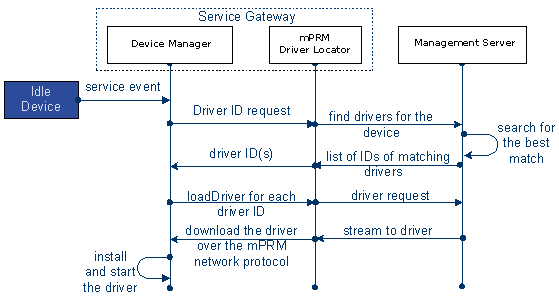
Explanation of the RM matching algorithm:
A. Device Detection. When a newly plugged device appears in the network the base driver registers it as a Device service in the OSGi framework.
B. Notification Phase. A service event informs the device manager of the registration of Device services. A registered device remains idle until it is attached to a Driver bundle. The association of a device with an appropriate Driver service is done with the help of a Driver Locator service that allows a device manager to find a Driver bundle and to install it.
C. Matching Phase. The device manager consults the driver locator about the DRIVER_IDs of drivers that match the new device. The properties of the newly detected Device service are passed to the Management Server. The Management server returns a list of DRIVER_ID values representing driver bundles, which correspond to the device properties. To select the drivers to return, it performs a matching between the drivers and the devices in the software repository. Strict criteria are applied for selection. Only if all the properties of the driver are present in the properties of the device with the same property values, a driver is considered suitable for the registered device.
D. Download Phase The RM driver locator downloads the driver bundle over the RM network protocol (a protocol for communication between the OSGi device and the management server).
E. Attaching Phase The device manager installs and starts the driver bundle. The device manager tells the driver to attach to the device. If the operation succeeds, a dependence between the device and the driver is settled. The relation between the device and the attached driver is stored in a file. At future restart, the Device Manager Bundle reads the data from this file, checks if the driver recorded for a particular device presents in the framework and directly attaches it. In this way, a significant part of the device attachment mechanism is skipped and system resources are saved.
For more information about the Device Manager refer to the Device Manager Bundle chapter (Bundles -> OSGi Category) of the Framework Package Documentation of the Bosch IoT Gateway Software.
If a driver service, after being installed, finds that it is not the most suitable driver for the device it provides a referral to another Driver in the form of a DRIVER_ID, which is used for downloading a new driver. The referring driver is disqualified for further matching for the same device.
Installation and Setup
The driver locator is enabled by fulfilling the prerequisites and bundle installation.
Prerequisite
Driver locator upon the OSGi device is possible only if a device manager is running on the framework. In the OSGi runtime by Bosch Digital, the Device Manager Bundle attaches appropriate drivers to the devices currently available in the framework. This bundle provides an implementation of a device manager and complies with the Device Access Specification which is a part of the OSGi Service Platform. The Device Manager Bundle JAR file is called devicem.jar, and is found in the bundles folder of the OSGi runtime.
Bundle Installation
The RM Driver Locator is enabled by activating the server and client driver locator bundles. Install and start the RM Driver Locator (packages/osgidm/osgidm.drvlocator.agent.jar) on the managed OSGi devices. If the managed device is registered with the Remote Driver Locator option checked, then the bundle is automatically activated by the system. Otherwise, it can be installed and started by a device operator manually through the RM Management Console.
The backend support is wrapped in a separate bundle – the RM Driver Locator Handler (packages/osgidm/osgidm.drvlocator.handler.be.ms.jar). The management server requires the osgidm.drvlocator.handler.be.ms.jar to be installed to be able to locate device drivers.
Nothing is necessary to install on the Control Center.
Dependencies of the Device Driver Locator in the Device Access Process
The device driver locator has a key function in the device attachment process. The following figure illustrates the relationships and dependencies of the device driver locator with the other entities involved in the device access operation.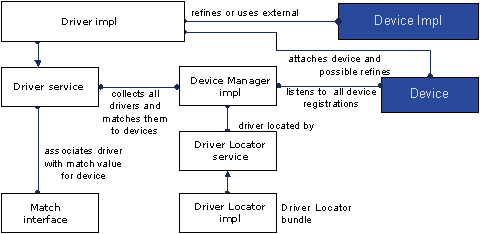
These are the players in the device attachment scheme:
- Device Manager – The bundle that controls the initiation of the attachment process behind the scenes.
- Driver – Competes for attaching Device services of its recognized device category.
- Device – A representation of a physical device or other entity that can be attached by a Driver service. A service which has a device category set in its Dictionary is considered a device.
- Driver Locator – Assistant in locating bundles that provide a Driver service.
Device Driver Maintenance
Driver bundles are stored in the software repository. When a driver bundle is published the user indicates whether the bundle type is Device Driver.
User Interface
Through the RM Management Console, you can view, and add driver bundles to the software repostory. You can define bundles as drivers and enter their properties.
Refer to User Guide for more details.
API
RM provides a Driver Selection API to plug your own Driver Location Services as well as use the already existing ones. Refer to the OSGi Bundles Management document from the Programmer's Guide for more details.