Overview
The HTTP Tunnel is used for accessing HTTP-based applications on devices with dynamically changing IP addresses and HTTP ports. With the HTTP Tunnel the user does not need to be aware of the device's current IP and port. Instead of making requests to the device directly, the user sends the requests to the HTTP Tunnel, which, in turn, redirects them to the device. The HTTP Tunnel "knows" the IP and port of the device using the information stored on the RM backend.
The HTTP Tunnel supports both HTTP and HTTPS requests. If an HTTPS connection is used, the data exchanged over the connection between the browser and the RM remote access server will be encrypted with SSL.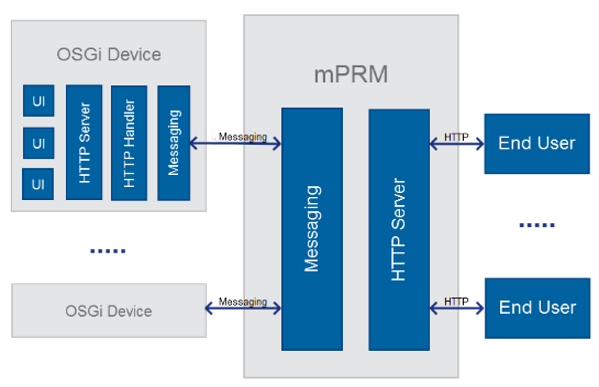
Message Dispatcher Policies
An OSGi device connects to a predefined RM and maintains a persistent connection (will reconnect, if needed). The HTTP Tunnel functionality allows the use of the publicly available RM host for accessing the connected device. The device IP address and http port selection are carried out automatically based on the current device configuration, thus the end device and the user communicate transparently.
There are two types of predefined dispatcher policies: Subdomain Driven Resolution and HTTP Header resolution. The system properties defining the resolution type are set on the RM (default.prs). Only one resolution type can be used at a time. In case of clustered RM installation the properties should be set on all of the backend hosts.
If the ready-to-use dispatcher policies do not meet the user requirements, a custom Dispatcher Policy can be implemented. For more information please refer to the HTTP Tunnel Developer's Guide.
Subdomain Driven Resolution
When using Subdomain driven resolution the device identifier to which the request is targeted is part of the URL.
To use Subdomain driven resolution the following system property should be set:
messaging.dispatcher.httptunnel.host=<RM_SERVER_DOMAIN_NAME>
where <RM_SERVER_DOMAIN_NAME> is the RM host domain name. For example if the domain name of the RM machine is "mprm.swh" the same value will go to the property.
To forward a request to a device, the following scheme should be used:
<DEVICE_ID>.<RM_SERVER_DOMAIN_NAME>
Example:
messaging.dispatcher.httptunnel.host = mprm.comRequests to www.mprm.com will be forwarded to the RM, requests to abc.mprm.com will be redirected to the device with ID abcHTTP Header Resolution
If the HTTP header resolution is used, the device ID is given as an HTTP Header.
The following system property should be set
messaging.dispatcher.httptunnel.header=<HTTP_HEADER_NAME>where the <HTTP_HEADER_NAME> is the name of the http header, containing the device ID.
All requests to any <alias> on the RM are redirected to the appropriate end device <alias>:
http://<rm>/<alias> is redirected to http://<device>/<alias>
Example:
http://rm.com/system/console => http://device/system/consoleAccess Rights
The user should have a specific role (Device-Tunnel-Caller(DEVICE_PATH)) in order to access the device resources. For more information refer to Types of Groups.
Authorization
The RM supports Basic User Authentication therefore providing additional pages and resources access control. Pages and resources access control are checked only when the Authorization requirement is selected in the configuration. The authorization check is performed on the backend server.
The HTTP tunnel basic access authentication can be switched on/off through the HTTP Tunnel Configuration: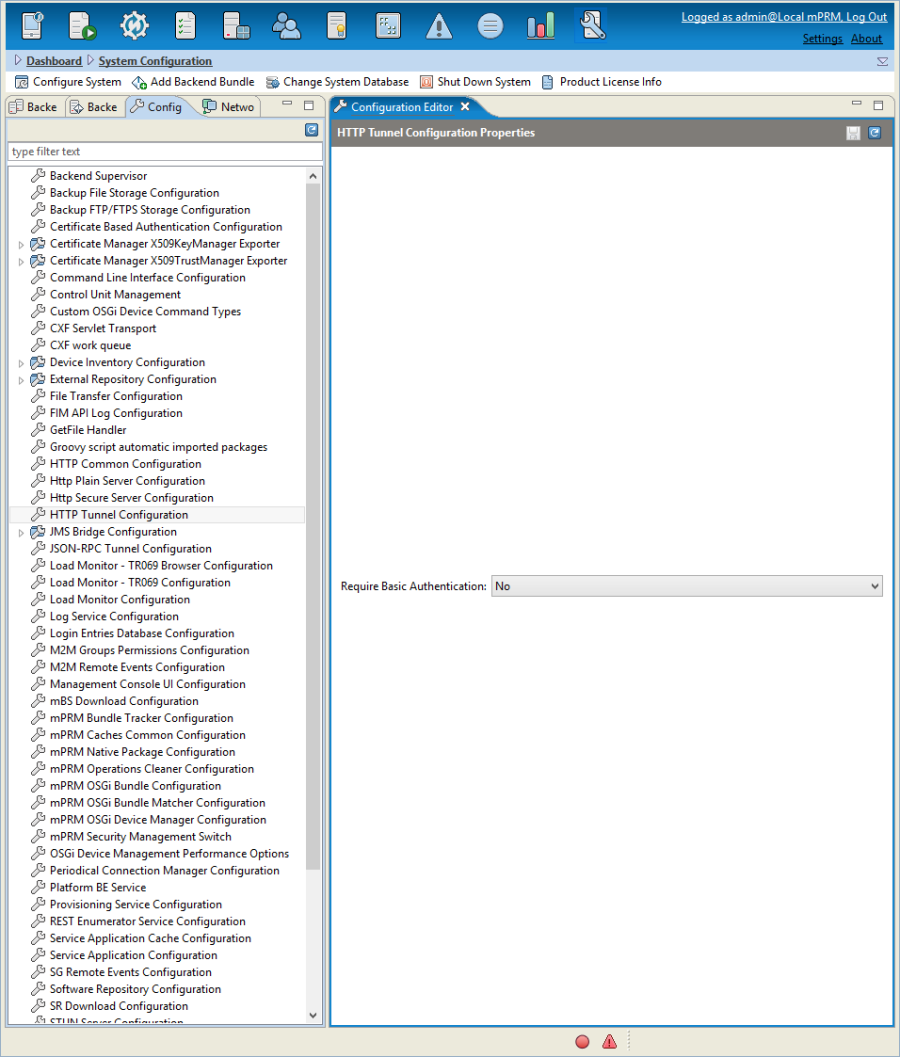
If Basic User Authentication is enabled, Requests must contain an Authorization Header:
Authorization = Basic dGVzdDp0ZXN0... where dGVzdDp0ZXN0 is the Base64-encoded value of the string "test:test", which corresponds to user account "test" with password "test"Request Interceptor Plugins
A request Interceptor can be used to intercept incoming requests before they are redirected to the target remote device, therefore allowing additional access control for the remote requests. Bundles willing to intercept HTTP tunneling requests can implement and register as an OSGi service the following interface:
com.prosyst.mprm.net.tunnel.interceptor.TunnelRequestInterceptorRequest Interceptor can be registered with a target. If it is registered with no target, it is used for intercepting all requests. If it is registered with a target, the interceptor is called only for predefined requests. HTTP Tunnel Request Interceptors can be registered with a target, containing http.tunnel phrase.
TunnelRequestInterceptor.TARGET, "http.tunnel.myInterceptor"It is possible to register multiple Request Interceptor interfaces, each using a different target.
For more information refer to Request Interceptor Programmer Guide.
Custom Device ID Resolution
The HTTP tunnel by default supports Device ID resolution through the HTTP header or URL. Due to security concerns such scheme might not be desirable in all use cases. For such situation the Custom Device ID Resolver interface can be used. It allows the resolution to be done based on a session ID or some kind of access key, for example.
For more information refer to: Custom Device ID Resolver.