Overview
The Download Server is used for downloading bundles and their components (descriptors, icons, previews and resources) from the RM Software Repository. Because of the RM specific requirement to communicate with multiple clients, it uses the asynchronous programming technique with non-blocking system calls when performing the download process. In order to use it, you must make a request with correct download URL and credentials, so it provides Java API helping the download URLs generation. The Download Server also can be configured by the RM console. Different Download Server properties can be changed through it as: RM HTTP/HTTPS Server URL, using when generation the download URLs; the authentication type; the sessions timeout; if the ban protection to be enabled or not and so on.
Architecture
The Download Server block scheme is presented below::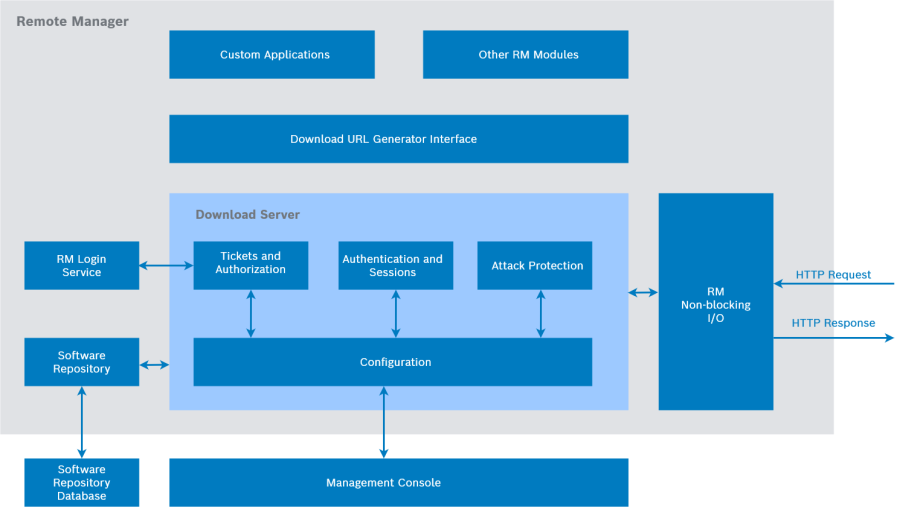
Figure 7: . Download Server block scheme.
Non-blocking I/O
When downloading from the RM Software Repository, there can be a long delay from system calls such as read() and write(). The desired behavior is not to wait, but to continue with another download request processing. For this purpose instead of blocking calls, non-blocking system calls are used. They returns immediately, without waiting for the I/O to complete. The asynchronous communication is achieved using the RM NIO HTTP Server API.
Download URL Generation
The Download Server provides with API that generates the needed URLs for downloading. There are separate ways to generate the download URL of bundles, descriptors, icons, preview and resource::
Method | URL | Description |
|---|---|---|
| http(s)://(RM host):(RM port)/sr_download/content/<bundleId>/<bundleFriendlyName>?ticket=<ticket>&anon=<anon> | The download URL the bundle with a given id can be downloaded from. The bundle friendly name (optional) specifies how the bundle will be named after it is downloaded. |
| http(s)://(RM host):(RM port)/sr_download/content/<concreteType>/<globalId>/<version>/<bundleFriendlyName>?ticket=<ticket>&anon=<anon> | The download URL the bundle with given concrete type, global id and version can be downloaded from. The bundle friendly name (optional) specifies how the bundle will be named after it is downloaded. |
| http(s)://(RM host):(RM port)/sr_download/descriptor/<bundleId>?ticket=<ticket>&anon=<anon> | The download URL the descriptor of a bundle with a given id can be downloaded from. |
| http(s)://(RM host):(RM port)/sr_download/icon/<bundleId>?locale=<locale>&ticket=<ticket>&anon=<anon> | The download URL the icon of a bundle with a given id can be downloaded from. |
| http(s)://(RM host):(RM port)/sr_download/preview/<bundleId>?locale=<locale>&ticket=<ticket>&anon=<anon> | The download URL the preview of a bundle with a given id can be downloaded from. |
| http(s)://(RM host):(RM port)/sr_download/resource/<bundleId>/<resourceName>&ticket=<ticket>&anon=<anon> | The download URL a resource of a bundle with a given id can be downloaded from. The resource name specifies the exact bundle resource. |
The URLs generation takes into account several Download Server properties, that are also configurable. These configuration properties are:
Property | ID | Type | Default value | Description |
|---|---|---|---|---|
|
|
| false | If only HTTPS downloads are to be performed. |
|
|
| - | Specifies explicit URL where RM HTTP server is (for instance 'http://172.22.111.11:8080/plain_ctx'). |
|
|
| - | Specifies explicit URL where RM HTTPS server is (for instance 'https://172.22.111.11:4443/secure_ctx'). |
|
|
| false | If (when the server host from the device point of view is unknown) to use NAT support for the download URLs creation. |
For more information on how to use the Download URL Generator API refer to Download Server URLs Generation programmer guide.
Attack Protection
The attack protection role is to prevent the Download Server from picking out the user credentials and download bundle components from the RM Software Repository without permission. If the attach protection is enabled, when a bad request is made - wrong scheme, unsuccessful authentication or log-in, the remote address is added to the ban records table. If a certain number of such bad requests is achieved then the requests, made from this remote address, are blocked for certain time. Configuration properties:
Property | ID | Type | Default value | Description |
|---|---|---|---|---|
|
|
|
| If ban-based protection mechanism is enabled. |
|
|
|
| The maximum number of bad requests the IP address can make before to be banned. |
|
|
|
| The period a banned IP address will stay banned (in milliseconds). |
|
|
|
| The capacity of the table where banned IP addresses are kept. |
|
|
|
| The period after which the ban table is cleaned from the expired records (in milliseconds). |
Authentication
In order specific user to download bundle components from the Download Server, the user is first authenticated with the user credentials, passed as request headers. Different type of authentication can be made - anonymous, basic, digest, with different authentication algorithm - MD5 or MD5-sess. The user authentication is obligatory when the ticket checking is disabled, otherwise it can be turned off. These are all configuration properties:
Property | ID | Type | Default value | Description |
|---|---|---|---|---|
|
|
| true | Whether the authentication checker acts as proxy or not. |
|
|
| 2 | The type of authentication when client connection is over HTTP. |
|
|
| 1 | Required client authentication when connects over HTTPS |
|
|
| RM SR Download Server | The realm of SR Download Server for basic/digest authentication. This property is valuable only if basic or digest authentication is required. |
|
|
| RM SR Download Server | The domain of SR Download Server for digest authentication. This property is valuable only if digest authentication is required. |
|
|
| MD5 | The authentication algorithm for digest authentication. This property is valuable only if digest authentication is required. |
|
|
| auth,auth-int | The QOP(Quality of Protection) for digest authentication. This property is valuable only if digest authentication is required. |
|
|
| 180000 | The time (in milliseconds) for expiration of an authentication requests sent to client and not respond. |
|
|
| 3600000 | The digest authenticated sessions offline timeout (in milliseconds). |
|
|
| 36000000 | The digest authenticated session maximum time to live (in milliseconds). |
|
|
| 20000 | The maximum count of kept digest authentication requests. When the count is reached every new authentication requests will dump the oldest authentication request - and latter's session should be re-authenticated. |
The used HTTP Request/Response Headers are:
Header | Type | Description |
|---|---|---|
WWW-Authenticate | response header | Must be included in 401 (Unauthorized) response messages. The field value consists of at least one challenge that indicates the authentication scheme(s) and parameters applicable to the Request-URI. |
Authorization | request header | Sent after receiving a 401 response from the server. Consists of credentials containing the authentication information of the user agent for the realm of the resource being requested. |
Proxy-Authenticate | response header | Must be included as part of a 407 (Proxy Authentication Required) response. The field value consists of a challenge that indicates the authentication scheme and parameters applicable to the proxy for this Request-URI. |
Proxy-Authorization | request header | Allows the client to identify itself (or its user) to a proxy which requires authentication. The field value consists of credentials containing the authentication information of the user agent for the proxy and/or realm of the resource being requested. |
Sessions
Session is defined as the time between the download start and end. There is a maximum number of sessions per IP address - download sessions, processing simultaneously, and maximum number of all opened sessions. Configuration properties:
Property | ID | Type | Default value | Description |
|---|---|---|---|---|
|
|
| 20000 | The maximum number of download sessions the server is limited to handle simultaneously. |
|
|
| 10 | The maximum number of simultaneous download sessions per IP address of the request. |
|
|
| 40000 | The period after which the server checks whether the session is expired (in milliseconds). |
|
|
| 300000 | The period after which the session is considered expired (in milliseconds). |
|
|
| 0.0.0.0 | IPs whose download sessions count is unlimited by the server. |
Tickets
Tickets are constructed when generating the download URL and consist of the download target, the anonymous parameter, valid after and valid before values. The ticket validation is checked, if the ticketing is enabled, when processing the request. The anonymous parameter is also validated that is not changed in the URL in that way. Configuration properties:
Property | ID | Type | Default value | Description |
|---|---|---|---|---|
|
|
| RM RAS | The Certificate Domain the Download Manager's Ticket Manager will use. |
|
|
| true | Whether to check tickets. |
|
|
| 180000 | Time for expiration of download tasks in milliseconds. |
|
|
| 3600000 | The maximal delta into the clocks allowed for the client and server (in milliseconds). |
Authorization
The user authorization is done via user login. It checks if the user has rights to download the requested bundle component.
Configuration
The Download Server can be configured through RM console. All modules properties marked above can be change according to the desired Download Server behavior. For example whether to process only HTTPS download requests or whether to enable ticket checking. The configuration is done via org.osgi.service.cm.ManagedService and the service PID is mprm.sr.download.conf.
Common HTTP Request/Response Headers
The Download Server uses the following common HTTP request/response headers::
Header | Type | Description |
|---|---|---|
Content-Length | response header | The server sets "Content-Length" entity-header field, indicates the transfer-length of the message-body (the size of the file going to be downloaded). |
Content-Type | response header | The server sets "Content-Type" entity-header field, indicates the media type of the entity-body sent to the client. |
Content-Disposition | response header | The server sets "Content-Disposition" header to suggest a default filename of the downloaded file to be saved with. |
Resuming
The Download Server resuming feature allows to resume a partially completed download, which can save time compared to starting the whole download over. It is useful if one is accidentally stopped before it completes. The resuming used these request/response headers:
Header | Type | Example | Description |
|---|---|---|---|
Range | request header | Range: bytes=500- (The bytes 0-499 have been downloaded, the download will continue from 500th byte to the end of the file) | Specifies the start byte for download resuming. |
Accept-Ranges | response header | Accept-Ranges: bytes | Allows the server to indicate its acceptance of range requests for a resource. Sent with response codes 416 (SC_REQUESTED_RANGE_NOT_SATISFIABLE) and 206 (SC_PARTIAL_CONTENT). |
Content-Range | response header | Content-Range: bytes 734-1233/1234 (Apply to the last 500 bytes, the header "Content-Length" must correspond to the bytes size i.e. 500) | Sent with a partial entity-body to specify where in the full entity-body the partial body should be applied. Sent with response codes 416 (SC_REQUESTED_RANGE_NOT_SATISFIABLE) and 206 (SC_PARTIAL_CONTENT). |